Choose a meeting note-taker by the shape of your meetings
Most advice about AI note-takers compares transcription accuracy. That is the wrong axis, because the three products people actually choose between are built on two opposite bets about how a recording should happen — and one of the three answers costs nothing.
This page is a decision, not a review. Nothing here has been used, trialled or tested by me; every claim below is read from documentation and from each vendor's own pricing page, and the month of that reading is stated on each tool's own page. What I can offer that a feature list cannot is the shape of the choice: which constraint in your working life rules out which architecture.
The short version, before the questions: the strongest reason to pay for transcription is the archive, not the transcript. A tool that hands you one meeting's notes is competing with a feature you already own. A tool that makes every meeting you've ever had searchable is a different product, and that is the one worth money to a meeting-heavy team.
Question one
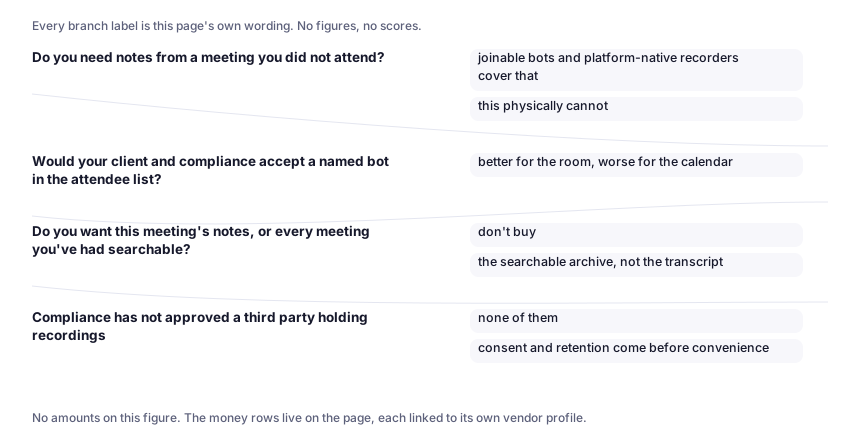
Do you need notes from a meeting you did not attend?
If yes, one architecture is already out. A note-taker that listens through your own machine cannot cover a call you were not on: as the Granola profile puts it, joinable bots and platform-native recorders cover that and this physically cannot. That is an architectural limit, not a missing feature, and no roadmap will argue with it.
Question two
Would your client and compliance accept a named bot in the attendee list?
Bot-based recorders join the call as a visible guest. Some people read that as a courtesy — the tool discloses itself. Others read it as the reason the tool exists: an auditable participant. And a client who sees an unfamiliar name in the attendee list every week may tell you once, politely, and then stop booking you.
If a named guest is a problem, the device-side approach solves it — and creates the opposite one, which is the honest trade in this category: better for the room, worse for the calendar. Nothing joins, so nothing changes for anyone else in the call; and nothing is visible to them either, which leaves disclosure entirely to you, out loud, on every call.
Question three
Do you want this meeting's notes, or every meeting you've had searchable?
If what you need is the one meeting you missed, the recorder your platform already ships is free — don't buy a note-taker to solve it. Zoom, Meet and Teams all caption and record calls you were in, and their transcripts are good enough to skim. Every profile on this desk says so on its own page.
If you want a searchable record of the last year of conversations — the searchable archive, not the transcript — you are buying a different thing, and two of the three architectures can deliver it. This is the question that decides whether money should change hands at all, and it is the one an accuracy scorecard cannot answer.
Where the money lands
| Your situation | What I would put money on | Why |
|---|---|---|
| Solo, calls from your own machine, clients notice bot icons | Granola, Business at $14 per user/month (tiers and the month they were read) | A flat per-seat price with no credit meter is the rarest thing in this category: there is no mechanism for a surprise bill |
| A team that wants cross-meeting search and coverage of calls it missed | Fireflies or Otter, and read their pricing pages before you budget | Both sell the archive, not the transcript. They differ in whether you can check them: Fireflies' numbers render live on its own page — per user per month; exact figure on Fireflies' pricing page while Otter's tier names are legible |
| You only ever need the meeting you missed | Nothing. Use the platform you already pay for. | The free answer is the right answer here, and a profile that told you otherwise would be selling, not checking |
| Compliance has not approved a third party holding recordings | none of them is installable yet — consent and retention come before convenience | Privileged, medical or regulated conversations raise the bar above convenience, and individual tiers do not carry enterprise data terms |
Enter a team size to see the monthly figure. Only tools whose price we can account for appear here.
No fixed number to multiply. Fireflies renders its per-seat price on its own page, so that figure has to be read there rather than estimated here. See the Fireflies profile.
Nothing to multiply yet. I have no written record of reading Otter's pricing page, so this calculator will not build a bill out of a figure I cannot account for. The tiers are on the Otter profile.
A price we cannot account for
No number here. I have no written record of reading Otter.ai's pricing page, so quoting a figure would mean trusting someone else's summary. The tiers themselves, and the month they were read, live on Otter.ai's profile.
That is deliberate. Most review sites will quote you a price they took from another review site. On this desk the rule runs one way: where we can show that a person read the vendor's own page and wrote down when, the figure appears; where we cannot, the cell says so instead — even when that vendor's page would give us a very quotable number. A figure that shows up here later will not be a repaired omission; it will mean somebody actually read that page.
What to do in the next half hour
- Open your conferencing platform's recording settings and check whether it already produces a transcript you can search. That is the baseline you are spending against.
- Take one real meeting — your worst audio, the one with people talking over each other — and run it through whichever of the two architectures fits your answers above. Judge the notes on whether you could send them to a colleague without a rewrite.
- Ask one question in writing before you install anything for a team: who holds the recordings, for how long, and what happens to them when you leave.
Related
- How we check a tool — what a profile on this site is allowed to claim, and the rule that keeps a check date honest.
- Granola, Fireflies and Otter.ai — the three profiles this decision reads from; each states the month its pricing was read.