How to test any AI tool in 30 minutes before you pay
New AI tools launch every week, and the demo always looks like magic. The gap between "wow, in the demo" and "useful, every day, in my actual work" is where subscriptions go to die. The half-hour evaluation below is designed to expose that gap before you pay — not after. It works for writing assistants, image generators, coding copilots, meeting notetakers: anything that promises to do part of your job. You'll need a free tier or trial, three real tasks from your own work, and a stopwatch you're honest with.
Minutes 0–5: define the job, not the tool
Before touching the trial, write one sentence: "This tool should replace/produce ___ at ___ quality, ___ times per week." Fill every blank. "This should draft my client follow-up emails at 80%-done quality, five times per week" is testable. "This should help me with email" is not — vague goals are why people buy tools they never open twice.
Also decide two things now: your baseline — how long the task takes with no AI at all — and your kill criterion — the monthly cost above which you'd cancel even if the tool turned out decent. If you never set a baseline, the tool gets a free pass on tasks that already take four minutes. If you can't fill in the sentence's blanks, you're shopping for a hobby, not a workflow; that's fine, but judge it on enjoyment.
Set-up:
- Three real tasks chosen from last week's actual work — not the vendor's showcase examples
- Real material ready to paste: your brief, your transcript, your spreadsheet excerpt
- Client names, credentials and anything confidential stripped out of every paste
- Baseline timing written down for each task, done the old way
- A notes doc open — memory lies, timestamps don't
Minutes 5–20: the three-task test
Run exactly three tasks. The three tasks should be:
- The bread-and-butter task. The boring 80% of what you'd use it for, done the way you'd actually need it done. For a writing assistant, paste raw notes plus the client's request and ask for a reply confirming the new date. For an image tool, brief the hero image your current campaign actually needs. For a coding assistant like Cursor or GitHub Copilot, reproduce a small real bug in your own code, not a toy snippet.
- The edge case you know you'll hit. Your industry jargon, your weird file format, your client who writes in all caps. Every tool has a demo personality and a production personality; the edge case meets the real one.
- The task one competitor does better. Pick the thing you're 90% sure another tool nails — a citation-heavy research answer that Perplexity exists for, or meeting summaries from a dedicated meeting notetaker. You're testing whether the vendor is honest about its limits, and whether you'd be trading one gap for another.
Score each run on one question only: how much editing did the output need before I'd send it out? Note it as 0 — send as-is; 1 — two minutes' fix; 2 — full rewrite. Add the three scores: 0–2 means the tool does the job. 3–4 means it's a draft machine, which is fine if you priced it as one. 5–6 means the tool is about your task, not for it.
Minutes 20–27: five failure checks
These are the patterns that don't show up in one happy-path test:
- Consistency. Run the bread-and-butter task twice with identical input. If quality swings wildly between runs, you're not buying a tool, you're buying a slot machine — only workflows where a human reviews every output can live with that randomness.
- The second turn. Almost every tool is good at turn one and confused at turn two. Ask for a specific revision that references the output: "keep paragraph two, make the rest half as long, drop the closing question." Tools that handle iteration save hours; tools that quietly restart your work cost hours you'll never get back.
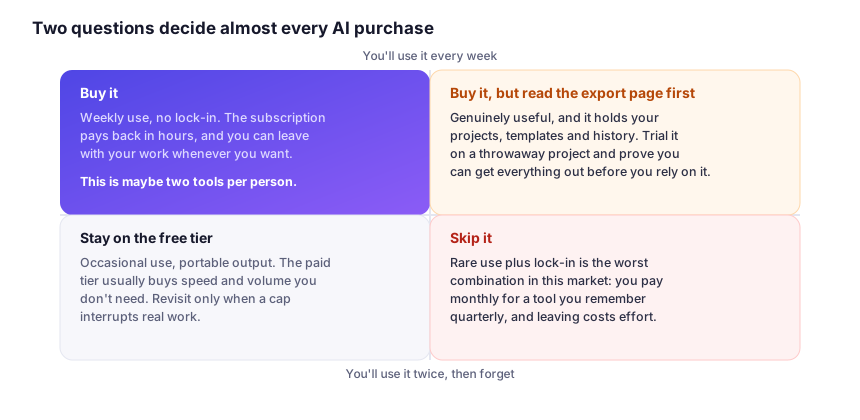
- Export and escape. Get your output — and your data — out of the tool, now, while you still have leverage. Formats supported, watermarks, "export available on Pro tier only." If leaving is painful today, that pain is tomorrow's price increase; walk while the trial is free.
- Latency at real sizes. Demo files are tiny. Throw your actual 60-page PDF or hour-long recording at it. A tool that shines on samples and chokes on reality isn't the same product — and if it takes minutes rather than seconds on a task you run many times a day, it's a research toy, not a workflow part.
- Confident wrongness. Give it one task with a verifiable answer — a math check, a fact you know cold, a clause you can look up. You're not expecting perfection; you're checking whether it flags uncertainty or bluffs smoothly. A smooth bluffer stays out of anything client-facing — the reason this site's disclaimer calls AI output a first draft.
Minutes 27–30: read the pricing page like a lawyer
AI pricing is creative in all the wrong ways. I won't quote figures — tiers move constantly; check the vendor's pricing page and our changelog for shifts we've noticed. Before paying, find the answers to these four questions in the plan details:
- What exactly is a "credit" or "use"? One prompt? One generation that costs more at higher quality? Some tools charge per image attempt, so a 4K upscale of a draft you already paid for bills you twice.
- What throttles on the tier you'd buy? Speed limits, queue priority and model choice are the usual levers. A "Pro" tier that still caps you at the small model is a different product than the demo implied.
- What happens to unused allowance? Monthly credits that expire are a subscription to a bucket, not a service. If usage is spiky — quiet months, brutal ones — expiring credits mean paying for capacity you throw away.
- What's the renewal and cancellation path? Intro-year pricing that doubles silently is the oldest trick in the book, and it's back in style. Set a calendar reminder for the day before renewal; the vendor won't do it for you.
Then do the honest math: hours saved per week × your hourly value ÷ monthly cost. Under roughly 2×, wait — free tiers improve, and your attention isn't free. Over 5×, buy it and stop checking. Between 2× and 5×, buy the monthly, not the annual, and let two months of real usage settle the argument.
The verdict format we use
At the end of 30 minutes we write ourselves one line, and it's always one of these three:
- "Replace:" it does the job at acceptable quality — pay for the cheapest tier that removes the throttle you actually hit.
- "Assist:" it produces good drafts you still edit — useful, but price it as a time-saver, not an employee.
- "Avoid:" the gap between demo and your real work was too wide — not today, at this price, for this task.
What 30 minutes cannot tell you
The half-hour test is a filter, not a final verdict. Be honest about which questions it answers and which need weeks of daily use.
| Question about a tool | Visible in 30 minutes? | How to actually find out |
|---|---|---|
| Can it do my bread-and-butter task? | Yes | The three-task test itself. |
| Is its quality stable run to run? | Partly | Two identical inputs now; a week of real use for the rest. |
| Will I still use it in month three? | No | Keep the free tier active and track how often you open it unprompted. |
| Does it degrade when the vendor changes models? | No | Save your three test prompts; re-run them after every announced update. |
| Is the pricing sustainable for my usage pattern? | Partly | One full billing cycle at the cheapest plan, with usage notes. |
| Is support there when it breaks? | No | Send one real support question during the trial; time the reply. |
Evaluating AI tools: common questions
What if the tool demands a credit card before I can try it?
Skip it, or use a card-guarding virtual number if your bank offers one. A vendor that requires payment details just to demonstrate value is telling you where their priorities sit — the risk of a bad trial is entirely yours, so treat the demand as a data point in the evaluation. There is almost always a comparable tool in the same category with a genuine free tier.
Is 30 minutes really enough time to judge anything?
It's enough to reject, not enough to fully accept. The half-hour test reliably kills tools that can't survive contact with your real work, which is most of the value — the rest (durability of habit, quality drift, support) needs a free-tier month, which is what the "Assist" verdict is for.
Should I just trust benchmark leaderboards instead?
No — use them as a shortlist filter, never as a decision. Public benchmarks measure model runs under specific test conditions, not your workflow, your material and your quality bar; you won't find scores quoted in our guides for that reason (the reasoning is spelled out on our methodology page). Your three real tasks beat any leaderboard.
How often should I re-run this on tools I already pay for?
Twice a year, or whenever renewal is within a month. Free tiers improve, paid tiers change and your own tasks shift — a tool that earned "Replace" eighteen months ago may now be an "Assist" at the old price. Re-running costs you the same three saved test prompts and ten minutes.
We apply this rubric and the same honesty rules to everything in our profiles. For the assistants it's easiest to test this way, start with our ChatGPT vs Claude vs Gemini breakdown — or see which ones you can evaluate for free first in 15 genuinely free AI tools.