GitHub Copilot
The short verdict
The default, and the right default: ten dollars a month inside the editor you already use, with a free tier for honest evaluation and a business plan that answers the legal questions companies actually have. Buy Cursor instead if you want the AI to drive the keyboard. Don't buy either if you write code as a hobby — paste into a free assistant and keep the ten dollars.
- Maker
- GitHub / Microsoft
- Category
- Coding
- Entry price
- Paid
- Free option
- Yes — a limited free plan; students and popular open-source maintainers get it free
- Works on
- VS Code, Visual Studio, JetBrains, Neovim, Xcode, GitHub.com, CLI
- Pricing checked
- October 2026
What GitHub Copilot is, plainly
GitHub Copilot is an extension, and that's the sharpest sentence you can write about it in a directory that also contains Cursor: Cursor is a code editor rebuilt around AI, Copilot is a guest in whatever editor you already have, and the choice between them is mostly the choice between 'AI should drive' and 'I should drive, with help'. It completes lines as you type, answers questions about the open file, proposes fixes to review comments on GitHub itself, writes from issues, and on paid tiers runs an agent that drafts pull requests. It spreads across every mainstream editor and the GitHub platform, which no editor-first rival can match for reach.
What it actually replaces is the two minutes of lookup and boilerplate typing that a competent developer spends daily: scaffolding, common patterns, tests for code it can already see, regex you'd otherwise re-derive. Its unique structural advantage is context of platform — it knows the repo because it lives where the repo is, and features like code review suggestions use that. What it does not replace is architectural judgement, and completions remain its weakest quality zone: an autocomplete that optimises for 'accept it' can quietly write code you don't understand, which is a bad trade in a codebase someone must maintain. Experienced users end up with a split workflow — completions for boilerplate, chat or agent for real design questions, and review for everything.
The cost question has an unusually clean answer: the Pro tier is ten dollars a month and if it saves you half an hour of anything, it pays for itself. The genuine comparisons are internal: Pro's ten versus Cursor's twenty versus paying neither and pasting snippets into a free assistant, which is more annoying but workable if you code a few hours a week rather than a job. Business tiers add the procurement-relevant pieces — policy controls, an IP indemnity for suggestions that match public code, and no-training-by-default terms — and that bundle, not capability, is what companies actually subscribe to.
On the code question every developer eventually asks: Copilot's suggestions have been scrutinised in litigation, and the terms evolved under that pressure. For individuals the working assumption is that you own your code and accept responsibility for it; for companies, the indemnity at Business level is precisely why the enterprise tier exists. Treat any AI-generated line the way you'd treat a stranger's pull request: it's yours the moment you merge it, with or without paperwork.
Where it wins
- Works inside your existing editor and keybindings — adoption friction close to zero, which matters for team rollouts.
- Cheapest serious entry point in AI coding at $10/month, with a genuinely useful free tier and student access.
- The only tool in the category with platform reach: repo context, PR review, issues, CLI, not just the editor.
- Business tier's IP indemnity and no-training defaults answer the two questions enterprise legal always asks first.
Where it falls short
- Autocomplete's failure mode is writing plausible code you never read — a debt that lands on whichever colleague debugs it next quarter.
- For heavy agentic, multi-file work many developers find editor-first tools like Cursor more effective despite the higher price.
- Premium request allowances complicate the otherwise simple pricing — model-heavy tasks draw down a meter, so read what $10 actually includes now, not at launch.
- Litigation over suggestion provenance is unresolved; the terms and indemnity respond to it, but 'who's liable for this AI-suggested line' remains legally unsettled ground.
What it's built for
Inline completions in every mainstream editor
Line and block suggestions as you type, in VS Code, JetBrains, Neovim and Xcode. The core value proposition and still the feature people keep paying for — accept-rate goes up the more boilerplate-heavy your stack is.
Copilot Chat with repo context
Ask about the open file, the codebase, or an error; get answers grounded in your code rather than generic examples. Better than pasting into an external chat because the context assembly is already done.
Agent mode and coding agent
Assign a task and it plans edits across files, runs them and can open a pull request from an issue. The tier of feature that has made ten-dollar-per-month subscriptions feel like a bargain to maintainers, and the tier where you most need to read diffs.
Code review on GitHub itself
Draft review comments on pull requests — the platform-native feature no editor-based rival has access to. Uneven judgement, but it catches the obvious class of mistakes and frees human review for the real ones.
CLI and Copilot on the command line
Natural-language shell questions inside the terminal, with the usual 'confirm before you pipe this to disk' caution that applies to any AI near your rm command.
What it costs at your team size
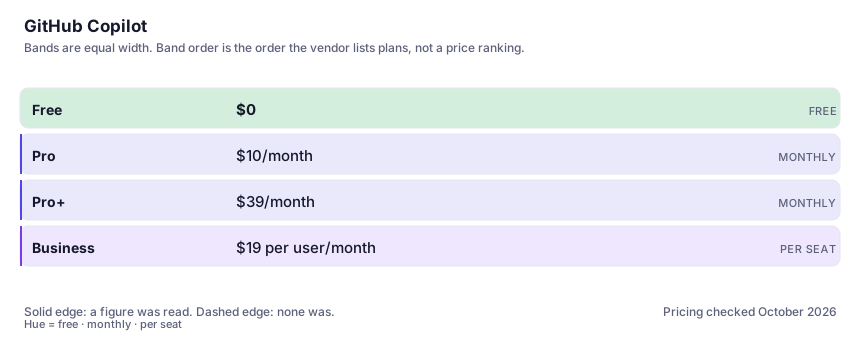
| Plan | Indicative price | What you actually get |
|---|---|---|
| Free | $0 | A capped monthly allowance of completions and chat requests. Enough to evaluate habit fit, and explicitly free for students and some open-source maintainers — check eligibility before paying anything. |
| Pro | $10/month | Unlimited-feeling completions, chat, agent mode and a monthly premium-request allowance for the heavier models. The best price-to-time-saved ratio in the coding category; verified on GitHub's own plans page. |
| Pro+ | $39/month | Much larger premium allowances and access to the strongest available models. Aimed at developers running agentic workloads all day — most people can prove they need Pro first before landing here. |
| Business | $19 per user/month | Org-wide policy management, no-training-by-default terms and IP indemnity for suggestions. The features here are contractual, not technical, and that's exactly why companies buy them. |
Count the people who would each need their own login.
Who it fits, and who it doesn't
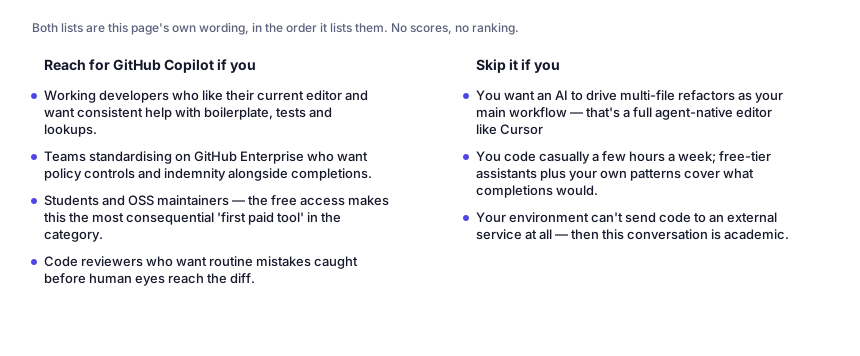
Reach for GitHub Copilot if you…
- Working developers who like their current editor and want consistent help with boilerplate, tests and lookups.
- Teams standardising on GitHub Enterprise who want policy controls and indemnity alongside completions.
- Students and OSS maintainers — the free access makes this the most consequential 'first paid tool' in the category.
- Code reviewers who want routine mistakes caught before human eyes reach the diff.
Skip it if you…
- You want an AI to drive multi-file refactors as your main workflow — that's a full agent-native editor like Cursor.
- You code casually a few hours a week; free-tier assistants plus your own patterns cover what completions would.
- Your environment can't send code to an external service at all — then this conversation is academic.
Where it stops fitting
How to test it properly in 30 minutes
Don't judge a tool on the demo. Run the same four tasks you'd actually do with it, and score it against this checklist — the same one this desk works from before a profile goes up (see how we check a tool).
- Install it and work a normal week without changing habits. Count accepted suggestions in code you would otherwise have typed by hand — that rate is the whole value case.
- Deliberately accept nothing on the ugliest part of your codebase for two days, then compare. Judge whether the AI code you skipped would have needed debugging anyway.
- Run one agent-mode task on a real issue and read every line of the diff. Judge whether you caught yourself merging on trust.
- For business: read the data-training setting and the indemnity terms with whoever owns compliance in your org.
- Compare the same task in Copilot Pro and Cursor Pro for a week each before anyone buys team seats; the twenty-dollar difference has to show up in your actual diffs.
Questions people ask
What happens to my code with Copilot?
Code context sent for completions flows through GitHub/Microsoft services under your plan's terms. Business and Enterprise arrangements include the commitment that your code and prompts are not used to train models for others; individual tiers historically offered a training opt-out and consumer privacy expectations differ from enterprise ones, so read your own settings page rather than any third-party summary. Also remember the editor telemetry question — what your IDE plugin collects locally is a separate document from what the cloud service keeps.
Who owns code Copilot writes?
GitHub's position is that outputs belong to you under their terms, with an IP indemnity attached to business plans for certain claims about suggestions matching public code. But nobody can give you a clean legal answer to 'is this generated line copyright-encumbered', the underlying lawsuits are unresolved, and the practical engineering answer is the same as for any dependency: treat merged AI code as code you own and must maintain. The indemnity is a risk-transfer purchase, not an absolution.
Copilot or Cursor?
Copilot is an extension that assists inside your editor; Cursor is an editor redesigned so the AI does the editing. If your workflow is 'I type, I want good suggestions', Copilot is cheaper and less disruptive. If your workflow is 'I describe the change and review the diff', Cursor or terminal agents win despite the price. Many heavy users end up paying both, which tells you they're different tools, not competing ones.
Is the free tier enough?
For evaluation, yes; for daily professional use, the completion cap runs out mid-session and breaks your rhythm — which is the intended conversion mechanism, not a bug. If eligibility rules don't grant you Pro for free, ten dollars is the honest cost of the habit, and the test above exists to prove whether it's justified.
Alternatives worth comparing
Cursor
The editor built around AI agents that edit whole files — for developers who want to describe changes and review diffs, not type them.
The default AI assistant — the broadest feature set, and the benchmark every other tool gets measured against.
Claude
The assistant for people who read a lot: long documents, careful prose, and fewer invented answers.
Disclosure: this profile is editorial. GitHub Copilot did not review it, pay for it or provide a free account for it. Links to the vendor are plain outbound links, not affiliate links. Errors are mine — report one and it gets fixed and logged on the updates page.