Build a personal AI stack: start with three tools, not thirty
The most common AI failure isn't a bad model — it's a browser full of tabs. People subscribe to five tools in one weekend, use each twice, and conclude the category is overhyped. The people quietly getting value run a tiny stack: one general assistant, one tool embedded in their hardest recurring task, and one connector that makes the other two touch their actual files. Three roles. That's the whole architecture.
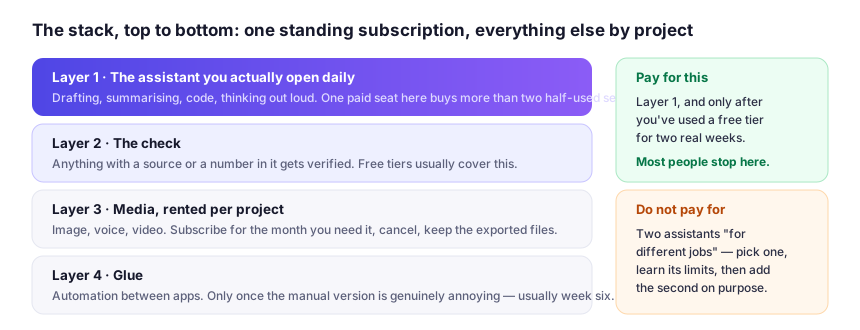
Role one: the general assistant (pick one, use it everywhere)
Drafting, summarizing, brainstorming, explaining, translating. The big chat assistants — ChatGPT, Claude, Gemini — are all strong here, and the differences matter less than your habits: the assistant comparison covers where each still wins, but the advice is pick one and get fluent, don't collect them. Split across three assistants and none of them learn how you work, so you re-explain yourself everywhere.
Two settings are worth five minutes. Custom instructions: your role, who you write for, the formats you use constantly, and two or three sentences of your own writing as a tone sample — which does more than any adjective about "professional" or "friendly". Then memory, if your tool has it, with one rule: put durable facts in (names, recurring projects, standing constraints), and clear it before anything sensitive. A week into a configured assistant, it stops sounding like a stranger.
Role two: the specialist for your most expensive task
Find the task in your week that costs the most hours — not the one that looks coolest to automate. For most people it's one of these, each with a mature tool category:
- Writing that must sound like you → a workspace assistant such as Notion AI, where your docs already live and AI assists in-line instead of across a chat window.
- Meetings → a notetaker such as Otter.ai that transcribes, attributes and drafts the follow-up — or whatever your call platform already records, which is free and good enough more often than people admit. Either way it hands back the twenty minutes you spend reconstructing what was said.
- Visual assets → one image or video tool matched to your job, using the category logic in the image generator guide and video breakdown.
- Research and competitive monitoring → a citation-first assistant such as Perplexity. If your work involves claims you must defend, a tool that shows its sources beats a clever one that doesn't.
- Code and data → an assistant inside your editor, Cursor or GitHub Copilot. For non-programmers, asking the general assistant to write a spreadsheet formula covers most of what people used to call data work.
Before paying for any specialist, run the 30-minute test from the evaluation guide on it. Specialists earn subscriptions; you only need one generalist.
Role three: the connector
The third role turns tools into a system: something moves information between your assistant, your files and your calendar without you carrying it. Two honest options:
Native integrations first. Current assistants increasingly read your drive, search your mail and check your calendar — inside the assistant you already picked. If your life is in one ecosystem, this may be the entire connector layer, for free.
Automation platforms second. When data needs to flow on a schedule — new leads into a personalized draft, saved articles summarized weekly, form submissions triaged by an AI step — a visual automation tool with AI blocks handles it — the job Zapier is built for. Start with exactly one flow; a half-built automation library is how stacks die.
If you want the more autonomous version — agents that take a goal and execute multi-step tasks — read the agents guide first. Short version: for personal workflows, scheduled automations beat autonomous agents on reliability, most of the time.
What a stack costs: three honest budgets
Prices below are what the vendors' own pages showed when I last looked, in October 2026, in US dollars. They move and regional pricing differs, so treat each as a shape rather than a quote and check before you pay — the same rule this site applies to its pricing checks.
| Budget | What's in it | Who it is actually for |
|---|---|---|
| $0/month | Free tiers of one assistant, one notetaker, one research tool. When I checked: Otter's Basic plan capped roughly 300 transcription minutes a month and three file imports in total; ElevenLabs' free tier about 10,000 credits a month on a non-commercial licence; Descript around an hour of processing with a low export ceiling; Zapier 100 tasks a month. | Anyone still discovering which task is worth paying for. The caps, not model quality, are what you buy out of. |
| about $20/month | One paid assistant — ChatGPT Plus, Claude Pro and Perplexity Pro all sit near twenty dollars — covering the generalist role and usually one specialist built in: long-document work, image generation, scheduled runs. | The single-person default. Buy this first, for the task you hit weekly. |
| about $40-60/month | The $20 assistant plus one tool that owns a named weekly output: Otter Pro at about $17/month, Descript Hobbyist at about $16/month with roughly ten media hours, a deck tool such as Gamma's individual plan at about $12/month, or Zapier Professional from about $20/month on annual billing. | Someone whose paid tool produces something they can point to this week. |
Team maths multiplies differently, because per-seat pricing is where stacks get expensive: assistant team tiers run at roughly $25–30 per user a month, and a workspace bundle such as Notion's AI lives on its Business plan at about $20 per user. Buy a second seat when the second human needs the tool, not when they're merely curious.
Then read the meter, because the sticker price is rarely the whole price. An automation plan counts a task per action, so a six-step flow burns six monthly tasks every time it runs. A coding plan's entry tier includes frontier-model access that is itself usage-metered, so heavy agentic sessions either throttle or bill on top. A workspace plan may put its newest agent features on a separate credit pool. Model your own weekly volume before choosing a tier — it's the arithmetic pricing pages do worst.
What to skip (for now)
- Niche writing tools with one clever trick. The general assistants absorbed most of these features.
- Second and third assistants. Diminishing returns; divided history.
- "AI everything" suites from legacy software. Bolted-on AI in tools you already own is usually the shallowest version. Fine to try free; rarely worth a paid tier.
- Anything that requires your data to live in it to work. A specialist that can't export is a subscription with extra steps.
The two rules that keep the stack alive
Every tool must own a named output. If you can't point to what a tool produced this week — drafts, notes, images, triaged leads — it's decoration. Cancel decorations.
One in, one out. New tool joins only when an existing one demonstrably fails its job. Stacks grow by replacement, not addition; that's the difference between a system and a hoard.
A seven-day install plan
Stacks fail because they're installed all at once on a Sunday. This takes a week of working days and ends with something running rather than a folder of trials.
- Day one: pick the assistant, fill in custom instructions, use it for one real task you'd have done by hand.
- Day two: add a tone sample and your standing formats — the difference between an assistant that sounds generic and one that saves you editing.
- Day three: name the most expensive recurring task of your week in the "this should produce ___ at ___ quality, ___ times per week" form from the evaluation guide. Can't fill the blanks? You don't need role two yet.
- Day four: trial one specialist against that sentence, on your own material, for thirty minutes, free tier first.
- Day five: turn on one native integration — calendar, drive or mailbox — and use it once, deliberately.
- Day six: build one scheduled automation with one input and one output you'll actually read.
- Day seven: set a reminder for thirty days out with one instruction to your future self: name what each paid tool produced this month, or cancel it.
Switching tools without losing your work
Eventually a tool stops earning its place, and the switching cost is almost always data, not money. Three habits make the swap cheap. Keep your prompts in a plain text file outside the app — the instructions and examples that make an assistant sound like you are portable, and they're what people lose when they move. Export your history and saved projects before you cancel, because the export button reliably disappears with the subscription. And run one-in-one-out with a two-week overlap, so you compare outputs on the same job rather than on memory.
If a tool won't let your work leave in a usable format, that isn't a feature gap — it's the exit price, and part of the cost before you pay for a year.
Running a two-person business? The same architecture maps onto company workflows in the small-business guide, and every pick here is tagged in the profiles.