How a two-person business can use AI without hiring a consultant
Small businesses don't need an "AI strategy." They need Monday mornings that take two hours instead of five. These six are worth building first: each has a defined input, a defined output and an obvious place for a human to say no. For each you get the setup, the prompt to copy and the failure to watch.
One rule runs through all six: AI drafts, a named human sends. Nobody in a two-person shop has time to clean up an autonomous mistake, so every workflow stops one step before anything becomes irreversible.
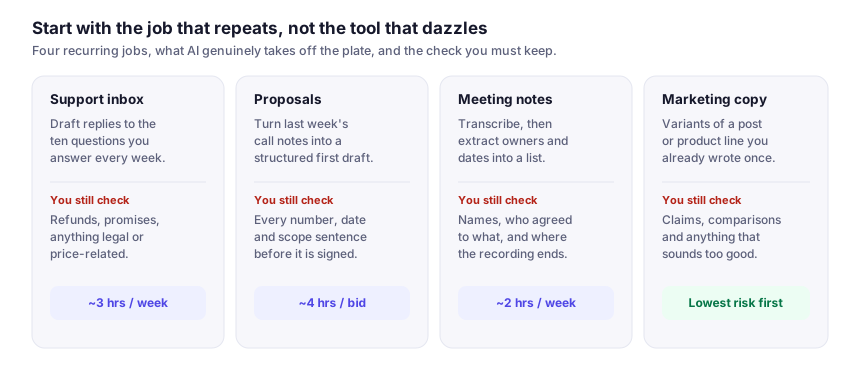
1. Support email triage and drafting
The workflow: each incoming support email gets classified (question / complaint / refund / spam) and a draft answer written in your voice from your own documents. You edit and send; you never start from blank.
The setup: an automation with an AI step watching the shared inbox → Claude or ChatGPT drafting with your FAQ pasted as context → the draft lands as a reply-not-sent. One afternoon to build.
The prompt to copy:
Draft a reply for [business name], which sells [what you sell] in [place].
Facts you may use — nothing else: [paste FAQ / returns policy / price list]
Rules:
- If the answer is not above, write ESCALATE and one line on what is missing.
- Quote the FAQ line you used at the end of the draft, in square brackets.
- Never promise a refund, a date or a price that is not written above.
- Under 120 words. Tone like these two real replies: [paste, paste].
The FAQ quote is the whole trick: a wrong draft becomes obvious in one read instead of hiding inside polite phrasing.
Watch for: refunds and angry customers go to a human first, and any email containing a number — an order total, an invoice, a deadline — skips automation entirely. The characteristic failure is an invented policy that sounds reasonable; log each one and paste the fix back into the prompt. Auto-send comes last: only after weeks without a bad line reaching you, and only for plain informational cases — opening hours, shipping, stock — never money, dates or complaints.
2. Proposals and quotes the same day
The workflow: paste a client enquiry into your assistant with a past winning proposal and your price list; get a structured draft; drop it into a Gamma or Canva template and send. The tool doesn't win the deal — replying the same day does.
Using this enquiry: [paste] and our accepted proposal: [paste]
Sections, in order:
1. What we think you need, in your words, not ours
2. Approach, in three steps
3. In scope / explicitly out of scope
4. Timeline, and what we need from you to hit it
5. Price — leave as [PASTE FROM PRICE LIST]
End with three ways this proposal might be over-promising.
That last line is the valuable one: it surfaces commitments you'd rather delete than deliver.
Watch for: re-check every number against your price list. Models are unreliable at money arithmetic, so pricing is copy-paste, never generated, and a negotiated quote gets rewritten by hand.
3. One recording, five outputs
The workflow: record one voice memo about something you actually know — on a walk or doing dishes. Transcribe with Otter.ai or Descript, then rewrite it into a newsletter issue, a LinkedIn post, three short-video scripts and a help-centre article. One input becomes a week's output: the bottleneck was expertise, not typing.
The reuse prompt: "Here is a transcript of me talking. Keep my phrasing wherever it's already clear. Extract the one claim worth arguing with, the concrete example I used, and three questions a customer would ask. Draft the five pieces using only facts in the transcript, then list anything you had to add." That last line keeps invented details visible instead of baked in.
Watch for: edit your voice back in. Readers smell unedited AI prose and it costs trust with exactly the audience you want; two real samples of your writing beat any adjective — see the prompt-writing guide.
4. Meetings that produce actions
The workflow: record client calls with everyone's consent → give the transcript to Claude with the standing instruction "list decisions, owners, deadlines, and contradictions" → paste the action list into your task tracker the same day.
What earns its keep is contradictions: a summary tells you what was said; a contradiction check tells you two people agreed on different things — the expensive kind you'd otherwise discover a week later.
Watch for: speaker attribution. Transcripts mis-assign who said what, so check owner names before the recap goes out and invite correction in it.
5. Bookkeeping prep, not bookkeeping
The workflow: export the bank CSV → your assistant classifies transactions against your chart of accounts and flags only the ambiguous ones → your accountant gets a clean file. Prep, not bookkeeping: AI drafts, humans stay liable.
The classification prompt: "Chart of accounts: [paste list]. For each transaction output date, description, category and confidence. Use UNSURE for anything that doesn't clearly match one listed category — don't invent categories." You review only the UNSURE rows, which is where the time comes back from.
Watch for: never upload bank logins, credentials or client-confidential files to a consumer AI account, and check whether your provider trains on inputs. Tax questions go to the accountant as questions, never as filed answers.
6. Weekly competitor and price check
The workflow: a recurring research run — in ChatGPT, Gemini or Perplexity if you want sources shown (check whether your plan includes scheduled tasks) — checks five competitor pages every Monday, diffs their pricing against last week's table and leaves a change list.
The prompt: "Check these five URLs: [list]. Output a table: URL, product or tier, stated price, stated limit, date checked. Below it, list what changed since this saved table: [paste last week's table]. If a page won't load or states no price, write NO DATA — do not fill the gap from memory."
Watch for: agents misread pages, and a misread price is worse than none — it arrives dressed as intelligence. Anything that triggers a decision gets a manual click-through of the source first.
Which workflow deserves your time first
Three questions set the order: how often does it run, what does a wrong draft cost, and whose data does it touch? Support email and content repurposing are the low-blast-radius starts — they run often and you see every draft before it leaves. Proposals and bookkeeping touch money, so they go last, once reviewing drafts is a habit. Meeting actions and the competitor check are cheap to add: they only ever hand you a list.
The order to build these in
Write the standing instructions once, where you both can see them, and hold every workflow to them. This is the whole SOP:
- Owner: [name]. Reviewer: [name]. Every draft has both, even when it's the same person.
- Allowed actions: read sources, write a draft. Forbidden: send, publish, pay, delete, change a price.
- Every factual line cites its source document in square brackets, so review is a lookup, not a memory test.
- Missing information produces ESCALATE, never a plausible guess.
- Anything involving money, dates, legal wording or an unhappy customer goes to a human, undrafted.
- Run drafts-only for two weeks on whichever workflow eats most of your week, fixing prompts rather than process; automate one more step only when drafts need under five minutes of editing.
What this costs, in money and in time
The sensible budget is one paid assistant plus free tiers for everything else — the shape of the personal AI stack, with a business inbox attached. Below is what the six workflows cost, in US dollars as the vendors' pages showed them when I checked in October 2026. Re-read each figure before paying: plans differ in how much you're allowed to send, not in how well the tool writes.
- One assistant seat — ChatGPT Plus or Claude Pro at about $20/month — carries the proposals, transcript clean-up and bookkeeping classification. The only day-one purchase.
- Meeting notes — Otter's free tier runs around 300 minutes a month with three file imports in total; Pro is roughly $17 per user. Check what your call platform already records.
- Decks — Gamma's free credit pool is one-off, not monthly, so a monthly cadence costs about $12/month; Canva Pro sits in the mid-teens if you want templates and resizing alongside.
- Plumbing — Zapier's free plan listed 100 tasks a month when I checked; Professional starts near $20/month billed annually. The arithmetic that surprises people: tasks count per action, so a six-step flow run forty times a month is 240 tasks, not 40.
Call it about $20/month to start and near $50–70 once all six workflows stand. Time is the cost people under-count: each workflow is built once, then reviewed daily until it earns trust. A twenty-minute weekly task never pays for its own automation; a ten-minute daily one pays inside the first month.