Otter.ai
The short verdict
The strongest reason to pay for transcription is the archive, not the transcript: searchable meeting history is worth real money to meeting-heavy teams. Before rolling it out anywhere, get the consent and retention questions answered — the bot joins your calls as a guest, and that is a policy conversation, not a feature. If your platform's free captions already answer 'what happened in that meeting', start there.
- Maker
- Otter.ai
- Category
- Productivity
- Entry price
- Freemium
- Free option
- Yes, with per-meeting and monthly minute caps
- Works on
- Web, iOS, Android; integrations with Zoom, Google Meet, Microsoft Teams
- Pricing checked
- October 2026
What Otter.ai is, plainly
Otter.ai records calls, transcribes them, and produces searchable notes with speaker separation and action items. Its defining architectural choice is also its defining controversy: the Otter bot joins the meeting as a participant, appears in the attendee list, and captures audio the way any guest would. That's what lets it transcribe across Zoom, Meet and Teams without special server access — and it's exactly the part your organisation's lawyers may care about, so read the consent section below before anyone installs it.
Otter works retroactively on files and imports, not only live calls. Its search spans every meeting you've ever had, which turns 'what did legal say about the contract in June' into a query instead of a favour. How that searchable record compares with whatever your conferencing platform already records is worked through on the meeting-notes decision desk.
Pricing is straightforward but capped on the free tier in ways that bite fast: minutes per conversation and per month are limited, so the free plan is an evaluation tool, not a workflow. The paid individual tier is cheap against the hours people spend writing up meeting notes; the business tier exists for admin controls, shared workspaces and the compliance posture individual plans can't offer. Be aware that the vendor has expanded into agent-style features on the higher tiers, so read what the tier actually includes rather than the tier name.
On accuracy: for clean, single-accent audio it is good enough to skim instead of listen, which is the whole value. Heavy overlap, jargon, or a bad microphone still produce confident errors on names and numbers, so verify anything load-bearing — a figure, a commitment, a deadline — against a human memory before it becomes a meeting minute. No transcription tool should be trusted on numbers, and no honest profile should tell you otherwise.
Where it wins
- The searchable archive genuinely changes what a team can recover from its own meeting history.
- Cross-platform: one tool covers Zoom, Meet and Teams calls plus uploaded audio, instead of three fragmented native notes.
- Speaker-labelled transcripts with summary scaffolding save real writing-up time on meeting-heavy days.
- Annual pricing at the individual tier is less than the hourly cost of the notes you're typing anyway.
Where it falls short
- The bot is a visible participant on every call — some attendees and several entire organisations treat that as a problem, and you have to be the one who flagged it first.
- Free-tier minute caps expire quickly; it's a demo, not a plan.
- Transcription errors land hardest on names, numbers and acronyms — exactly what meeting notes are kept for.
- Its cloud retention model means a third party holds recordings of sensitive conversations; individual tiers don't carry enterprise compliance terms.
What it's built for
Live transcription with speaker labels
Real-time text on calls with per-speaker attribution, good enough to follow along and copy quotes directly. Works best when people don't talk over each other, which describes precisely nobody's real meetings.
Searchable meeting archive
Every transcript is indexed. Searching across months of meetings is the feature converts casual users into paid ones, and it's the one nothing in Zoom or Teams matches without export gymnastics.
AI summaries, chapters and action items
Post-meeting it produces a condensed summary with decisions and follow-ups. The action items need editing — it will occasionally promote a joke to a commitment — but the skeleton saves the real fifteen minutes.
File and recording import
Upload audio and video after the fact: interviews, voice memos, a call recorded on your phone. This is the workflow journalists and researchers actually pay for, and it's capped on the free tier by design.
Agentic meeting tools on higher tiers
The business plans have grown into live coaching and CRM-ish automation territory. Useful if that's your world; do not let the consumer tiers be priced by features you'll never enable.
What it costs at your team size
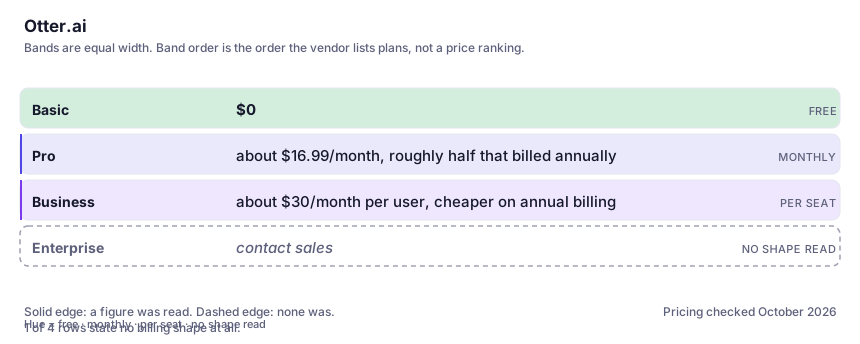
| Plan | Indicative price | What you actually get |
|---|---|---|
| Basic | $0 | Per-meeting cap around 30 minutes with a limited monthly minute allowance and only a few lifetime imports. Enough to test your real audio; not enough to rely on. |
| Pro | about $16.99/month, roughly half that billed annually | Longer conversations, a much larger monthly minute allowance, unlimited storage, advanced AI workflows. The tier individuals want if they're in meetings several days a week. |
| Business | about $30/month per user, cheaper on annual billing | Admin dashboard, team workspaces, higher caps and the workflow-automation features. Buy this for the admin and sharing layer, not for extra minutes. |
| Enterprise | contact sales | Security review, centralised controls and specialised agents. This is where procurement-grade data terms live — which matters given what this tool records. |
Count the people who would each need their own login.
Who it fits, and who it doesn't
Reach for Otter.ai if you…
- Meeting-heavy roles — sales, account management, founders — where follow-ups are written from transcripts daily.
- Researchers and journalists who import recorded audio and need searchable, speaker-labelled text.
- Small teams that want shared meeting notes without a knowledge-management project.
- You're the person always typing 'can someone send me the notes from that call'.
Skip it if you…
- Your meetings are all inside one platform that already gives you free transcripts and you never need cross-meeting search.
- You handle legally privileged, medical or heavily confidential conversations and your compliance rules haven't approved a third-party recorder — consent and retention questions come before convenience.
- The only thing you need is turning clean recorded audio into an edited story — that's an editing-first tool like Descript.
How to test it properly in 30 minutes
Don't judge a tool on the demo. Run the same four tasks you'd actually do with it, and score it against this checklist — the same one this desk works from before a profile goes up (see how we check a tool).
- Import one real meeting with the worst audio you regularly get — overlap, accents, jargon — and audit ten lines. Judge error rate, not the demo.
- Run the search across every imported meeting for a name and a number you know were mentioned. Searchability is the product; verify it works on your data.
- On the next call, tell attendees the transcription bot is joining before it does. Note the reaction. That tells you whether it survives your team.
- Compare one native platform transcript (Zoom or Teams) against Otter on the same meeting. If you can't name what Otter adds, don't pay for it.
- Read the vendor's data-handling and retention terms before importing anything confidential — after that fact, the recording isn't only yours anymore.
Alternatives worth comparing
Descript
Edit video and podcast by editing the transcript — the fastest way for a writer to cut sound.
AI inside your Notion workspace — for people whose notes and docs already live there, not for anyone wanting a standalone assistant.
The assistant that already has your email, docs and calendar — if you live in Google Workspace.
Disclosure: this profile is editorial. Otter.ai did not review it, pay for it or provide a free account for it. Links to the vendor are plain outbound links, not affiliate links. Errors are mine — report one and it gets fixed and logged on the updates page.