Descript
The short verdict
The best subscription on this list if your content is speech and your editor is a writer. It is the wrong tool for picture-led work and the free plan cannot ship anything, so test with one real project on the trial tier. Buy for the transcript workflow, not for the AI buttons.
- Maker
- Descript
- Category
- Audio
- Entry price
- Freemium
- Free option
- Yes — capped hours, watermarked exports
- Works on
- Windows, macOS, Web, browser-based collaborators
- Pricing checked
- October 2026
What Descript is, plainly
Descript transcribes your recording and turns the text into the editing surface: delete a sentence and the audio and video go with it. For anyone who thinks in words rather than waveforms, this removes the barrier that kept podcasters and video teams paying an editor to do obvious work. It also bundles recording, filler-word removal, multitrack layout, screen recording, clip extraction and export into one app, which is why it landed in media teams rather than in hobbyist forums.
The honest shape of it is a text-first editor that happens to handle video, not a video editor that happens to handle text. Where it wins is spoken content: interviews, podcasts, screen recordings, a talking-head explainer, a rough assembly you need to share with a client today. Where it loses is anything picture-led. Precise cuts on action, multicam switching, music-synced rhythm, colour, titles and motion graphics all live in a timeline that is simpler than a real non-linear editor and slower to move through once the project gets long. Many teams therefore rough-cut in Descript and finish in a proper NLE.
Two limits trip people up. First, the transcript is the editing interface, so a bad transcript means a bad workflow — proper nouns, accents, crosstalk and two people talking at once all produce text that you must fix before you can cut on it, and correcting it can take longer than scrubbing audio for a small edit. Second, quotas are measured in media or processing hours and AI features draw from a separate credit pool, so a long interview month can hit a cap mid-project, and exports on the free plan come out watermarked at reduced resolution. Check both against your real running time before committing a team to it.
If your output is sound with a picture attached, and your team includes people who will not learn keyboard trimming shortcuts, it is one of the best value subscriptions in this list. If your output is pictures with sound attached, buy the free version and try one of your real projects on it before paying anything.
Where it wins
- Removes the skill barrier: a producer who writes can now cut audio without learning an NLE.
- Searchable transcripts make finding a moment faster than any waveform editor.
- Recording, editing, cleaning, clipping and export in one product with shared links for review.
- Non-destructive text edits mean a rough cut is easy to reorder in front of a client.
- Studio Sound turns a bad room and a cheap microphone into something publishable.
Where it falls short
- Free exports are watermarked and resolution-capped, so the trial cannot ship anything.
- Monthly media-hour and AI-credit caps interrupt long projects at the worst moment.
- Bad transcripts slow you down rather than speed you up — fix text first, cut second.
- The timeline is weak for picture-led work: no serious multicam, colour or motion tooling.
- Filler removal set to full makes people sound unnatural and removes meaning.
- Performance degrades on very long source files; large assemblies belong in a dedicated editor.
What it's built for
Transcript-based editing
Words are the timeline. Delete, rearrange and search text; the media follows. Also the fastest way to find the moment you vaguely remember: Ctrl-F the phrase instead of scrubbing.
Filler-word and level cleanup
One click removes hundreds of instances of "um". It also removes the breaths and hesitations that make speech sound considered, so set it to a low setting or apply selectively, or your host will sound like a text-to-speech engine.
Overdub for fixing a single word
A cloned version of your own voice repairs one flubbed line without re-recording. It is genuinely good on a short word in a quiet tone, clearly worse across a sentence, and it inherits every consent question voice cloning raises if anyone but you appears in the file.
Multitrack, remote recording and clips
Bring in separate tracks, record guests remotely with local saves, and pull vertical clips from a long episode. The clip tool finds quotable lines, which is useful, and picks them by text density rather than by what will actually perform.
AI video utilities
Studio Sound for noisy rooms, eye contact correction for someone reading a script off-camera, background removal, and speaker separation. Studio Sound is the most reliably good of the set; gaze correction is the one viewers notice as uncanny, so use it on still frames rather than long shots.
What it costs, and what these numbers cannot tell you
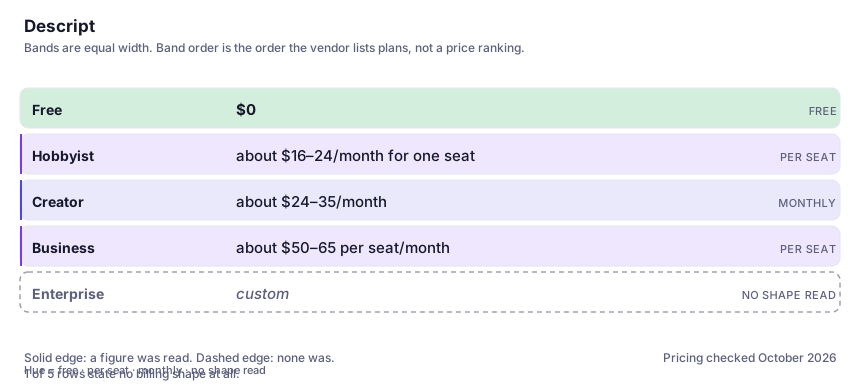
| Plan | Indicative price | What you actually get |
|---|---|---|
| Free | $0 | A small monthly allowance of processing time, watermarked exports at reduced resolution, a one-time AI credit grant and modest storage. Enough to test one real project, not to publish. |
| Hobbyist | about $16–24/month for one seat | Roughly 10 media hours a month, 1080p exports without watermark and a monthly credit allowance. Single-seat only, which is the constraint that forces most people up a tier. |
| Creator | about $24–35/month | Around 30 media hours, several seats, 4K export, far more storage and purchasable extra credits. The tier a two-person podcast or video team should start at. |
| Business | about $50–65 per seat/month | More hours and seats, translation proofing, brand layout controls and priority support. Buy it for the collaboration and admin layer. |
| Enterprise | custom | SSO, audit logging and negotiated terms. Relevant only if your security team has already asked about them. |
Who it fits, and who it doesn't
Reach for Descript if you…
- Podcasts and interview shows where the content is speech and the edit is mostly deletion.
- Screen-recorded product walkthroughs and training videos cut by a non-editor.
- Teams that need a rough cut shared for review today rather than a polished master.
- Repurposing one long recording into written quotes plus several vertical clips.
- Journalists and researchers who need accurate searchable text from recordings anyway.
Skip it if you…
- Your edit is driven by images, music timing or multicam switching — use a real non-linear editor.
- You are doing a single small trim; opening a text editor for that is slower than scrubbing.
- Your material has heavy accents, overlapping speakers or specialist vocabulary and nobody will proof the transcript.
- You need 4K and clean exports but are staying on the free or single-seat plan.
How to test it properly in 30 minutes
Don't judge a tool on the demo. Run the same four tasks you'd actually do with it, and score it against this checklist — the same one this desk works from before a profile goes up (see how we check a tool).
- Import one real hour of your own footage or audio and time the whole job from import to export. Compare that against how long the same edit takes in your current tool.
- Read the transcript against the audio and count errors in the first ten minutes. If proper nouns are wrong throughout, the text-editing advantage is smaller than it looks.
- Try three edits a picture-led workflow would need: a cut on movement, a two-camera angle switch, and a trim locked to a music beat. Note where you give up.
- Push filler-word removal and Studio Sound to full on a clip and listen for how human it still sounds.
- Check the hour quota for the tier against your monthly output, and confirm what happens when you exceed it — the answer matters more than the price.
- Invite a colleague to leave timestamped comments on a shared draft; collaboration is a large part of the value.
Alternatives worth comparing
The voice tool for narrators, dubbing and game audio — best-in-class TTS, provided you respect the consent rules.
Meeting transcription and notes via a bot that joins the call — for teams needing searchable records, with a privacy trade to read first.
Script-to-video for training and internal comms: turn a document into a narrated presenter clip without filming it.
AI video for people who already edit: shot-level control and a post-production toolkit, billed in credits you spend on takes you delete.
Disclosure: this profile is editorial. Descript did not review it, pay for it or provide a free account for it. Links to the vendor are plain outbound links, not affiliate links. Errors are mine — report one and it gets fixed and logged on the updates page.