Synthesia
The short verdict
The best value in AI video for people who make training and internal communication, because it replaces a filming process rather than imitating one — provided someone rewrites the script for a spoken voice. It is the wrong tool for brand films, product demos with real footage, or any audience that would resent a synthetic presenter. And the avatar-consent model is not a hurdle to route around: it is the reason you can still defend using this in two years.
- Maker
- Synthesia
- Category
- Video
- Entry price
- Per-seat subscription; free plan available
- Free option
- Yes — a restricted free plan; output allowance is metered in video minutes
- Works on
- Web app, iOS for viewing; API and enterprise workspace for volume
- Pricing checked
- October 2026
What Synthesia is, plainly
Synthesia is a business tool, not a filmmaking one, and the distinction explains everything about it. You paste a script, pick a presenter from the vendor's stock library and a voice, and it renders a video of that person delivering your text over slides. The vendor's own page positions this as a complete platform to "create, manage, translate and distribute video", and lists capabilities beyond the basic render: interactive roleplays and surveys, real-time conversational avatars, and an API for generating and translating videos programmatically. The audience is a learning-and-development team, an ops manager documenting a process, or a support lead who needs forty how-to videos and no studio.
What you learn in the first real project is that the product is metered by output minutes and governed by script length, so the whole workflow bends around that: roughly a page of spoken text is a minute of video, and a long document becomes a series of short focused clips rather than one film. The presenter reads what you write, which means writing for the ear — short sentences, explicit pauses, no subordinate clauses — is the actual skill, and a script pasted from a policy document comes out flat and unreadable. Names and brand words need respelling until they sound right. Multi-language versions work better than you expect on short paragraphs and worse on long ones, and the same avatar speaking a second language can sound like a different person. Before you plan a revision cycle, check what counts against your minute allowance: drafts and previews versus exports are not treated the same in every product, and assuming they are not is expensive.
The avatar-consent architecture is the most important design decision here and it should be read as a feature. Personal avatars require the person to record and consent, identity checks gate the process, stock avatars are licensed from real individuals, and the platform restricts synthetic media of people who have not agreed. That is a deliberate anti-deepfake stance, and it is also the practical limit: you cannot make a clip of your CEO who refused to record, and you cannot make a clip of anyone else at all. Keep the consent records as an asset — they are what allows a large organisation to keep using generated presenters as scrutiny increases, and they are what an auditor will ask for. The honest ceiling: output looks like corporate training video, and instantly reads as synthetic, which is fine for an internal SOP and wrong for a brand campaign. Gesture range is limited, hands and teeth glitch occasionally, and there is no story arc — no product close-ups, no real b-roll, no two people in a scene interacting naturally. Moderation also declines sensitive subject matter, which surprises teams making safety, health or political-compliance content. On rights: your plan's terms govern commercial use, and the generated performance is not somebody's acting, which simplifies some clearances and complicates the copyright status of the result.
Where it wins
- Turns written material into narrated video at a volume no film workflow can match, with no camera or editor.
- Translation and redubbing of an existing video is the single biggest time saving for distributed teams.
- The consent-and-verification model for avatars is a genuine answer to deepfake risk, not a fig leaf.
- Interactive and conversational formats make it more than a talking head — real training use cases.
- Predictable per-seat-plus-minutes pricing that a finance person can approve.
Where it falls short
- It looks and sounds like corporate training video. Nothing about it will be mistaken for branded film.
- Script quality dominates output quality, and most organisations have never written for a spoken voice.
- Minute metering shapes every decision; revisions are the hidden cost, so check whether previews count before you plan one.
- Moderation refuses some legitimate subject matter — health, political, sensitive compliance topics — and it refuses without much explanation.
- Glitches cluster where attention goes: hands, teeth, and the presenter's gaze on close crops.
- Requires a live person to record a personal avatar, so you cannot retroactively create a presenter from a colleague who declined.
What it's built for
Script to presenter video without filming
The core loop. Paste text, choose avatar and voice, pick a layout, render. A process document becomes a watchable clip in under an hour, including the script rewrite you were going to skip — that rewrite is where quality comes from.
Stock avatars licensed from real people
A library the vendor lists in the low hundreds on its own page. Choice is fine for corporate tone, poor for a brand with a specific personality, and the moment you need a presenter who matches your actual team you move to a personal avatar.
Personal avatars with recorded consent
A digital version of a real colleague, created from a consented capture session. Genuinely useful for making the subject-matter expert the face of their own training, and the consent step is not a formality — it is the mechanism that keeps the whole practice defensible.
Voices, languages and video translation
Text-to-speech in many languages and the ability to produce translated versions of an existing video. The productivity gain is real for distributed teams; long paragraphs lose sync and intonation, so short sentences travel better than your document does.
Interactive video and conversational avatars
Branching roleplays and survey-style video, listed on the vendor's own page as part of the platform, plus real-time conversational avatars. This is the most interesting direction for training — and the part most buyers have not budgeted for, so trial it deliberately rather than discovering it in year two.
API for programmatic generation
Create and translate videos from your own systems, which is what turns it from a video tool into a content pipeline: one source of truth, many rendered versions. Priced and limited separately — check the plan before architecting around it.
What it costs, and what these numbers cannot tell you
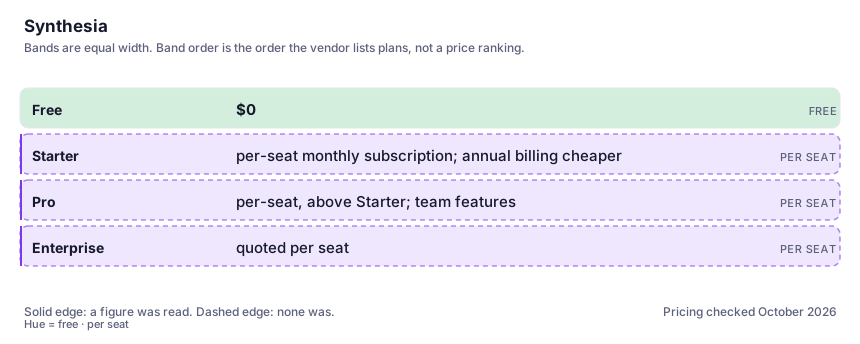
| Plan | Indicative price | What you actually get |
|---|---|---|
| Free | $0 | A limited plan the vendor lists as freemium, metered by a small video-minute allowance and restricted on avatars, features and commercial use. Enough to test one real script, which is the right way to evaluate it. |
| Starter | per-seat monthly subscription; annual billing cheaper | The individual-author tier: more minutes, personal avatar access on some configurations, and the practical limits you need to size for. We did not verify the current monthly figure in this build — take it from the vendor's pricing page. What matters is the minute allowance, not the price. |
| Pro | per-seat, above Starter; team features | More output minutes, more seats, brand kits, and the workflow features that matter once more than one person is producing. Before buying, count how many videos you actually maintain per quarter; the minute ceiling is the constraint people hit. |
| Enterprise | quoted per seat | SSO, admin and governance controls, higher allowances, consent and verification workflows, and the data terms an IT review will require. This is the tier where you should get the avatar-consent and content-restriction policies in writing. |
Who it fits, and who it doesn't
Reach for Synthesia if you…
- Learning and development teams producing onboarding, process and compliance video at volume.
- Support and operations teams turning written procedures into watchable walkthroughs.
- Companies with multilingual audiences who need the same message in ten languages without ten reshoots.
- Internal communication where consistency and turnaround matter more than cinematic quality.
Skip it if you…
- You need a brand film, an ad, or anything meant to be liked rather than understood.
- Your content depends on real product footage, hands demonstrating things, or people interacting in a scene.
- Your subject sits in restricted categories where moderation will fight you every time.
- You only need occasional short clips — a general video generator or a screen recorder is cheaper.
- Nobody in your organisation will rewrite the source document into spoken form; without that, output underwhelms.
How to test it properly in 30 minutes
Don't judge a tool on the demo. Run the same four tasks you'd actually do with it, and score it against this checklist — the same one this desk works from before a profile goes up (see how we check a tool).
- Convert one real internal document into a script written for the ear — short sentences, no clauses — and render it. Compare against rendering the document verbatim; the gap is the product's actual learning curve.
- Time the pronunciation fix on one branded term and one awkward name, and note whether the workaround survives the next re-render.
- Produce one translated version of the same video and watch it with the sound on at full length. Judge drift on later paragraphs specifically.
- Ask for a script in a sensitive-but-legitimate category (a safety incident, a health policy) and see whether moderation blocks it. That answers a question no feature list will.
- Start the personal-avatar flow, but stop at the consent step and read it. Note what you would need from a colleague, and how long the capture takes.
- Work out what one finished minute costs you in staff time, not licence fees. That number is the comparison against filming.
Alternatives worth comparing
AI video for people who already edit: shot-level control and a post-production toolkit, billed in credits you spend on takes you delete.
Descript
Edit video and podcast by editing the transcript — the fastest way for a writer to cut sound.
The voice tool for narrators, dubbing and game audio — best-in-class TTS, provided you respect the consent rules.
Gamma
Turns a text dump into a presentable deck, doc or site in minutes — for people who'd rather edit a draft than build one from blank.
Disclosure: this profile is editorial. Synthesia did not review it, pay for it or provide a free account for it. Links to the vendor are plain outbound links, not affiliate links. Errors are mine — report one and it gets fixed and logged on the updates page.