AI video generators in 2026: what's actually worth your time
"AI video" stopped being a party trick a while back, but the tools are so different that comparing them head-to-head is close to meaningless: a text-to-clip model, an avatar presenter and an editing suite solve three different problems. This guide sorts them first — what each is credibly good at, where each reliably disappoints, and the cheap test to run before paying.
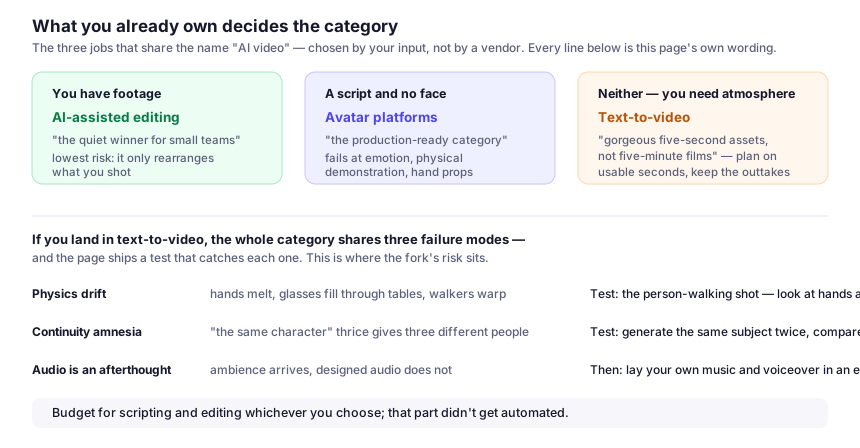
First, decide which problem you actually have
Almost every disappointed buyer skipped this step. Three distinct jobs get called "AI video", and they share almost nothing but the name:
1. Generate footage from text or images. You describe a shot — "drone view of a coastal road at golden hour" — and get a few seconds of video. For b-roll, concept visuals and ads with no crew.
2. Generate a presenter. You paste a script and an avatar delivers it, often in dozens of languages. For training material, product walkthroughs and internal comms, where a human on camera would just be expensive.
3. Edit with AI assistance. The footage is real; the machine cuts silence, reframes for vertical, captions it and finds the strongest moments. For anyone with an archive.
| Category | What you feed it | What arrives | Where you still work | Risk profile |
|---|---|---|---|---|
| Text-to-video (Runway, Pika and peers) | A written shot or a starting frame | Seconds, not minutes | Editing, sound, lettering, accepting outtakes | Highest: invents whatever it thinks you wanted |
| Avatar platforms (Synthesia and peers) | A finished script | A whole watchable video | Script, pacing, disclosure | Low, because nothing new is invented |
| AI-assisted editing (Descript and peers) | Your own real footage | Cut, captioned, reframed versions | Caption spelling, framing, clip selection | Lowest: it only rearranges what you shot |
If you have footage, buy category three. If you have a script and no face, category two. If you have neither and need atmosphere, category one. Most small teams buy category one out of curiosity, then quietly pay for category three — the one that saved hours.
Text-to-video: impressive, with three catch-all failure modes
Current text-to-video models produce genuinely cinematic short clips — the wide scenic movement and abstract product visual that used to mean stock-site hunting or a borrowed camera. What they don't produce is a finished sequence: plan on usable seconds, not minutes, and keep the outtakes.
Three failure modes run across the whole category:
Physics drift. Hands still melt, glasses fill through solid tables, and a person walking toward the camera tends to warp. Short cuts hide it; long takes expose it.
Continuity amnesia. Generate "the same character walking through a café" as three clips and you get three different characters. Consistent subjects across shots remain the hard problem — if your project needs a recurring person or product, this category is still a maybe.
Audio is an afterthought. Even generators with sound produce ambience, not designed audio — lay your own music and voiceover in an editor.
Treat each clip as a raw asset, keep shots under ten seconds, and design the edit around the strengths — wide scenic shots, product atmosphere, transitions. Write prompts the way you'd brief a cinematographer: subject, motion, lens, lighting, mood, in that order, one camera move per clip. Concrete nouns beat adjectives, as the prompt-writing guide covers. When a run goes wrong, the fix is usually narrower wording rather than a different tool: too many subjects, or two moves fighting.
A test you can run yourself
This site doesn't publish scores — a number would go stale within weeks and would describe my setup, not yours. What I can hand you is the test: take one brief you actually need filmed and run four clips through any generator you're considering:
- A scenic shot with no people — the category's comfort zone. If this fails, nothing else matters.
- A product-style shot — your object, described plainly, on a neutral background.
- A shot with a person walking — the known weak spot. Look specifically at hands and face.
- The same subject twice — the continuity test. Compare the two clips side by side.
Score it honestly: clips usable without re-shooting, attempts per usable clip, time from brief to a file you'd show a client. If two of four don't land quickly, the tool isn't ready for your work.
One limitation worth planning around: lettering inside a generated clip is unreliable — on-screen words wobble, misspell and change every take. Generate the image, then add titles in an editor, where you control font and language.
- Check the export before you pay: resolution ceiling, frame rate, and whether the tier you'd buy carries a watermark.
- Check whether unused credits roll over or expire monthly — an expiring bundle is a different product from a metered one.
- Check the licence covers paid advertising, not just "personal projects".
Avatar platforms: the production-ready category
If your goal is a talking human delivering a script — onboarding, feature explainers, localised sales pitches — avatars are the one category whose output is generally publishable as-is. Medium shots have largely stopped looking uncanny, and dubbing is legitimately good.
- Your script is most of the quality. Avatars read text well and improvise badly, so write for the ear — short sentences, no subordinate-clause marathons — as you would for a human presenter.
- Custom avatars change the feel. Platforms let you build a digital twin of a willing team member, which reads as more credible for company content than a stock presenter viewers learn to skim past.
- It is metered by output. Credits or minutes, not prompts: a rough script costs what a polished one does, so tighten the script before you render.
Where it fails: genuine emotion, physical demonstration or hand-prop interaction. An avatar cannot unbox a product; if the story needs hands, you need a camera.
Synthetic people: the ethics line and the rights line
Avatars carry the most reputational risk here, because a face implies a person who agreed to be there. Three rules keep you out of trouble:
- Never drive an avatar from a real person's face or voice without explicit, written consent — including your own staff and people who have left. Consent for one video is not consent for a library.
- Never build a synthetic person to impersonate a real one — public figures, a competitor's CEO, or "news anchor" formats that borrow institutional credibility the video hasn't earned.
- Label it. Some platforms stamp synthetic media on export; some require disclosure on sponsored placements and in regulated contexts. A small "AI-generated presenter" line costs nothing and avoids the trust damage of being found out later.
Rights deserve the same attention. Before you brief a project, read the vendor's licence and pricing page for three things: what you may do with the output commercially, whether an avatar's likeness is licensed for your sector, and what happens to videos you already published if you stop paying. Metering differs too — minutes, credits per render, or a separate charge for features that make output usable, like higher resolution or dubbing. Check the vendor's page for what your volume costs; don't trust a third-party summary, including this one.
AI-assisted editing: the quiet winner for small teams
If you produce podcasts, webinars, courses or demos, start here. It's the lowest-risk entry because the tool never invents anything: your footage is the content, and the machine only cuts faster than you can.
The trade-off matters before you buy: automatic clip selection optimises for something — usually speech density and hook-like phrasing — not your product story, so you still re-check framing, caption spelling and whether the picked moment is what you want to be known for. Descript-style editors differ in what they automate: filler and silence removal, multi-track timelines, or caption styling. Match the strength to your bottleneck rather than choosing by brand recognition.
Around the edit, ElevenLabs covers narration and dubbing when no presenter is in the room, Suno supplies a backing track when you'd otherwise go stock-searching, and Canva Magic Studio handles thumbnail and caption graphics without opening a full editor.
What to spend money on, by scenario
- Startup with no footage: one avatar subscription for explainers, occasional text-to-video credits for atmosphere — both only once you have a script worth reading.
- Creator with long-form content: an AI repurposing editor — the most reliable time saving here.
- Marketer testing ad concepts: text-to-video for mood boards and animatics; sell the concept first, produce it properly once it tests.
- Anything compliance-sensitive: real footage — synthetic media there invites questions you don't need to answer.
Video AI, answered plainly
Do I own the clips I generate?
Depends on the tier you pay for, so read the licence rather than the gallery: whether commercial use is allowed, whether paid ads are treated separately, and what happens to published clips if you stop paying.
Which category should I buy first if I have no footage?
An AI-assisted editor first if you have any long-form recording; avatars if you have a script and need a presenter; text-to-video last, because it's the least predictable per credit.