Pika
The short verdict
The most fun way to make one short, strange, shareable clip, with pricing unusually honest once you read the tier table. Do not buy Starter for paid work — commercial rights start at Creator, and that single line decides the plan for most businesses. Skip it entirely if you need realistic people, longer sequences, or consistency between shots.
- Maker
- Pika Labs
- Category
- Video
- Entry price
- Credit subscription, from $10/month
- Free option
- Free plan exists, but with no monthly credits — credit packs only
- Works on
- Web, iOS; originally Discord-based
- Pricing checked
- October 2026
What Pika is, plainly
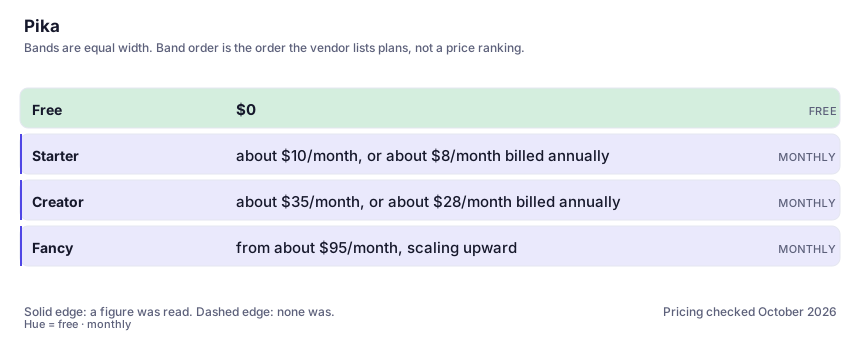
Pika is the consumer-shaped end of AI video. Where the pro tools hand you a timeline and a credit table, Pika hands you an idea and a set of transformations: make the object inflate, melt, crumble, squish, or turn into something it is not. Its strengths are style and surprise rather than realism, which makes it excellent for social cutdowns, one-off product stunts and animated-looking shorts, and poor for anything that has to pass as footage. Pricing is unusually readable and we read it straight off the vendor's page: Free at $0 with no monthly credits, Starter at about $10 a month ($8 on annual billing) with roughly 900 credits, Creator at about $35 a month ($28 annual) with roughly 3,150 credits, and a top "Fancy" band that scales from around $95 upward.
One line on that page is the most misunderstood thing about this tool, so it deserves repeating: on both the free plan and the $10 Starter plan, commercial usage rights are not included. Business rights start at the Creator tier, along with fast-processing lanes and early access to new models. If you are a freelancer or a brand team planning to publish what you make, the plan you thought you needed is one rung higher than you budgeted. The other structural detail worth knowing: the free plan carries zero credits per month and directs you to credit packs instead, so "free" here means "try it with purchased fuel", not "a small monthly allowance".
What you learn by using it: credits burn at different rates by duration and quality, so the same nominal clip can cost several times more at the higher setting, and a real project is a sequence of attempts rather than one generation. Motion strength is a trap — dialled too high, the effect behaviour bleeds into ordinary shots and everything wobbles like it is made of rubber. Faces drift across extends, in-scene text becomes unusable almost immediately, and physics bends in ways that are charming for a comedy clip and fatal for a product demo. Output looks fine on a phone and much less fine on a laptop at full width, so review on the largest screen your audience will use. Consistency across shots is Pika's weakest area, so plan edits around single surprising clips rather than a narrative. Content policy bars generating real people without consent and the filters are strict about public figures, which is the right call in a tool this fast. On rights, the same caution that applies to the whole category holds: your paid tier governs what you may do commercially, machine-made footage may not be registrable as copyright, and a clip that lands close to a protected character or brand remains your problem to defend.
Where it wins
- Fastest route in the category from an idea to a shareable clip, with the effect transforms as a genuine differentiator.
- Pricing is legible and cheap to enter, and the annual discount is stated plainly on the vendor page.
- No install, no hardware, no node graph — a non-editor can produce something usable in one sitting.
- Stylised and animated looks land well, which suits social formats better than photorealism does.
Where it falls short
- Commercial rights are not part of the free or Starter plans — the cheapest tiers cannot legally underwrite paid work.
- The free plan includes no monthly credits at all; you buy packs to test it.
- Weakest on shot-to-shot consistency and realism, so sequences and product demos suffer.
- In-scene text and human faces degrade quickly, especially once you extend a clip.
- Higher quality settings consume more credits per clip, so a monthly allowance covers fewer clips than the headline credit count suggests.
What it's built for
Effect-led transforms
The signature: apply a physical transformation to an object or subject in a clip — inflate, melt, squish, break apart. Nothing else in the category makes a single idea this immediately shareable, and it is the reason Pika stays installed even after you buy a pro tool.
Image-to-video with style presets
Upload a still, choose a treatment, get motion. Works best on illustration and stylised source frames; on photorealistic input it tends to reintroduce the uncanny movement that a pro tool handles better.
Text-to-video for short concepts
Describe a clip and get a few seconds. Fast and fun for a hook, weak for anything requiring precise blocking, and it will invent motion the laws of physics object to.
Extend and region edit
Lengthen a clip and change a region of it. Extends are where drift shows up fastest — colour, face and wardrobe all wander the further you push — so use them for continuity of mood, not of identity.
A web app plus packs, with credit top-ups
No install, no GPU, and a credit-pack route if you would rather not commit to a subscription. On the free plan that is the whole offer: access to all models, but zero included monthly credits and packs only.
What it costs, and what these numbers cannot tell you
| Plan | Indicative price | What you actually get |
|---|---|---|
| Free | $0 | Per the vendor page: no monthly credits — credit packs only — plus all models and a couple of parallel jobs. Excludes commercial usage rights, fast lanes and preview releases. Good for evaluating the look; not a plan you can run a business on. |
| Starter | about $10/month, or about $8/month billed annually | Roughly 900 credits a month and more parallel media jobs. Verified against Pika's pricing page in this build. Critically, it still does not include commercial usage rights — read that before a client project assumes it does. |
| Creator | about $35/month, or about $28/month billed annually | Roughly 3,150 credits, concurrent clip jobs, and full commercial permission. This is the real entry point for anyone publishing work for money, and the tier most small teams should actually budget for. |
| Fancy | from about $95/month, scaling upward | Vendor-listed from roughly $95 monthly ($76 annualised) with larger credit allowances, more concurrent jobs, priority speed and early model access. For high-volume social output; verify the current band before you commit. |
Who it fits, and who it doesn't
Reach for Pika if you…
- Social and creator content where one surprising visual gag is the deliverable.
- Freelancers and small brands willing to pay for the Creator tier to get commercial permission.
- Animators and illustrators styling still frames into motion for pitches and teasers.
- Anyone evaluating AI video for the first time who wants fast, readable answers about cost.
Skip it if you…
- You need the right to publish commercially on the cheapest plan — go straight to Creator or another tool.
- Your brief is realistic footage, a recurring character, or lip-synced dialogue.
- You need long clips or narratively assembled sequences rather than a few seconds at a time.
- You work under a legal team that has not cleared generative video at all.
How to test it properly in 30 minutes
Don't judge a tool on the demo. Run the same four tasks you'd actually do with it, and score it against this checklist — the same one this desk works from before a profile goes up (see how we check a tool).
- Generate the same idea at the lowest and highest quality settings and count the credits each consumed. That ratio is your real price per clip.
- Try one shot with visible signage or a product label and inspect the lettering at full width. Confirm the text ceiling for your use case.
- Extend one clip twice and grade how far the face and wardrobe drift. Judge it on a large screen, not the app preview.
- Apply one signature transform to a still you own and time the whole thing from upload to export. Speed is the selling point — measure it.
- Read the tier line on the pricing page that governs commercial usage before you accept a client job, and quote the tier name in your own proposal.
Alternatives worth comparing
AI video for people who already edit: shot-level control and a post-production toolkit, billed in credits you spend on takes you delete.
Script-to-video for training and internal comms: turn a document into a narrated presenter clip without filming it.
AI built into Canva — on-brand graphics, decks and quick edits for non-designers who already make their visuals there.
For mood boards, concept art and illustration: the best aesthetic defaults in the category, the least control over exact composition.
Disclosure: this profile is editorial. Pika did not review it, pay for it or provide a free account for it. Links to the vendor are plain outbound links, not affiliate links. Errors are mine — report one and it gets fixed and logged on the updates page.