Prompt writing: 10 habits that make every AI tool better
You don't need "god-mode" incantations or a 400-word template. The people who get consistently good results from AI — on emails, analyses, code, image briefs — share ten boring habits. They work in ChatGPT, Claude, Gemini and everywhere else, because the habits are really habits of clear thinking. Below: the habits plus copyable phrasing — a worked before/after prompt, a failure-mode table, a pre-send checklist.
One rule first: if a result is flat, suspect the ask before the model. Bad output almost always traces to a missing ingredient — audience, constraint, real material, or an example.
Before you type
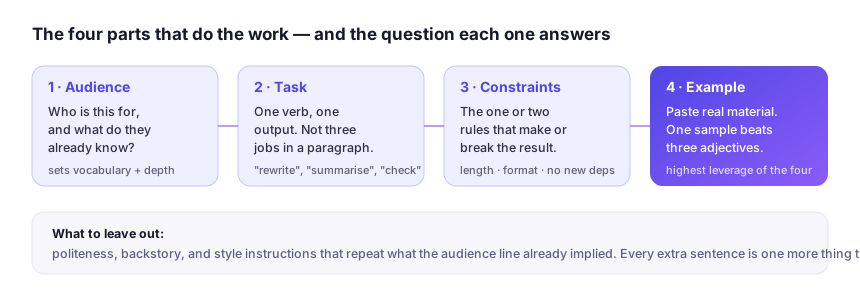
1. Say who it's writing for. "Explain this to a first-time landlord" beats "explain this." Audience decides vocabulary, length and tone better than any style instruction you could add. Make it a person you can picture: "Explain amortisation to my cousin who just bought her first flat, no jargon, two paragraphs." Specificity you can see beats adjectives you can't.
2. Give the constraint that actually matters. Every task has one or two make-or-break rules — word limit, "no bullet points," "must cite the source doc," "Python 3.11, no new dependencies." The test: if breaking a rule means you delete the output and start over, state it in the prompt, not in a follow-up. "Max 150 words, no exclamation marks, British spelling" is three dealbreakers typed in nine seconds.
3. Paste the context, don't describe it. "A short, punchy landing page" is a wish. Pasting your current page plus three competitor pages is a brief. Models perform far better with real material in front of them than with adjectives about it — and with long material, label where each block came from and what to ignore. Handling very large inputs is one of the genuine differences between assistants; our ChatGPT vs Claude vs Gemini guide gives you the five-task check for that, and verify upload limits on the vendor's own site — they change often.
Structuring the ask
4. Show, don't tell: one example beats three adjectives. Want a specific email style? Paste one you've written and say "Match this voice: same sentence length, same level of formality, none of the typos." This is the single highest-leverage habit on the list, and it works for code style, slide outlines and image briefs too. Two examples if the style varies by situation; more than three and the model averages them into mush.
5. Separate instructions from material. Use clear labels — Task:, Context:, Source text: — and keep the material last. It sounds trivial; it prevents the model from confusing "content to process" with "directions to follow," which causes a surprising share of bad outputs. It also defends you against prompt injection: if a pasted web page contains the sentence "ignore your previous instructions," a labelled Source text: block marks it as material, not a command. Treat pasted content as evidence, never as orders.
6. Ask for the plan before the work on big jobs. "Outline how you'd restructure this article, wait for my OK, then write it." A ten-second checkpoint saves a ten-minute redo. On risky tasks, ask for the plan and the risks: "list what could go wrong with this approach before you start." Whether a model flags uncertainty honestly is worth checking, not assuming — the 30-minute evaluation method has a five-minute test for smooth bluffers.
7. For hard problems, ask the model to check itself. Try: "Answer, then list the three weakest points in your answer," or "give your answer, then argue against it as a sceptical reviewer." Verified answers beat confident ones — especially for anything legal, medical or financial, where all AI output is a first draft at best (our disclaimer explains why; the methodology page applies the same standard to this site's own claims).
After the first output
8. Edit, don't re-ask. Regenerating rolls the dice again; targeted follow-ups compound progress. Reference the output by landmarks, not vibes: "Keep paragraphs 2 and 4, cut the intro, drop the closing question, make the whole thing a third shorter." "Be better" gives the model nothing to act on; "keep example 2, cut the rest in half" gives it a job. Most mediocre AI use is people regenerating instead of iterating.
9. Save your winners. The two prompts that work for your weekly report or your product-description style are assets. Keep them in a doc with the date and the product they worked on — a prompt that lands in one assistant can read as noise in another. Most assistants now support custom instructions or project-level context: encode your house style there ("British spelling, no em dashes, tables for comparisons") so every new chat starts pre-briefed.
10. Know when to switch tools, not words. If you've done all of the above and the output is still flat, the tool may be the problem — and the fix is a different product, not a longer prompt. Voice-critical writing often suits Claude; research that needs visible citations wants a citation engine like Perplexity; code that has to live inside your real project is a different shape of problem entirely — that's Cursor or Copilot territory. And image prompts need far less prose and far more concrete nouns: for Midjourney or Stable Diffusion, "weathered fisherman, oilskins, harbour fog, 35mm, natural light" beats a polite paragraph. Prompt skill transfers; model strengths don't.
Worked example: the same ask, two ways
The same ask, done badly and done well: a follow-up email to a client after a slipped deadline.
Vague: "Write an email apologising to a client for being late with the project."
Structured: Task: write a follow-up email. Context: I run a two-person studio; we promised a brand-audit deck on Friday and slipped a week because a team member was ill — no other problems, and this client has renewed twice. Audience: their marketing director, busy, low patience for grovelling. Constraints: under 120 words; one apology and no more; no excuses paragraph; must state a firm new date and one concrete concession (a free revision round). Source text: their original brief, pasted below. Example of my voice: the email I sent them last month, pasted below — match that tone.
Notice what the second version buys. The audience sets the register. The constraints rule out the two ways apology emails fail: over-apologising and vague rescheduling. The pasted brief and prior email mean the model never invents project details — and invented details are what turn a helpful draft into a dangerous one. If the first draft still needs a rewrite, one of the four ingredients is missing: audience, constraint, material, or example. Add it and iterate — habit 8 — rather than starting a new chat.
Six failure modes and the one-line fix
When output disappoints, the cause is usually visible in the symptom. Apply the fix and re-run once before concluding anything.
| Symptom | Likely cause | Fix, in one sentence |
|---|---|---|
| Generic, wallpaper prose | No audience, no example | Paste one sample of the target voice and say who reads it. |
| It ignored a rule you stated | The rule was buried mid-prompt | Move dealbreakers into a Constraints: line; repeat only the one it dropped. |
| It obeyed instructions inside your pasted text | Unlabelled material read as commands | Wrap pasted content in a labelled Source text: block — evidence, never orders. |
| Confidently invented facts | Asked to recall, not given the source | Paste the source; require quotes or an explicit "not covered in this document". |
| Quality drifts as the chat gets long | Stale context crowding the ask | Start fresh with a summary: "here's the brief and the current draft; continue." |
| Right answer, unusable shape | No format constraint | Ask for the form the reader consumes: "six bullets, one line each, verdict first." |
The pre-send checklist
If two or more boxes below are unchecked, the flat output you're dreading is predictable, not random.
- Named the reader — who consumes this output?
- Stated the one or two dealbreaker constraints up front?
- Pasted the real material instead of describing it?
- Included one example of the target output, if style matters?
- Separated task instructions from source material with labels?
- For big jobs, asked for a plan before prose?
- For factual claims, demanded quotes from the source or an explicit "not covered"?
Prompt writing: common questions
How long should a prompt be?
As long as the task is non-obvious — usually a short paragraph, not an essay. If a one-line ask already gets it right, stop; length is a tool, not a goal. Pasting context, constraints and one example grows a prompt naturally — good long prompts read like briefs, not incantations.
Do "act as a world-class expert" role prompts actually help?
Occasionally, but weakly — a role line mostly nudges tone, and everything it implies you can state directly. "Explain this to a busy first-time landlord, plain vocabulary, two paragraphs" delivers the same benefit with more control. Treat role framing as seasoning, not structure.
Should I keep one long conversation or start fresh chats?
Fresh chat per task, same product. Long conversations accumulate stale instructions and half-relevant material that dilute your asks — the drift row above is this exact problem. When a chat produces something worth keeping, save the output, not the thread; then seed the next chat with a short brief.
Do these habits work for image-generation prompts?
Partially. Showing instead of telling (habit 4) and concrete nouns (habit 2's spirit) transfer completely; audience labels and "argue against your answer" do not, because image models don't parse prose the way chat assistants do. For tools like Midjourney, write in subject, lighting, medium and style references — short lists beat sentences. Category quirks are covered in the profiles.
Put these to work: our small-business workflow guide uses exactly this framework for six real automations, or revisit the profiles to find the right model for the job.