ChatGPT
The short verdict
The safe first subscription. Nothing else covers as many tasks in one place, and the learning resources are unmatched. Pay for it because you use it daily, not because the free tier got slow — and never publish a fact it gave you without checking the source.
Changes that touch this profile
The news desk logged these changes and dated them. Each line links to the item that recorded it.
- — OpenAI widened the GPT-6 line with cheaper Sol and Luna
- — OpenAI put GPT-6 in ChatGPT with "Intelligent UI" — details we could not read
- Maker
- OpenAI
- Category
- Writing
- Entry price
- Freemium
- Free option
- Yes, usable indefinitely
- Works on
- Web, Windows, macOS, iOS, Android
- Pricing checked
- October 2026
What ChatGPT is, plainly
ChatGPT is the product that turned "chat with a language model" into a normal work task. It handles drafting, rewriting, summarising, analysis, code, image generation and file understanding in a single chat window, and it keeps absorbing features: memory across conversations, custom instructions, connectors to your own documents, voice mode, and agent-style task running. If you only learn one AI tool, this is still the one with the most surface area. What it's genuinely good at is breadth plus a low floor. You can be useless at prompting and still get a decent first draft of an email, a spreadsheet formula, or an explanation of a contract clause in five minutes. The paid tier mainly buys you the stronger model, higher usage limits, faster responses during peak hours, and the more capable reasoning and file handling — not a fundamentally different product.
What it's weak at is the stuff a directory page rarely mentions: it will sound confident while being wrong, its long-document handling has historically trailed Claude's, and the free tier's model is a step behind the model in the launch material. Treat it as an extremely fast first-draft machine whose output still needs your judgement — see how to evaluate an AI tool for the checklist this desk applies before a claim goes on the page. The losses to the other two are specific rather than general: Claude for a single long document and for editing prose without flattening the author's voice, Perplexity for current questions answered with clickable sources, Gemini for reach into the mailbox and docs you already live in. ChatGPT wins the round-robin on breadth and loses most single-task head-to-heads — a good trade if your week is varied, a poor one if every task looks the same.
The commercial shape matters before you pay, because the surprises are not in the subscription. Free is a real product with a weaker model, tighter caps during busy periods and later access to new features. The main individual paid tier is what people usually mean by "paying for ChatGPT": the strongest model, higher limits, priority speed and early features — the figure in the plans table is the widely quoted one, not a number I read off OpenAI's own page, which would not load when this profile was last updated. Above it sit a research-scale tier and team plans with admin controls and their own data terms. The surprise bill comes from the metered parts: API access is billed per token as a separate product, and the reasoning-heavy and agent-style modes carry ceilings no plan name tells you about.
On the record, the GPT-6 line moved twice. OpenAI announced GPT-6 Sol and GPT-6 Luna on 22 September, positioned as a cheaper pair inside the family, then GPT-6.1 Sol on 29 September. We publish no per-token figures for any of them: OpenAI's announcement pages block automated fetching, and this desk does not quote a number it has not read on the page that owns it. On 7 October its news index listed "GPT-6 and Intelligent UI for everyone", describing answers that arrive as interactive interfaces rather than plain text — the one claim readable on the vendor's own page, and enough to ask which of the small tools on your card it now replaces.
Where it wins
- The widest range of tasks in one product — writing, files, images, code, voice, browsing.
- Lowest learning curve of anything on this list; useful output on day one with no prompting skill.
- Paid tier is cheap relative to the time it saves a knowledge worker who uses it daily.
- Feature velocity: new capabilities land here before most competitors.
- Ecosystem effect: more tutorials, prompt libraries and third-party connectors are written for it than for any rival.
Where it falls short
- Confident wrongness is the default failure mode; anything factual needs a source check.
- Free tier silently downgrades you to a weaker model, so first impressions can be misleading.
- Long-document work has historically been better in Claude — test with your own file, not a summary.
- Usage caps and model routing change often, so a plan you bought for one reason may not be the plan you have later.
- Retention and model-training terms differ by tier and have changed more than once; assume anything you paste can sit in the provider's logs, and read the current policy for the plan you hold.
What it's built for
General chat that covers most office work
Drafting, editing, tone rewriting, explaining, translating, planning, brainstorming, turning notes into structure. This is 80% of real usage and it's where ChatGPT feels effortless. Bad at: anything where nearly-right is expensive — it hands you a plausible version of your domain, and the fluency hides the error.
Files and documents
Upload PDFs, spreadsheets and images and ask questions about them. Good for a first pass over a report or a contract; verify any number it quotes from a table before you reuse it. Bad at: scale inside one file — a question needing page 4 and page 40 held together at once is where accuracy slips, so split long documents and ask narrow questions.
Code help
Explains, writes and debugs code across mainstream languages, and runs Python for data questions in the paid tier. For editing inside a real project, a coding-first tool such as Cursor or GitHub Copilot will beat a chat window.
Image generation and editing
Built-in image creation means you can go from a written brief to a visual without switching products. Strong for concept and social visuals; weaker than dedicated tools when you need a specific brand style, reliable text inside an image, or two outputs that look like siblings.
Memory, custom instructions and GPTs
You can store stable context about your role and preferences, and build saved prompt-and-instruction bundles ("GPTs") for repeated tasks. This is where a paid account starts to feel like it belongs to you rather than to everyone. Bad at: precision about you — stored context is coarse and goes stale, so a half-remembered preference from a year ago shapes today's answers; review what it has decided about you.
Voice, browsing and agent-style task running
Talk to it out loud, ask it to look something up and return linked answers, or hand it a job that involves visiting pages and reporting back. Voice is strong for hands-free drafting and weak for anything you need verbatim later; the agent side is the slowest and least settled — good for a browse-and-collect task you can walk away from, not one with a deadline.
What it costs, and what these numbers cannot tell you
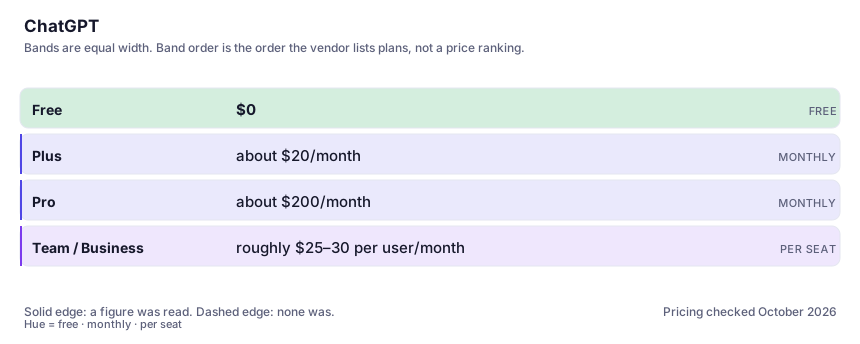
| Plan | Indicative price | What you actually get |
|---|---|---|
| Free | $0 | The capable-but-not-top model, capped messages during busy periods, no early features. Enough to decide whether AI chat helps you at all — judge the paid model before judging the product. |
| Plus | about $20/month | The tier most individuals want: strongest model, much higher limits, priority speed, and the newer features first. It buys app usage, not API quota — separate products, separate bills. |
| Pro | about $200/month | Very heavy users and researchers — extended reasoning limits and the largest-context configurations. Overkill for almost everyone. Commonly quoted figure; confirm it on OpenAI's page. |
| Team / Business | roughly $25–30 per user/month | Shared workspaces, admin controls and workspace GPTs. The relevant question is whether you need the admin layer, not the model. Business tiers carry their own data terms — don't assume consumer settings travel. |
Who it fits, and who it doesn't
Reach for ChatGPT if you…
- You want one subscription that covers drafting, summarising, analysis and the occasional image.
- You write or think in text all day and want a fast first-draft partner.
- You're new to AI tools and need the product with the most tutorials written about it.
- You need to ask questions of uploaded PDFs and spreadsheets without setting anything up.
- Your tasks change every day and you'd rather not run three separate tools to cover them.
Skip it if you…
- Your work is primarily very long documents — run the same file through Claude before you commit here.
- You need verifiable citations for published research — pair it with a citation engine such as Perplexity.
- You only ever use it for grammar and tone — that's a fraction of what you're paying for.
- Everything you produce has to be traceable to a source you hand to someone else — that gap is structural, not a prompting problem.
How to test it properly in 30 minutes
Don't judge a tool on the demo. Run the same four tasks you'd actually do with it, and score it against this checklist — the same one this desk works from before a profile goes up (see how we check a tool).
- Paste one real document you work with weekly and ask for a summary plus three things it gets wrong. Judge accuracy, not fluency.
- Give it a task with a hard constraint (word limit, format, audience) and count how many constraints it silently drops.
- Ask a factual question you already know the answer to, then ask it to cite sources. Note whether it invents anything.
- Run the same prompt on the free tier and the paid model back to back. Decide whether the gap is worth the subscription to you.
- Use it for one full working day and log every output you actually shipped. That number, not the demo, is the value.
- Ask three number-seeking questions about one uploaded file, then re-ask them in a fresh conversation with the same file. If the numbers move between runs, none of them belong in anything you send out.
Questions people ask
Is the free version of ChatGPT good enough?
For occasional use, yes — it will still handle drafting, explaining and rewriting well. The gap appears under load: caps during busy hours, a weaker model, and later access to new features. If you use it most days, the paid tier usually pays for itself in the first week.
Does ChatGPT remember what I tell it?
It can, if you enable memory or set custom instructions, and that context carries between conversations. Treat it as convenience, not confidentiality: review what's stored, and don't rely on memory for anything you'd be uncomfortable about the provider holding.
Can I use ChatGPT output commercially?
Generally the provider's terms allow you to own and use what you generate, but that's a moving target and it doesn't cover third-party rights — generated images that resemble a character or brand are still your problem. Check the current terms for your plan tier before publishing commercially.
What's the difference between the models inside it?
The chat product is a wrapper. Inside, there's a fast cheap model, a capable general model and a slower reasoning model that spends more compute "thinking" before answering. Reasoning models are noticeably better at multi-step problems and noticeably slower, which is why the picker matters as much as the prompt.
Should I use the ChatGPT app or the API?
The app whenever a human is in the loop; the API only when the model is plumbing inside something you're building. Same model family, different contract: the app is a flat subscription with usage ceilings, the API is metered per token and can surprise you, and it carries none of the app's conveniences — no saved conversations, no memory, no connectors, no GPTs, different data terms.
Is voice mode good enough to take meeting notes?
For thinking out loud and hands-free drafting it is genuinely useful. For anything that has to be exact afterwards — a meeting with commitments in it, a client call — no. Treat it as dictation for ideas, not a transcript of record.
Alternatives worth comparing
Claude
The assistant for people who read a lot: long documents, careful prose, and fewer invented answers.
The assistant that already has your email, docs and calendar — if you live in Google Workspace.
An answer engine that cites its sources — the tool to open when you need to check, not just to write.
Disclosure: this profile is editorial. ChatGPT did not review it, pay for it or provide a free account for it. Links to the vendor are plain outbound links, not affiliate links. Errors are mine — report one and it gets fixed and logged on the updates page.