Perplexity
The short verdict
The verification layer, not the writing layer. Keep it open next to whatever tool is generating the draft, and click at least one citation before you believe a number.
- Maker
- Perplexity AI
- Category
- Research
- Entry price
- Freemium
- Free option
- Yes, enough for daily light use
- Works on
- Web, iOS, Android, browser extension, API
- Pricing checked
- October 2026
What Perplexity is, plainly
Perplexity answers a question and shows you where it got the answer. That's the whole pitch, and for research-shaped work it's the difference between a tool you can use and a tool you have to re-verify from scratch. Every claim comes with numbered citations you can click, and follow-up questions keep the source set in view. It has grown into the same bundle the assistants sell — file and image analysis, collections, voice, mobile apps, a browser and an API — but the reason it exists has not changed, which makes comparing it to ChatGPT or Claude the wrong axis: it loses on writing and wins on auditability, the one thing a plain assistant will not hand you without setup.
The Pro tier adds model choice, deeper multi-step research runs that browse widely and assemble a report, file and image analysis, and the ability to save collections. The research mode in particular replaces the ugly workflow of twenty open tabs and a copy-paste doc — with the caveat that a long generated report still needs you to check its load-bearing citations.
Where it's weak: it's not a writing instrument. Prose comes out flattened and encyclopaedic, so drafts written for a human audience still belong in ChatGPT or Claude. It also misreads ambiguous questions — a search box has no place to say "here's what I assumed" — and citation links can point at a page that mentions the claim in passing rather than one that supports it. Use it to find and check, then use a writing model to write. See how to evaluate an AI tool for the verification habit that matters most here.
The commercial shape is unusual for this category because the metering is the product. Free is a real tool with a daily allowance of deeper queries — count your actual queries for a week and you will know whether you need more. The paid tier buys query volume and model choice rather than features nobody uses, and it has been bundled into other companies' subscriptions often enough that you should check what you already pay for before buying it separately; the widely quoted figure is around twenty dollars a month, which is what sits in the plans table because the vendor's pricing page would not load for me when this profile was last updated. Above that sit enterprise seats and an API the vendor describes as a platform for building search into your own product. The surprise bill is API-shaped: a cron job, or a feature calling the search endpoint on every user request, where per-request costs stack invisibly.
Where it wins
- Citations by default — the only mainstream assistant where checking is the normal path, not an extra chore.
- Deep research mode genuinely replaces hours of tab-juggling for a market scan.
- Free tier is published as a product with stated limits, not a countdown trial.
- Fast for the "what is the current state of X" question that a non-browsing model answers badly.
- It lowers the odds of quoting something that never existed, the specific failure chat models have on thinly sourced topics.
Where it falls short
- Prose quality is poor for anything you'd send to a client.
- Citations can be decorative: a source may mention a claim rather than support it.
- Ambiguous questions get a confident single interpretation instead of a clarifying question.
- Long research reports are strong on structure and weak on judgement — you still supply the opinion.
- You cannot control the evidence base: whatever dominates the index dominates the answer, so a thin or SEO-poisoned topic degrades quietly, and results are not reproducible day to day.
What it's built for
Cited answers
Every response carries numbered sources you can open. This is the feature; everything else is packaging. Bad at: proving much — a citation shows something was read, not that the source supports the claim, so check the marked passage is the load-bearing one.
Deep research runs
A paid capability that browses many sources, reads them and assembles a longer report with citations. Useful for market scans and due diligence; slow enough that you start it and go do something else. Bad at: judgement and brevity — it is well-structured filler until you add the opinion, and length can make weak sourcing look thorough.
Focus modes
Narrow the search to academic, writing, video, social or news verticals, which cuts the noise when you know what kind of source you want. Bad at: topics whose best material sits outside the vertical you picked; a narrow filter narrows the truth as well as the noise.
Spaces and collections
Save threads with sources and notes attached — a lightweight research notebook rather than a chat history you'll never find again. Bad at: being a knowledge base — no versioning, no permissions, so anything that matters belongs in a document you own as well.
File and image questions
Upload a document or screenshot and ask about it with web grounding available, which is handy for checking a claim in a PDF against what's published. Bad at: long structured analysis of one big file, which is Claude's ground; use this when the file must be checked against the outside world.
Search endpoints for developers
Its API exposes the search-and-cite pipeline as something your own product can call — the vendor's docs describe routing, agent, search and embeddings APIs — which is how you add citations to a chatbot instead of sending users to a website. Judge it on latency and per-query cost against a plain model API: grounded answers are slower, and the quota you prototype on is not the bill you ship with.
What it costs, and what these numbers cannot tell you
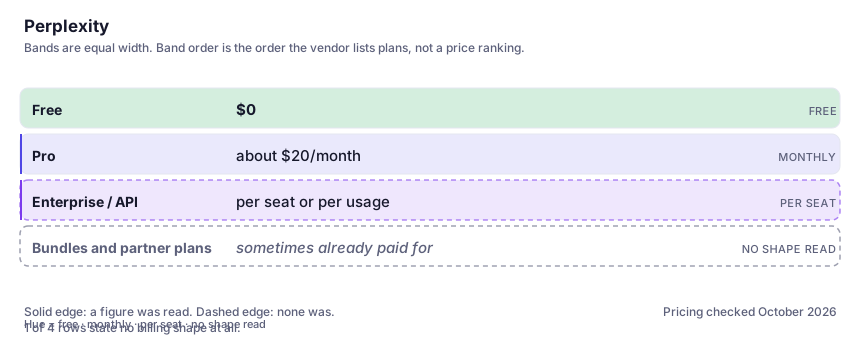
| Plan | Indicative price | What you actually get |
|---|---|---|
| Free | $0 | Cited answers plus a limited number of deeper research queries per day. Enough for most people who search a few times an hour — count your real queries for a week before upgrading, because here the limit genuinely is the product. |
| Pro | about $20/month | Frontier model choice, far more research runs, file analysis, and the productivity extras. Also bundled with some other subscriptions, so check before paying twice. The figure is the commonly quoted one; I could not read it off the vendor's pricing page when this profile was last updated. |
| Enterprise / API | per seat or per usage | Team workspaces with admin controls, plus programmatic access for building search into your own product. Seats buy administration; the API buys grounding per request, on different billing logic. |
| Bundles and partner plans | sometimes already paid for | Pro has repeatedly shipped bundled with hardware and other services, which is how people pay twice without noticing. Check what you already hold — the cheapest plan here is often one you already have. |
Who it fits, and who it doesn't
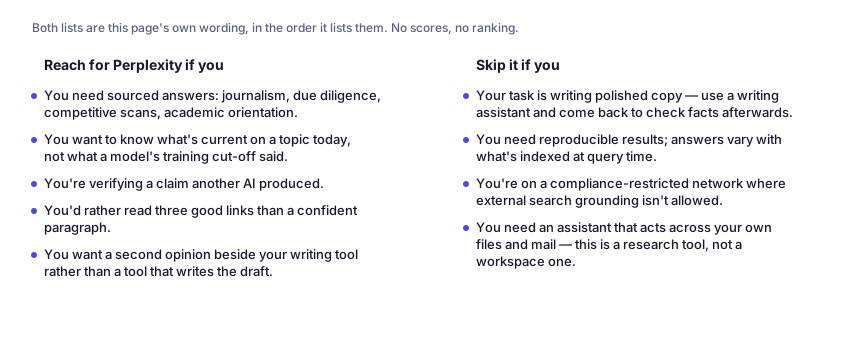
Reach for Perplexity if you…
- You need sourced answers: journalism, due diligence, competitive scans, academic orientation.
- You want to know what's current on a topic today, not what a model's training cut-off said.
- You're verifying a claim another AI produced.
- You'd rather read three good links than a confident paragraph.
- You want a second opinion beside your writing tool rather than a tool that writes the draft.
Skip it if you…
- Your task is writing polished copy — use a writing assistant and come back to check facts afterwards.
- You need reproducible results; answers vary with what's indexed at query time.
- You're on a compliance-restricted network where external search grounding isn't allowed.
- You need an assistant that acts across your own files and mail — this is a research tool, not a workspace one.
Where it stops fitting
How to test it properly in 30 minutes
Don't judge a tool on the demo. Run the same four tasks you'd actually do with it, and score it against this checklist — the same one this desk works from before a profile goes up (see how we check a tool).
- Ask a question with a number in it that you can verify independently, then open the cited source and check the number appears where it claims.
- Run one genuinely ambiguous question and see whether it asks a clarifying question or guesses.
- Do a deep research run on a topic you know well and count how many of its conclusions you'd defend.
- Compare a free-tier query limit day against your actual daily search count before paying.
- Use it to check one paragraph of AI-written text you already have. That's the workflow most people should adopt.
- Pick the three claims a research report's argument depends on and open only those sources. A well-organised report can still rest on pages that mention the claim in passing.
Questions people ask
Is Perplexity more accurate than ChatGPT?
For questions where accuracy means "does this match a published source", yes — because it shows the source. It is not more accurate about reasoning, maths or judgement, and a cited wrong answer is still a wrong answer with better typography.
Can I cite its output in published work?
Cite the underlying sources it links to, after you've opened them. Don't cite Perplexity itself; you'd be citing a summariser, and if it misread the source the error becomes yours.
Is the paid tier worth it for a student or researcher?
Usually yes, if you read in one discipline and use the deeper research runs weekly. If you only look things up occasionally, the free tier's daily allowance covers it.
How is it different from Google?
Google gives you ten links and makes you read; this gives you an answer and the links that support it. That's better for synthesis and worse for serendipity — and it means you must resist treating the summary as the research.
Is the free tier enough, or will I hit the wall?
For lookup-shaped use — a few questions an hour — the free tier's published limits cover real work; the assistants' free tiers publish more volume but not sourced answers. The wall arrives with volume: one research run after another, or hours interrogating a topic. Do a week of real work on free and count the queries; hitting the ceiling twice means the paid tier buys throughput, not better answers.
Is my searching private, and does it train on it?
Treat it as an outside research service, not a notebook. Queries and uploads go to a hosted product, retention and training terms have varied by plan, and enterprise seats come against different terms again. Assume anything typed could be read somewhere at the vendor unless your plan says otherwise in writing — which matters when you are doing due diligence on unpublished information.
Should I use the app or the API, and how good is mobile?
The app when a human reads the answer; the API when your product does, since it returns grounding and citations as structured output you render yourself. If the feature is "cited answers inside your own tool", the API is the only route — price it on the vendor's page before turning it on for traffic. Mobile and voice are fine for asking and shortlisting; checking several citations on a small screen is not.
Alternatives worth comparing
The default AI assistant — the broadest feature set, and the benchmark every other tool gets measured against.
Claude
The assistant for people who read a lot: long documents, careful prose, and fewer invented answers.
The hub where open models, datasets and demos live — infrastructure for builders and researchers, not a consumer chatbot.
Disclosure: this profile is editorial. Perplexity did not review it, pay for it or provide a free account for it. Links to the vendor are plain outbound links, not affiliate links. Errors are mine — report one and it gets fixed and logged on the updates page.