Claude
The short verdict
The pick for anyone whose work is documents and prose rather than demos. It won't dazzle you in a five-minute trial — it wins in week three, when you notice how little you had to rewrite.
Changes that touch this profile
The news desk logged these changes and dated them. Each line links to the item that recorded it.
- — Claude Opus 5.5: the top tier got 40% cheaper and the subscriber limits went up
- — Claude Haiku 5.5: a 1M-token context window on the cheap tier
- Maker
- Anthropic
- Category
- Writing
- Entry price
- Freemium
- Free option
- Yes, with daily caps
- Works on
- Web, macOS, Windows, iOS, Android
- Pricing checked
- October 2026
What Claude is, plainly
Claude is Anthropic's assistant, and its identity is narrow on purpose: it is built for people who work with large amounts of text. It handles long documents better than most rivals, its writing tends to need less de-editing, and it's more likely to tell you what it isn't sure about than to fill the gap with confidence. Sold as a subscription it now covers the same ground as the others, but the temperament is the differentiator: it hedges, it flags assumptions, and it will argue with your premise instead of completing your sentence.
The difference shows up in three places, each traceable to a published spec. Whole-report comprehension: you can paste or upload a document that would overflow other tools and still get a coherent answer about section four. Editing judgement: it resists the urge to inflate, which makes it better at rewriting human writing than at generating content from nothing. And agentic coding and file work, where the Claude Code terminal tool has become a serious option for developers who want the model to operate on a repo rather than a snippet. Where it loses is breadth and immediacy: it is a weaker multimedia studio than ChatGPT, it has nothing like Gemini's reach into your own mailbox and Drive, and unlike Perplexity it hands you prose rather than sources. Its context advantage is also easy to overread — a big window is a ceiling, not a promise that the far end of the document was attended to.
The trade-off is breadth and speed. It's less of a multimedia studio than ChatGPT, the free tier's caps bite faster under daily use, and it's slower on reasoning-heavy settings. If your work is documents, analysis and prose, it's arguably the better tool; if your work is a bit of everything, run the same five tasks through both before you choose. The site's head-to-head comparison is written for exactly that decision.
Commercially it is simple once you read the numbers. Anthropic's pricing table showed Claude Code excluded from the free tier as shown 2026-10-07, so developers should price the paid tiers from the start. Pro at $20 monthly, or $17 per month billed annually with about $200 up front, buys usage headroom and Claude Code rather than a different model. Max starts at $100 a month and sells a choice of usage multiples above Pro — if you never hit Pro's ceiling, that is capacity you will not use. Team seats were listed at $20 per seat monthly billed annually or $25 monthly, and the business tiers' table carried the line "no model training on your content by default", which is the sentence IT actually asks about. Anthropic publishes per-session usage limits rather than unlimited use, and the complaint that follows is about timing rather than price: users report hitting a usage ceiling inside one heavy session rather than at the end of a month.
On the record, two changes moved the subscription rather than the API. On 22 September Anthropic introduced Claude Opus 5.5 and raised the five-hour usage limits on Pro, Max, Team and seat-based Enterprise — the rolling limit is the wall a subscriber actually hits, so that half of the announcement matters more to a plan holder than the price cut does. On 7 October it launched Claude Haiku 5.5 with a 1M-token context window listed in the platform docs, which is the first time the cheap end of the family can carry a whole contract pile rather than a chapter.
Where it wins
- Best-in-class handling of long documents and multi-file context.
- Prose needs less correcting: fewer clichés, less hedging padding, better voice matching.
- More willing to say "I'm not sure" or flag an assumption, which makes it safer for analysis work.
- Strong developer story through Claude Code, not just a chat box.
- Its hesitancy is the feature: it argues back and flags premises, which costs time on simple tasks and saves it on consequential ones.
Where it falls short
- Free-tier caps are easy to hit mid-day, which is when you least want them.
- Slower than rivals on the careful reasoning settings.
- Weaker all-round media kit — image generation and voice are behind the category leaders.
- Refusals still occur on innocuous business writing; you lose time rephrasing.
- No citation layer: answers arrive as prose, so current-events claims need verifying elsewhere before you repeat them.
What it's built for
Long-context document work
Its signature strength. Contracts, research papers, financial statements, an entire codebase's documentation — ask cross-cutting questions and it holds the thread. Bad at: the last mile. It will still mis-quote a figure buried deep in a big file, and the smoother the answer reads, the more reason to find the page yourself.
Writing that sounds less like a model
Noticeably better at matching a supplied voice and at leaving your phrasing alone. Give it one real sample of your writing and the gap over rivals widens. Bad at: volume from nothing — on a blank page it drifts toward the tidy neutral middle, which is good for editing and mediocre for content at scale.
Projects and knowledge bases
Group chats with persistent instructions and uploaded reference files, so a recurring workflow doesn't start from zero every session. Bad at: being a company wiki — it holds files and instructions, not permissions, versioning or governed search.
Artifacts: live side panels
Drafts, code, tables and simple interactive pages render in a side pane you can iterate on, which is better for building small tools than copying out of a chat bubble. Bad at: anything you intend to ship. Excellent for a calculator or a formatted preview; a real app belongs in a repo with a real editor.
Claude Code for repository work
A terminal agent that reads your project, edits across files and runs commands. Aimed at developers, and one of the main reasons technical users keep a subscription. Bad at: being cheap to run — it consumes usage fast, so read the pricing page before pointing it at a large refactor or leaving it unattended.
Connectors, browsing and voice
It can reach connected tools and accounts, browse when asked, and take spoken input on mobile. All of this works and none of it is the reason to choose it: the equivalents elsewhere are deeper, so judge Claude on reading and writing.
What it costs, and what these numbers cannot tell you
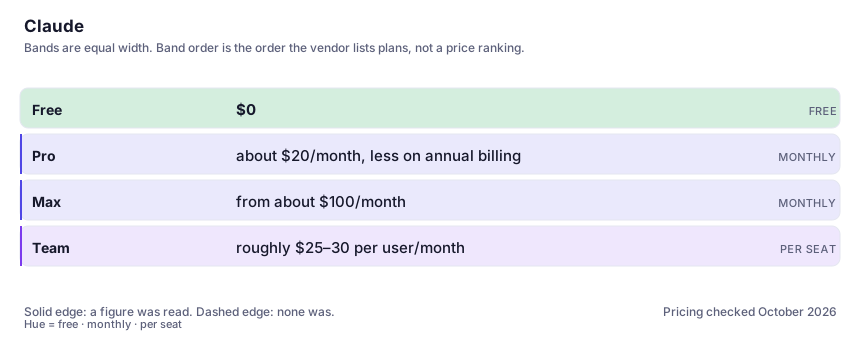
| Plan | Indicative price | What you actually get |
|---|---|---|
| Free | $0 | Real access to the capable model with daily usage limits. Fine for a week-long trial; not fine for a deadline day. Anthropic's table listed Claude Code as not included here as shown 2026-10-07, which matters if you are evaluating it as a developer. |
| Pro | about $20/month, less on annual billing | Much higher limits, the reasoning model, Projects and file work. The tier individuals should start at. Anthropic's page as shown 2026-10-07: $20 monthly, or $17 per month on an annual plan billed up front. |
| Max | from about $100/month | Large multipliers on usage plus the heaviest agentic features. Only sensible if you hit Pro limits routinely. The page offers a choice of usage multiples above Pro; buy the smaller and upgrade when you have observed yourself needing it. |
| Team | roughly $25–30 per user/month | Shared seats, admin controls and higher per-user limits; annual billing is materially cheaper per seat. Anthropic listed standard seats at $20 per seat monthly billed annually or $25 monthly, with business tiers stating no model training on your content by default — the line IT will ask about, and worth confirming on their page. |
Who it fits, and who it doesn't
Reach for Claude if you…
- You read long documents for a living: legal, academic, financial, policy, research.
- You edit other people's writing and care about preserving their voice.
- You're a developer who wants an agent that understands a whole repository.
- You want an assistant that argues with you rather than agreeing with everything.
- Your failure mode is shipping something confident and wrong — this is the one most likely to tell you what it guessed.
Skip it if you…
- Your main need is image or video generation — this isn't that tool.
- You need the cheapest possible seat for a large team; compare per-user pricing directly.
- You only ever ask short factual questions — the free tier of anything covers that.
- You need answers with links attached; use an answer engine for that and keep this for the writing.
How to test it properly in 30 minutes
Don't judge a tool on the demo. Run the same four tasks you'd actually do with it, and score it against this checklist — the same one this desk works from before a profile goes up (see how we check a tool).
- Upload your longest regular document and ask three questions that require information from different sections. Watch for cross-section synthesis, not summary.
- Paste a paragraph of your own writing plus a rewrite request, and compare the voice to a rival tool on the same input.
- Ask a question whose answer is genuinely ambiguous and see whether it flags the ambiguity or picks a side silently.
- Run one multi-step task (research, then structure, then draft) in a single conversation and count how often you have to correct it.
- If you code: point Claude Code at a small real repo and give it a bug to fix. Judge whether it touched the right files.
- Ask it to criticise a document of yours before asking it to rewrite that document. A generic critique means it isn't actually reading.
Questions people ask
Is Claude better than ChatGPT?
For long documents, careful editing of existing prose and repository-level coding work, most people who test both pick Claude. For breadth — images, voice, multimodal extras, the largest feature surface — ChatGPT still wins. The honest answer is that they're different shapes, and the deciding factor is which three tasks you do every week.
How much can it actually read at once?
Far more than the rest of the category, but "context window" is a marketing number: retrieval accuracy drifts as the input grows, and very long documents are best handled by asking targeted questions rather than dumping everything and hoping. Split by topic when precision matters.
Is the free tier worth using?
Yes for evaluation, no as a steady state. The caps interrupt real workdays, which is precisely the situation you're buying a subscription to avoid. Use a week on the free tier to find out whether the writing style suits you, then decide.
Should I subscribe to the app or pay for API access?
Subscribe when a human reads the output; use the API when software does. The app is a flat monthly price with usage ceilings; the API is metered per token, and because these models are priced to be good with long inputs, a script that sends whole documents can spend far more than the subscription that tempted you to try it. Prototype at your expected real volume rather than three example prompts, and set a spending cap before anything runs unattended.
Does Anthropic train on what I write?
It depends on which product you're on and what you've switched on. Anthropic's business-tier pricing table carried the line that content is not used for model training by default as shown 2026-10-07, while consumer accounts are governed by settings you have to go and look at yourself. Treat that as a pointer, not a compliance answer: read the current privacy terms for your own plan before pasting anything confidential.
Does it work with my team's documents?
Projects lets you keep a set of reference files and standing instructions that apply to every chat in that project. For company-wide deployment there's a Team tier with admin controls; check the provider's current data-handling terms before putting anything confidential in.
Alternatives worth comparing
The default AI assistant — the broadest feature set, and the benchmark every other tool gets measured against.
The assistant that already has your email, docs and calendar — if you live in Google Workspace.
An answer engine that cites its sources — the tool to open when you need to check, not just to write.
Disclosure: this profile is editorial. Claude did not review it, pay for it or provide a free account for it. Links to the vendor are plain outbound links, not affiliate links. Errors are mine — report one and it gets fixed and logged on the updates page.