Gemini
The short verdict
Buy it for the plumbing, not the model. If Google apps are where you work, it's the highest-leverage assistant on this list; if they aren't, use the free tier as your second opinion.
- Maker
- Category
- Productivity
- Entry price
- Freemium
- Free option
- Yes, and it's genuinely usable
- Works on
- Web, Android, iOS, Gmail, Docs, Drive, Workspace
- Pricing checked
- October 2026
What Gemini is, plainly
Gemini is Google's assistant, and its real advantage isn't the model — it's location. It sits inside the products a large share of office workers already open every morning: Gmail, Docs, Sheets, Drive, Meet and Search. That means the useful question isn't "is it smarter than the others" but "does it save me the twelve clicks I currently make." The subscription has the same shape as its rivals now — chat, uploads, images, voice, multi-step research runs, and the same models sold through AI Studio and the API — but unlike the other two, most of its distinctive value is distribution rather than capability.
The multimodal handling is strong and the free tier is more generous than it has any right to be, which makes it an excellent second assistant even if another tool is your first. Very large inputs — a whole Drive folder, hours of video, a long PDF set — are where its architecture earns attention, and Google AI Studio remains the cheapest way for a developer to poke at these models directly. Where it loses to the other two is narrower than the marketing suggests: as a writer it is blander than Claude and less willing to preserve a specific human voice through an edit; as a general kit it trails ChatGPT on the maturity of its extras; and it doesn't show sources the way Perplexity does, so research work still needs a second tool. Its edge is rarely "the model answered better" and usually "the answer arrived where I was already working."
The downsides are integration-shaped. The assistant inside Workspace is not the same product as the consumer app, feature names change between the two, and the deeper hooks depend on you accepting Google reading a lot of your context. If you don't use Workspace, much of the value evaporates and you're left comparing plain model quality — where it's competitive but not obviously ahead. Commercially, Google's AI plans page as shown 2026-10-07 listed a $0 tier with consumer storage attached, Plus at $4.99 a month, Pro at $19.99 and a top Ultra tier from $99.99; what those buy is usage ceiling, the heavier reasoning and agentic features, and storage — not a different assistant. Workspace is bought separately per user, and there the contract terms are the product. Surprise bills are API-shaped: the free AI Studio quota is generous enough to prototype against, and per-token pricing on a large-context model multiplies fast once real traffic arrives.
Where it wins
- Lives where the work already happens — Gmail, Docs, Drive, Meet.
- Generous free tier; you can evaluate it for weeks without paying.
- Handles very large multimodal inputs better than most rivals.
- Search grounding makes it less useless on current-events questions than offline models.
- Cheapest verified paid entry of the three big assistants: $4.99 a month against the others' $20 tier (as shown 2026-10-07).
Where it falls short
- Much of the value is conditional on being a Google Workspace user.
- Product naming and feature parity between consumer and Workspace versions are confusing.
- Deeper usefulness means granting Google more access to your content; that's a real trade, not a footnote.
- Prose style is a bit more corporate than Claude's and needs more editing for voice.
- Integration cuts both ways: assistant features can appear in surfaces you never opted into, and naming and limits vary by region, account type and Workspace edition.
What it's built for
Workspace integration
Draft and summarise in Gmail, extend tables in Sheets, pull answers from Drive documents. The single reason most users pick it over a rival assistant. Bad at: anyone outside Google's estate — strip the integrations away and you are evaluating a very good chat model, which is a less flattering comparison.
Very large inputs
Handles long context windows well, including video and document sets, which suits research and media review rather than short questions. Bad at: guaranteeing recall across all of it; a bigger ceiling raises what you can send, not the odds that page 70 was read.
Multimodal by default
Images, screenshots and audio in, images out. Good for "explain this error screenshot" and "what's in this scan" workflows. Bad at: controlled aesthetics — capable for a quick visual, not brand-system material, and consistent style across a set takes more work than the demo implies.
Search-grounded answers
Ties into Google's index for current information, with links you can click through. Better than a purely offline model for anything time-sensitive — still verify before publishing. Bad at: being a citation product; the links are grounding rather than the deliverable.
Google AI Studio for developers
A free-ish console to try the models, tune prompts and get API keys. The fastest path from "I use the chat app" to "I call the model from my own code". Bad at: cost certainty — the quota that carries a prototype is not the one that carries a launch.
Research runs and automation inside Google's apps
On the paid tiers you get deeper multi-step search runs and assistant actions across Docs, Sheets and Gmail — plan a topic, gather sources, produce a report. My honest read is "good enough to start, not enough to finish": the report needs your editing, and anything acting on live data stays supervised.
What it costs, and what these numbers cannot tell you
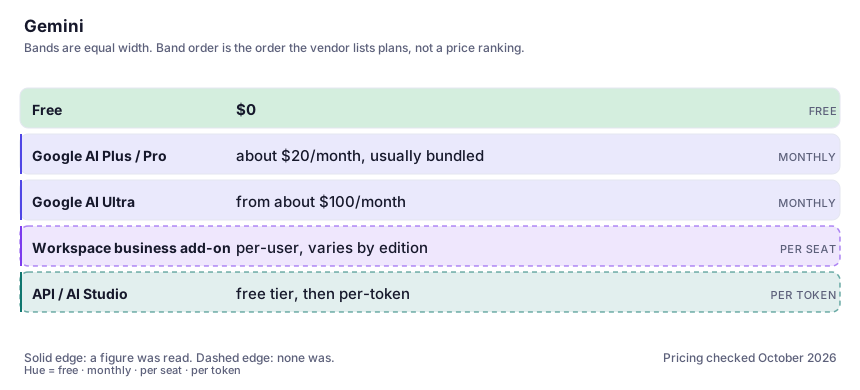
| Plan | Indicative price | What you actually get |
|---|---|---|
| Free | $0 | Strong model access with modest limits, plus the basic Workspace surface area. The best free tier of the three big assistants: a usable assistant with a ceiling, not a demo. |
| Google AI Plus / Pro | about $20/month, usually bundled | The paid consumer tiers are sold as part of a Google storage plan: higher limits, the reasoning model, deeper app integration and bundled cloud storage. Verified on Google's AI plans page as shown 2026-10-07: Plus at $4.99 a month, Pro at $19.99 — the cheapest real upgrade of the big three. |
| Google AI Ultra | from about $100/month | The top consumer tier, shown on that page starting at $99.99 a month with a higher option also listed. It buys the largest ceilings and the deepest assistant access inside Google's apps. Almost nobody needs it; buy it after watching yourself hit Pro's ceiling. |
| Workspace business add-on | per-user, varies by edition | Admin controls, shared prompts and data-handling terms your IT department will want to read. Get the current per-seat figure from Google's sales page. Here the contract is the product: permissions, retention terms and central management, not a smarter model. |
| API / AI Studio | free tier, then per-token | Pay only for what you send. The pricing page is the source of truth; model prices in this family change quarterly, and consumer app subscriptions do not cover API usage. |
Who it fits, and who it doesn't
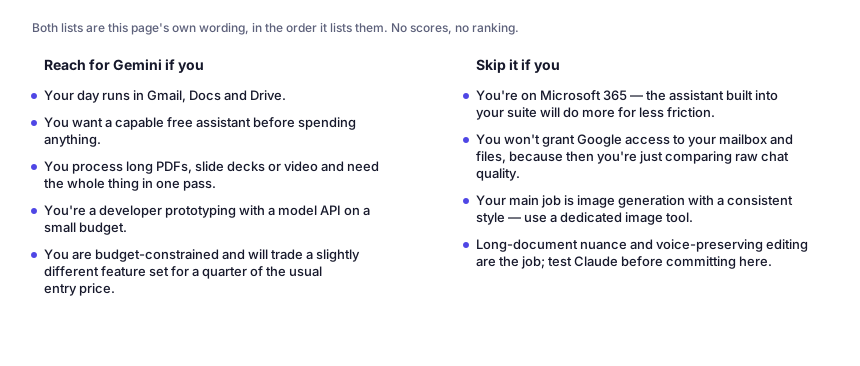
Reach for Gemini if you…
- Your day runs in Gmail, Docs and Drive.
- You want a capable free assistant before spending anything.
- You process long PDFs, slide decks or video and need the whole thing in one pass.
- You're a developer prototyping with a model API on a small budget.
- You are budget-constrained and will trade a slightly different feature set for a quarter of the usual entry price.
Skip it if you…
- You're on Microsoft 365 — the assistant built into your suite will do more for less friction.
- You won't grant Google access to your mailbox and files, because then you're just comparing raw chat quality.
- Your main job is image generation with a consistent style — use a dedicated image tool.
- Long-document nuance and voice-preserving editing are the job; test Claude before committing here.
Where it stops fitting
How to test it properly in 30 minutes
Don't judge a tool on the demo. Run the same four tasks you'd actually do with it, and score it against this checklist — the same one this desk works from before a profile goes up (see how we check a tool).
- Ask it to summarise the last five threads on one subject in your real inbox. Integration value shows up immediately or not at all.
- Give it a long PDF and ask three questions requiring figures from different pages. Check the numbers against the source.
- Compare one drafting task against your current assistant with the same prompt and the same word limit.
- Read the admin/data-handling terms for whichever tier you'd buy before you attach a work account.
- Try one screenshot-to-explanation task to see how the multimodal input behaves on your actual error messages.
- Do the same job twice — once in the Gemini app with a file attached, once inside Docs with the same prompt. The gap between the two is the integration you are buying; if it is small, the subscription is buying you little.
Questions people ask
Is Gemini good enough to be my only AI assistant?
If your work is inside Google's apps, quite plausibly yes — the integration saves more time than small differences in model quality cost you. If it isn't, it's usually better as a second assistant for long inputs and search-grounded questions.
What's the difference between Gemini the app and Gemini in Workspace?
Same models, different plumbing. The consumer app is a chat product; the Workspace version is the assistant embedded in Gmail and Docs with access to your files and stronger admin controls. Features arrive at different times in each, which is the main source of confusion.
Is the free tier actually limited?
Yes, but gently — you'll hit the ceiling on heavy days rather than on casual use. For evaluation purposes the free tier is enough to reach a real verdict, which isn't true of every competitor.
Does Google train on what I write?
It depends on your account settings and plan; consumer and Workspace arrangements differ, and business tiers generally come with contractual terms that exclude your content from training. Check the setting inside your own account rather than trusting any third-party summary, including this one.
Is Gemini better than ChatGPT or Claude?
If your work lives in Gmail, Docs and Drive it is usually the better tool, for reasons unrelated to model quality — it removes the copy-paste loop the others make you run. If it doesn't, Claude tends to win on long documents and on editing prose without flattening the author, and ChatGPT on breadth of extras. Judge it on where your files are before you judge it on the model.
Which paid tier, and does a consumer plan cover API use?
Spend a week on free and count the days you hit a ceiling, then test the $4.99 tier before deciding the $19.99 one is worth it for the storage and deeper app access. And no — a consumer plan covers the apps, not your API keys, which are metered per token separately. That gap is where the surprise bills in this family come from.
How good is it on Android and by voice?
On Android it is the most useful of the three, because it can act on what is already on the phone. The limits match the others: voice is for asking, not for anything you need in writing later, and the more the assistant reads your screen and app context, the more worth auditing which permissions you granted.
Alternatives worth comparing
The default AI assistant — the broadest feature set, and the benchmark every other tool gets measured against.
Claude
The assistant for people who read a lot: long documents, careful prose, and fewer invented answers.
An answer engine that cites its sources — the tool to open when you need to check, not just to write.
Disclosure: this profile is editorial. Gemini did not review it, pay for it or provide a free account for it. Links to the vendor are plain outbound links, not affiliate links. Errors are mine — report one and it gets fixed and logged on the updates page.