Cursor
The short verdict
The tool that changed how developers work, and the one that changes your bills if you let it: twenty dollars entry, real usage meter behind it, no enterprise indemnity shield. Take it if multi-file agent work is your shape and you review every diff; take Copilot if you want help without replacing your editor; take neither if you code casually and type slowly on purpose.
Changes that touch this profile
The news desk logged these changes and dated them. Each line links to the item that recorded it.
- Maker
- Anysphere
- Category
- Coding
- Entry price
- Freemium
- Free option
- Yes — limited agent requests and tab completions
- Works on
- Desktop (Windows, macOS, Linux) — a VS Code fork, so extensions and keybindings carry over
- Pricing checked
- October 2026
What Cursor is, plainly
Cursor is not an assistant bolted onto an editor; it is the editor — a VS Code fork, so your extensions and muscle memory migrate — rebuilt so that the primary way to change code is to describe the change and review the diff. The tab key completes the next edit where your cursor is; the agent pane takes a task, plans across files, runs terminal commands and iterates until tests pass. This is the workflow that converts people, and it's genuinely a different job from what an autocomplete extension does: at its best Cursor is a junior engineer who types fast, never gets tired, and needs everything checked.
The comparison that matters sits one entry up: Copilot is an extension that assists your existing editor for ten dollars; Cursor is a replacement editor that asks you to change how you work, for twenty. For developers whose task shape is multi-file — refactor this across the codebase, wire up this API end to end, port this component — the diff-review loop tends to beat completions outright, and the doubling of price looks trivial next to the hours. For developers whose work is careful, single-file, architecture-sensitive code, the agent's confidence can cost more than it saves: reading a hundred-line diff you didn't write is not free, and Cursor makes generating it very cheap. Judge which kind of developer you are before judging the tool.
The pricing has a sharp edge worth naming before someone hits it. The base Pro tier is twenty dollars a month, but the frontier models inside it are metered by usage; heavy agentic sessions hit that ceiling and either throttle to cheaper models or bill on-demand usage beyond the included amount. Ultra exists at a much higher price for people who genuinely live in the agent all day, and that's the honest read: this product's cost scales with how much you let it drive. Teams cost more per seat and buy shared context plus privacy-mode administration — which leads to the section your employer will care about.
On your code: Cursor has a privacy mode where, when enabled, code context isn't retained or used for training, and team plans default toward those controls — verify the current wording on their own terms before trusting it, because these defaults have changed and are changing again. On generated code: the ownership analysis is identical to every other AI coding tool — you own what you accept, you maintain what you merge, and the unresolved public-code lawsuits that touch Copilot apply in substance here too, without the enterprise indemnity shield GitHub sells. A pragmatic stance: treat the agent like a fast, confident, occasionally-wrong teammate whose every commit gets a review, and keep tests running because an agent that can execute commands can also execute a mistake.
One last judgement call on lock-in: because it's a VS Code fork, leaving Cursor is switching an editor, not untangling a plugin, and the settings-sync between the two is where the quiet friction lives. If your setup is heavily customised, budget a weekend for migration and judge the twenty dollars against the first real task it saves, not the demo.
Where it wins
- The multi-file agent workflow is real and measurably faster than editor-plus-extension for whole-project tasks — this is what converts people.
- VS Code fork means near-painless migration: extensions, themes and keybindings survive the move.
- Model choice beats single-provider tools; when a rival model gets better for code, you can switch that week.
- Tab's next-edit prediction is the best-completed feature in the product, in the literal sense — people keep it on for this alone.
Where it falls short
- The $20 sticker price hides a usage meter: frontier-model work can mean throttling or on-demand bills beyond the subscription.
- It replaces your editor, your settings and your update channel — that's lock-in and maintenance surface no extension asks you to accept.
- Cheap diffs are a trap: agents generate changes faster than teams can thoughtfully review them, and technical debt follows the path of least review.
- No enterprise IP indemnity equivalent to Copilot Business; on the code-ownership question you're on your own reading of their terms.
What it's built for
Tab: predictive next-edit
Completes not just the line you're writing but the next place your cursor should go — renames propagate, boilerplate follows. The feature that makes users feel the editor is keeping up with them; it's autocomplete promoted to a different level of utility.
Agent pane for multi-file work
Describe the task; it plans, edits across files, runs terminals, reads errors and iterates. The reason people switch editors at all, and the reason code review discipline becomes more important, not less.
Whole-project context
It indexes your repo so questions about 'where do we handle auth' answer with real files, not guesses. Better than pasting context into external chat, though the index occasionally lags and stale context produces confident nonsense.
Model picker including frontier and open models
Bring your own API keys or use theirs across a rotating menu of coding-strong models. Power and cost control in one place — and the mechanism by which a twenty-dollar subscription quietly becomes a usage bill if you let it.
Background and cloud agents
Run tasks asynchronously or in remote environments while you keep working. Genuinely useful for CI chores and long refactors; also the frontier where the pricing meter bites hardest.
What it costs at your team size
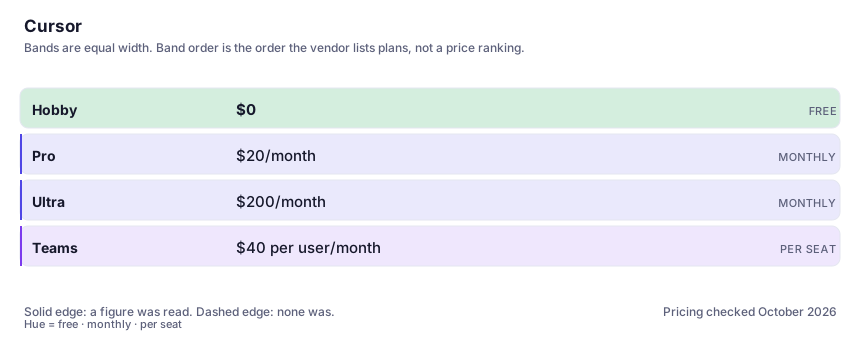
| Plan | Indicative price | What you actually get |
|---|---|---|
| Hobby | $0 | Limited agent requests and completions. Enough to evaluate whether the diff-review workflow suits how you code — which is the only question worth answering before paying. |
| Pro | $20/month | Extended agent limits, frontier model access within an included allowance, background runs. Watch the usage meter: heavy agentic work goes beyond included amounts and onto on-demand billing. |
| Ultra | $200/month | Large-model heavy users running agents all day. Almost nobody needs this in month one; earn the upgrade by hitting Pro's ceiling visibly first. |
| Teams | $40 per user/month | Centralised billing, enforced privacy mode, shared context and admin dashboards. The enforced-privacy-mode piece is what IT asks for; check their current terms before relying on it. |
Count the people who would each need their own login.
Who it fits, and who it doesn't
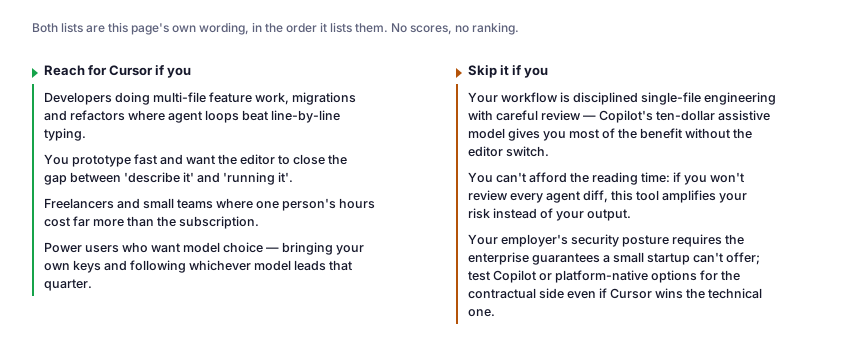
Reach for Cursor if you…
- Developers doing multi-file feature work, migrations and refactors where agent loops beat line-by-line typing.
- You prototype fast and want the editor to close the gap between 'describe it' and 'running it'.
- Freelancers and small teams where one person's hours cost far more than the subscription.
- Power users who want model choice — bringing your own keys and following whichever model leads that quarter.
Skip it if you…
- Your workflow is disciplined single-file engineering with careful review — Copilot's ten-dollar assistive model gives you most of the benefit without the editor switch.
- You can't afford the reading time: if you won't review every agent diff, this tool amplifies your risk instead of your output.
- Your employer's security posture requires the enterprise guarantees a small startup can't offer; test Copilot or platform-native options for the contractual side even if Cursor wins the technical one.
Where it stops fitting
How to test it properly in 30 minutes
Don't judge a tool on the demo. Run the same four tasks you'd actually do with it, and score it against this checklist — the same one this desk works from before a profile goes up (see how we check a tool).
- Migrate one real project and do a normal week's tasks. Note which took the agent loop and which you did by hand anyway — the ratio is your verdict.
- Assign one multi-file refactor you'd estimate at three hours. Time the agent, then read the entire diff honestly and count what you had to correct.
- Run the same task with a cheaper and a frontier model. The gap tells you whether the usage-meter pricing will actually constrain your work.
- Check the privacy-mode toggle exists where you expect, and read what the vendor's current terms say about retention before pasting anything proprietary.
- Keep a one-week log of every change you merged from the agent without fully understanding. That number is the risk budget you're running.
Questions people ask
What happens to my code in Cursor?
With privacy mode enabled — and enforced on team plans — code context is not retained by Cursor or sent to model providers for training, per the vendor's documentation; verify the current wording yourself before depending on that summary, because these defaults have changed before. Also weigh the substrate: it's a VS Code fork sending context to third-party model APIs, and enterprise reviewers will want the SOC-type documentation, not this paragraph.
Do I own code Cursor writes?
Same analysis as every AI coding tool: their terms grant you output ownership, and their licence is yours to honour, but neither you nor they have resolved the underlying copyright question around AI code that matches public training data. Cursor doesn't carry an indemnity programme comparable to GitHub's business tiers, so the practical position is: you own generated code, you review it, you maintain it, and you treat every agent diff like a stranger's pull request.
Is Cursor worth $20 when Copilot is $10?
Worth it if your task shape is multi-file agent work; not if your usage is completions and chat, where Copilot gives you 80% for half the price. The honest pattern: many developers trial both and keep the one that changes their hours per feature, then notice which one they actually open — the editor you use wins.
Does it work with my VS Code extensions and setup?
Mostly yes, and 'mostly' hides real detail: it's a fork so the extension ecosystem and keybindings carry across, but vendor-proprietary extensions and some marketplace dependencies don't, and settings-sync quirks appear at the edges. Migrate one machine and work a week before deciding the answer is yes for you.
Alternatives worth comparing
AI pair-programmer inside the editor you already use — for developers who want completions and chat without changing tools.
Claude
The assistant for people who read a lot: long documents, careful prose, and fewer invented answers.
The default AI assistant — the broadest feature set, and the benchmark every other tool gets measured against.
Disclosure: this profile is editorial. Cursor did not review it, pay for it or provide a free account for it. Links to the vendor are plain outbound links, not affiliate links. Errors are mine — report one and it gets fixed and logged on the updates page.