Gamma
The short verdict
The best ninety-minutes-saved tool in the presentations space, provided you judge it against a blank slide rather than against a designer. Pay for it when your deck volume is weekly; skip it when brand governance matters more than drafting speed, or when two decks a year means the free tier plus your writing assistant already covers the job.
- Maker
- Gamma
- Category
- Productivity
- Entry price
- Freemium
- Free option
- Yes, with a one-time AI credit pool and Gamma branding
- Works on
- Web, iOS, Android; export to PowerPoint, PDF, Google Docs
- Pricing checked
- October 2026
What Gamma is, plainly
Gamma does one job well: it turns unformatted input — notes, an outline, a document, a rough prompt — into a finished-looking presentation, doc or simple website. You paste the words, it makes the cards. The output isn't avant-garde design, but it's consistently tidy, readable and shareable, and it arrives in about ninety minutes less time than a blank PowerPoint would have cost you. For internal updates, pitch drafts and course materials where 'clear and done' beats 'crafted', that's the trade most people happily make.
The honest comparison is not Gamma versus a designer-built deck. It's Gamma versus the first two hours of a deck: the skeleton, the layout decisions, the alignment fussing. It replaces that stage completely, and then creates its own second stage — every Gamma deck starts recognisably Gamma, so if the audience is a brand-conscious client, expect to spend real time adjusting cards, and note that the PowerPoint export is an approximation rather than a native editable file. Figma Slides and PowerPoint's own designer features nibble at the same problem from different directions; what Gamma still clearly wins is speed from raw text to shareable link.
The commercial trap is the credit model: generation and AI edits consume credits, the free tier's pool is one-time rather than monthly, and the paid tiers are really 'how many decks per month do you make' rather than 'what features do you get'. If you make two decks a quarter, the free tier plus a plain assistant to write the content will cover you indefinitely — paste your assistant's outline into whatever presentation tool you already own. If you make decks weekly for a team, the paid tier's branding removal and credit allowance are cheap against a designer's hour. One more thing before paying: run the same source text through Canva and compare which house style you'd rather edit, because that's the decision that actually matters.
Worth noting what it will not do: hold your brand system, respect a slide-master governance policy, or produce animation-heavy keynotes. It replaces a human first draft, not a human design system.
Where it wins
- Genuinely the fastest first-draft deck tool: text in, shareable presentation out, with no layout decisions.
- Publishes to a link by default, which kills the attachment-email version mess for async updates.
- AI edits happen per card, so iterating doesn't mean regenerating everything.
- Handles docs and simple sites with the same input, covering the 'I need a page as well as a deck' case.
Where it falls short
- Everything looks faintly Gamma; brand-conscious decks need real manual time to escape that.
- PowerPoint export is lossy — if your organisation mandates native editable files, test it on one deck first.
- The free tier's credits are one-time, so 'free plan' really means 'extended demo' for regular users.
- Brand systems, slide masters and compliance templates are not its world; a corporate design system will fight it.
What it's built for
Text-to-presentation
Paste notes, an outline or a whole document and get a structured deck with headings, cards and image suggestions. The core loop, and still the fastest path from 'I have words' to 'I have slides' in the category.
AI editing per card
Ask it to shorten a card, change its tone, or restructure a section, without regenerating the whole deck. Better than re-prompting a chat assistant and pasting back.
Presentable web links
Every deck publishes as a share link that reads well in a browser, which suits async updates — no attachment, no version confusion. Analytics on who opened it exist on paid tiers.
Documents and simple sites
The same card engine makes one-page websites and formatted docs. Useful for a quick landing page; do not expect anything a web designer would respect.
Templates with a taste ceiling
A few visual themes that stay coherent no matter how you edit. The flip side is everyone's decks look like Gamma — pick the theme deliberately and customise the fonts early if it matters.
What it costs, and what these numbers cannot tell you
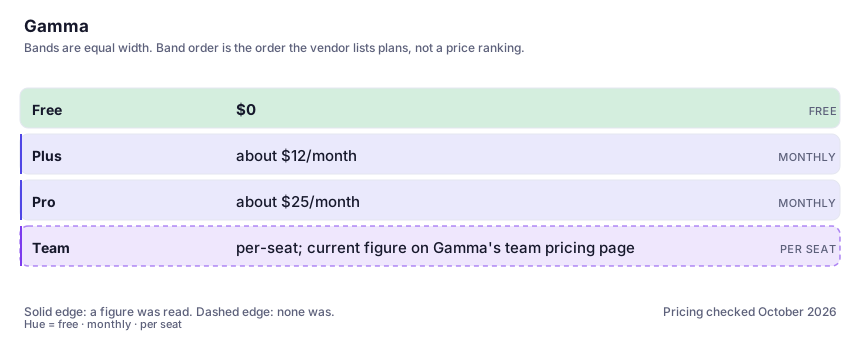
| Plan | Indicative price | What you actually get |
|---|---|---|
| Free | $0 | A one-time pool of AI credits (reported around 400), Gamma branding on outputs, export limits. Enough to test your real content through it; not enough to keep using once the credits go. |
| Plus | about $12/month | Monthly replenishing credits, branding removed, more AI edits. The individual tier most people land on. Credit counts and pricing move; check Gamma's pricing page before buying. |
| Pro | about $25/month | A much larger credit allowance plus the deeper analytics and custom-font options. Buy it on generated-volume maths, not on feature names — the tiers mostly differ in how many decks you get. |
| Team | per-seat; current figure on Gamma's team pricing page | Shared workspace, brand kits and pooled billing. The relevant question is whether per-seat beats everyone sharing one Pro account under their terms. |
Who it fits, and who it doesn't
Reach for Gamma if you…
- Founders and managers producing weekly internal updates, pitch drafts or course material where clarity beats craft.
- You have the words already (notes, a doc, an outline) and hate the formatting stage more than the writing stage.
- Async sharing: you want a link people read, not a file they download.
- Solo users who'd otherwise pay a freelancer per deck — one paid month covers more volume than one commission.
Skip it if you…
- Your decks must follow a locked brand template with slide masters — you'll spend your savings fighting the export.
- You make two decks a year; the free trial of anything plus your existing assistant's outline covers it.
- The core value is complex animation, live data or precise diagram control — that's PowerPoint, Keynote or Figma territory.
How to test it properly in 30 minutes
Don't judge a tool on the demo. Run the same four tasks you'd actually do with it, and score it against this checklist — the same one this desk works from before a profile goes up (see how we check a tool).
- Feed it one real messy document (not a demo text) and time how long until you'd send the deck to a colleague unembarrassed.
- Export a generated deck to PowerPoint and open it there. Check how much reflow and text-box damage you'd have to repair.
- Run the same source through Canva Magic Design and compare which result needs less editing toward your voice.
- Count how many decks you actually made last quarter, then map it onto the credit tiers. Buy the tier your volume needs, not the one with the nicest-sounding name.
- Delete a card and ask the AI to restructure the section. Judge whether the edit stays local or reshuffles everything you liked.
Alternatives worth comparing
AI built into Canva — on-brand graphics, decks and quick edits for non-designers who already make their visuals there.
The default AI assistant — the broadest feature set, and the benchmark every other tool gets measured against.
AI inside your Notion workspace — for people whose notes and docs already live there, not for anyone wanting a standalone assistant.
Disclosure: this profile is editorial. Gamma did not review it, pay for it or provide a free account for it. Links to the vendor are plain outbound links, not affiliate links. Errors are mine — report one and it gets fixed and logged on the updates page.