Notion AI
The short verdict
Worth it for teams who live in Notion and keep re-answering the same internal questions; the workspace context is something no standalone assistant gets for free. Skip it if you're a solo user wanting better writing — your existing assistant writes better for less. And price the Business tier honestly: you're buying a collaboration context layer, not a chatbot.
- Maker
- Notion
- Category
- Productivity
- Entry price
- Freemium
- Free option
- Yes, but the AI is a limited trial unless you're on the Business plan
- Works on
- Web, Windows, macOS, iOS, Android, browser extension
- Pricing checked
- October 2026
What Notion AI is, plainly
Notion AI is the assistant layer bolted into Notion itself, and that preposition is the entire product. It writes and rewrites text inside your pages, answers questions by searching your workspace's own documents, autofills database columns from a prompt, and turns recorded meetings into summary notes with action items. It does not behave like a separate chat product you visit; it behaves like a set of buttons that live where your work already sits. If your team's wiki, project tracker and meeting notes are all in Notion, the ask-what-does-my-company-know workflow works here in a way it doesn't in a plain assistant without setup.
Judged as pure generation, though, it is behind the dedicated assistants. The writing is competent but blander than Claude's and less flexible than ChatGPT's, long-form reasoning tasks still go to a real assistant, and the whole product quietly depends on how well your workspace is organised — an AI pointed at a messy wiki produces confidently wrong internal answers at speed. The honest framing is this: Notion AI does not replace ChatGPT or Claude; it replaces the copy-paste loop of pulling your Notion pages into an external chat and pasting the result back. That loop is maybe twenty minutes a day for a heavy Notion user, and the product is really selling you those twenty minutes back.
The commercial shape is where people get annoyed, so read it before paying. On the Free and Plus plans the AI is a capped trial — useful for a taste, not for work. Full AI access (meeting notes, workspace Q&A, the agent features) now effectively sits behind the Business tier, which is a per-seat price roughly double the Plus plan. For a solo user who mostly wants writing help, a standalone assistant plus Notion's free plan covers 80% of the use case for less money. Notion AI becomes worth it when several people share the workspace and the cross-document questions, because the shared context is what you're actually buying. Run the same questions through your regular assistant first and see how much pasting you'd have to do to get equivalent answers — that gap, in minutes per week, is the real price of this add-on. See how to evaluate an AI tool for the evaluation structure this desk works from.
Where it wins
- The context is the moat: answers drawn from your real workspace beat answers drawn from your memory of it.
- Database autofill is genuinely useful for classifying and enriching records at scale — few rivals do this at all.
- Meeting notes bundled into the per-seat plan can replace a separate transcription subscription for teams already paying at the Business tier.
- Zero setup. If you use Notion, the AI is simply there, in the editor, on day one.
Where it falls short
- Full access is gated behind the Business plan, effectively doubling the per-seat cost for people who only wanted the AI.
- As a pure writing or reasoning engine it trails dedicated assistants; you will notice on any long-form task.
- Garbage in, confident garbage out: on a poorly organised workspace its Q&A surfaces stale or wrong internal answers with links, which makes them harder to distrust.
- The newest agent capabilities run on a separate credit meter, so the subscription price is not the total price.
What it's built for
Drafting and editing inside pages
Write-from-cursor, rewrite, change tone, summarise a section, pull action items out of a messy meeting page. Nothing remarkable on its own — the point is it happens without leaving the document.
Workspace Q&A
Ask a question in plain English and it searches your pages and databases for the answer, with links back to the source pages. The single feature that plain assistants can't match without exports and setup.
Database autofill
Add an AI column to any database: classify records, extract a field from text, draft per-row content across hundreds of rows. This is the most underrated feature for ops-shaped work.
AI meeting notes
Records or ingests meetings and produces summaries and follow-ups attached to the relevant page. Included on the Business tier rather than sold separately, which changes the maths if you also pay for a transcription tool.
Agents and custom agents
Newer agentic features that run multi-step tasks against your workspace. Note the billing: the heaviest of these sit on a separate credit-based meter beyond the plan, so a subscription is not the end of the cost curve.
What it costs at your team size
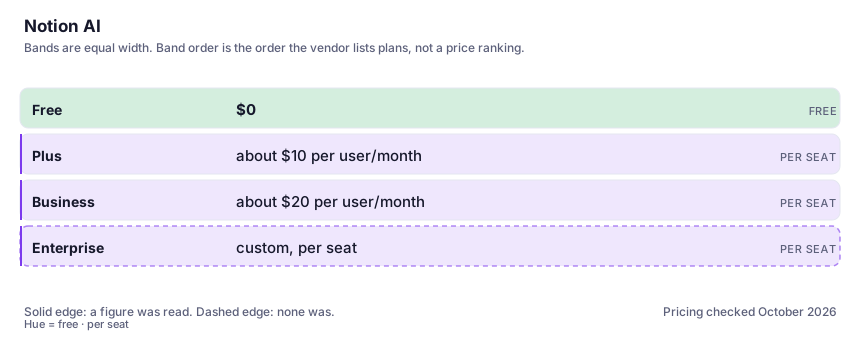
| Plan | Indicative price | What you actually get |
|---|---|---|
| Free | $0 | The core Notion product plus a limited AI trial. Enough to test whether in-workspace AI clicks with how you work; not enough to depend on. |
| Plus | about $10 per user/month | More workspace capacity, but the AI stays trial-limited. Annual billing shaves a meaningful percentage off the per-seat price. Do not buy this expecting full AI. |
| Business | about $20 per user/month | Where full Notion AI actually lives: meeting notes, workspace Q&A, the agent features, all bundled. The relevant question is whether everyone in your team needs it, because it's billed per seat. |
| Enterprise | custom, per seat | Adds the security controls most IT departments actually ask about, including a no-retention arrangement for AI processing. Verify the current terms with Notion's sales page. |
Count the people who would each need their own login.
Who it fits, and who it doesn't
Reach for Notion AI if you…
- Teams whose company knowledge genuinely lives in Notion and who answer the same internal questions repeatedly.
- You want meeting notes and action items filed automatically under each project, not in a separate transcription app.
- Ops and PM work: classifying, tagging and extracting fields across big databases.
- Anyone currently paying for both a Notion plan and a standalone assistant for the same in-doc tasks — test whether one can cover both.
Skip it if you…
- Your notes live in Obsidian, OneNote or Google Docs — the entire value proposition is workspace-local and does not travel.
- You're a solo user who mainly wants writing help; a plain assistant plus Notion's free plan is cheaper and writes better.
- You can't keep your workspace tidy. The AI will faithfully retrieve whatever mess is in there.
How to test it properly in 30 minutes
Don't judge a tool on the demo. Run the same four tasks you'd actually do with it, and score it against this checklist — the same one this desk works from before a profile goes up (see how we check a tool).
- Ask workspace Q&A five questions whose answers you know, drawn from different parts of your real pages. Score retrieval accuracy before judging the prose.
- Give it one messy meeting page and ask for a summary plus action items. Compare the result against what your regular assistant produces from the same pasted text.
- Run one AI autofill column across 50 real database rows and manually audit ten of them. Check error rate, not speed.
- Estimate your weekly copy-paste time with your current assistant, then multiply by your per-seat price. That is the actual ROI calculation.
- Before any team rollout, read the current data-handling and model-training terms for the tier you'd buy — not from a blog post, from Notion's own page.
Alternatives worth comparing
Claude
The assistant for people who read a lot: long documents, careful prose, and fewer invented answers.
The assistant that already has your email, docs and calendar — if you live in Google Workspace.
An answer engine that cites its sources — the tool to open when you need to check, not just to write.
Disclosure: this profile is editorial. Notion AI did not review it, pay for it or provide a free account for it. Links to the vendor are plain outbound links, not affiliate links. Errors are mine — report one and it gets fixed and logged on the updates page.