Zapier AI
The short verdict
Automation plumbing as a subscription: you're buying the connector maintenance first, the AI drafting second, and both are real. A small team doing cross-app busywork weekly will find it pays; one developer with an afternoon will find one script does 80% of it for the cost of hosting. Price the failure case honestly — a silent broken Zap is an automation tax you pay in surprises.
- Maker
- Zapier
- Category
- Automation
- Entry price
- Freemium
- Free option
- Yes — limited monthly tasks, enough to prove the concept
- Works on
- Web; runs server-side across its app integrations; iOS app for monitoring
- Pricing checked
- October 2026
What Zapier AI is, plainly
Zapier connects apps, and its AI layer makes the connections easier to build and smarter inside: you describe the automation in English, it drafts the workflow across whichever apps you use; you drop an AI step into any Zap to classify, summarise or transform data mid-automation; and its Agents product moves beyond rigid if-this-then-that toward tools that decide which steps to take. The catalogue is the real asset — thousands of apps with maintained connectors — because an integration you build once and debug forever is the tax AI automation is selling you relief from.
The central judgement: Zapier replaces the glue code you would otherwise write, and the question is whether you would actually write it. A developer with cron, a runtime and tolerance for maintenance can self-host cheaper automation for the same effect, and a single Python script plus API calls covers many two-app workflows for roughly the cost of the server. What Zapier sells against that isn't capability, it's the other side of the invoice: when a partner app changes its API, somebody upstream at Zapier fixes the connector, and your automation keeps working while your own script would have quietly died three days ago and been discovered three weeks from now. For a small business without an engineer on call for plumbing, that maintenance transfer is the whole purchase, and it's usually worth more than the AI garnish.
The pricing has one trap that surprises every new user, so name it plainly: tasks-meter billing where each run's step-actions consume tasks, and multi-step Zaps multiply the consumption; AI steps add their own usage costs, and Agents activity runs on a separate allowance that can bind before the task pool you thought you were buying against. The free tier's modest monthly tasks genuinely cover light use — a few workflows checking a couple of things daily — and are the right place to prototype before choosing a paid task volume. Read the task-vs-step-vs-AI-action arithmetic on your intended workflow specifically, because the advertised plan price routinely understates what real multi-step automations consume.
On quality: the natural-language builder produces automations that work on happy paths, and the failure cases are where you pay for experience. An AI-drafted Zap that half-maps your fields looks finished and isn't; every drafted workflow deserves the same review as generated code — run it on real edge data, watch what happens to a blank name, a duplicate, a rate-limited response. The embedded AI steps themselves lean on third-party models, so anything that summarises or classifies customer data should get a privacy look at where that text travels under your plan's terms. Automation that fails silently is worse than no automation, and this category is built to fail silently in exactly that way.
The buy signal is a list, not a feeling: enumerate the manual transfers your team performs weekly — copy from email to CRM, from form to sheet to Slack — multiply by the minutes and the error rate, then price against the task tier that covers the volume. If that number doesn't clear the subscription, writing the script really is cheaper and the tool isn't for you yet.
Where it wins
- The connector catalogue transfers maintenance to someone else — the honest core value versus DIY scripts.
- AI-drafted workflows get real automations to eighty percent, then the visual editor lets you fix the rest without code.
- AI steps embedded mid-automation (classify this email, extract those fields) are quietly the best utility feature in the product.
- The free tier covers genuinely useful light automation, so you can evaluate on real workloads before paying.
Where it falls short
- Task metering multiplied by steps, plus separate AI and agent allowances, makes 'about $X/month' a fiction for heavy multi-step workflows.
- AI-generated Zaps fail on the last ten percent — half-mapped fields and unhandled edges look finished and break in production.
- This class of automation fails silently, and a Zap that stopped running three days ago is discovered by a customer, not by you.
- At scale, per-task pricing against what a hosted script would cost makes a developer-flavored alternative genuinely cheaper — the maintenance argument is the counterweight, not the price.
What it's built for
Natural-language Zap builder
Describe the automation and it assembles the trigger-action chain across connected apps. Accelerates the first ninety percent and confidently botches the last ten, which is precisely the part you must test.
AI steps inside workflows
Classify, extract, summarise or generate as one step among app actions — turn inbound feedback into labelled rows, for instance. The most practically useful AI feature here, because it augments plumbing you already needed.
Zapier Agents
Looser, more autonomous tools with memory and access to many apps, acting on triggers or requests. Genuinely new capability versus classic Zaps — and the product line where activity limits and pricing need the closest reading before you rely on it.
The connector catalogue
Thousands of maintained app integrations. Unsexy, load-bearing and the reason a self-hosted script comparison isn't really free: you'd rewrite and babysit all of it yourself.
Tables, Interfaces and chat add-ons
Lightweight data storage and simple internal apps around the automations. Useful for glue-shaped mini-apps; do not mistake it for a database strategy.
What it costs, and what these numbers cannot tell you
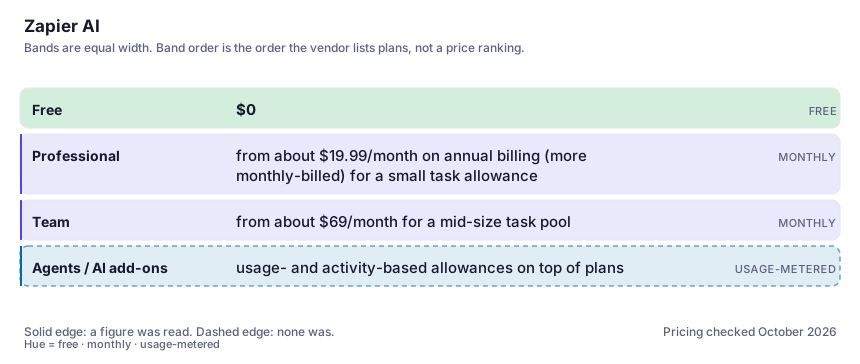
| Plan | Indicative price | What you actually get |
|---|---|---|
| Free | $0 | A couple of hundred monthly tasks with multi-step limits. The right sandbox for proving your core workflows before paying; most first automations fit inside it. |
| Professional | from about $19.99/month on annual billing (more monthly-billed) for a small task allowance | Multi-step Zaps, paths and filters with task volume scaling up from there. The exact price you pay is a function of your run counts, not the tier name — model that first. |
| Team | from about $69/month for a mid-size task pool | Shared workspaces, admin visibility, bigger allowances. Buy it when several people build automations and someone needs to see who wired what to billing. |
| Agents / AI add-ons | usage- and activity-based allowances on top of plans | Agent activity runs on its own meter with included monthly amounts and paid upgrades above; AI-by-Zapier steps bill per run by model tier. Check the current rate card inside your own account — this is the layer where surprise bills live. |
Who it fits, and who it doesn't
Reach for Zapier AI if you…
- Small businesses whose glue work lives across a CRM, forms, email, sheets and Slack — and nobody on staff owns servers.
- Operations people automating recurring manual copy-paste work, weekly, with error costs attached.
- Teams wanting AI-flavoured automation (classify, summarise, extract) without running their own model plumbing.
- Prototyping: proving a workflow idea in an hour before commissioning anything real.
Skip it if you…
- Your automations are high-volume and data-shaped rather than app-shaped — a script plus the APIs directly beats per-task billing at scale.
- You need tight control of retry semantics, transactions or order guarantees — Zapier's best-effort model is not an orchestration engine.
- Compliance forbids third-party services reading the data crossing between your apps, including those convenient AI steps.
- You already have a capable technical person who enjoys plumbing; the honest 80% here costs them an afternoon.
How to test it properly in 30 minutes
Don't judge a tool on the demo. Run the same four tasks you'd actually do with it, and score it against this checklist — the same one this desk works from before a profile goes up (see how we check a tool).
- List the five manual transfers your team does most weekly with times, then draft all five here and count which actually ran clean for a week. That ratio is the product.
- Feed one live Zap deliberately bad data: a blank email field, a duplicate row, a Unicode name. Watch whether it fails loudly or fails silently.
- Model your monthly task consumption precisely — steps per run times runs per month — against tier pricing before choosing a plan. The tier page understates this arithmetic on purpose.
- If evaluating Agents: run one real workflow for a week under included activity limits and read exactly what counts as an activity. The meter definitions matter more than the headline price.
- For anything touching customer data through an AI step, read the current sub-processor and retention terms — that summary travels; confirm the trip is allowed in your context.
Alternatives worth comparing
Cursor
The editor built around AI agents that edit whole files — for developers who want to describe changes and review diffs, not type them.
The hub where open models, datasets and demos live — infrastructure for builders and researchers, not a consumer chatbot.
AI inside your Notion workspace — for people whose notes and docs already live there, not for anyone wanting a standalone assistant.
Disclosure: this profile is editorial. Zapier AI did not review it, pay for it or provide a free account for it. Links to the vendor are plain outbound links, not affiliate links. Errors are mine — report one and it gets fixed and logged on the updates page.