Fireflies.ai
The short verdict
The reason to pay for a meeting bot is the searchable archive, not the transcript — a team's interrogable meeting history is worth real money, and Fireflies is one of two credible ways to get it. But the bot joins your calls as a visible guest and a third party keeps everything it records, so the consent and retention conversation has to happen before rollout, not after an attendee notices. If your platform's free captions already answer 'what happened in that meeting', start there and only upgrade when cross-meeting search becomes the thing you keep asking for.
- Maker
- Fireflies
- Category
- Meetings & voice
- Entry price
- Freemium
- Free option
- Yes — a permanent free plan with capped transcription and storage; paid plans are billed per seat
- Works on
- Web, desktop and mobile apps; a meeting bot that joins Zoom, Google Meet and Microsoft Teams; integrations into CRM and chat tools
- Pricing checked
- October 2026
What Fireflies.ai is, plainly
Fireflies records your meetings, turns the audio into a speaker-labelled transcript, and layers AI summaries, topics and action items on top, with the whole archive searchable afterwards. The defining mechanism is the same one that defines the category and its controversies: a Fireflies bot is added to the call as a participant, sits in the attendee list, and captures audio the way any guest would. That is what lets it work across Zoom, Meet and Teams without needing special server access on each platform — and it is precisely the part that makes it a policy decision rather than a feature purchase, so settle the consent question before anyone installs it on a shared account.
The choice between a bot-based archive and the recording your platform already makes is worked through on the meeting-notes decision desk.
The commercial shape is per-seat and capped on the free tier in ways that bite quickly. The free plan is a genuine permanent plan, not a trial, but it limits how much you can transcribe and store, so it is an evaluation tool rather than a workflow. Above it sit paid tiers billed per user per month, and the pattern across this category is that the individual tier is cheap against the hours spent writing up notes, while the higher tiers exist for admin controls, team workspaces, retention settings and the compliance posture that a consumer plan cannot offer. One caution specific to this product: the exact per-seat prices and the free-tier minute caps render dynamically on Fireflies' own pricing page and third-party figures disagree, so treat any number quoted elsewhere — including here — as stale and read the current price and allowance off the vendor page before you budget.
The recording-consent problem deserves to be said out loud rather than buried in a footer. A bot capturing a conversation you did not disclose creates real legal and reputational risk: many jurisdictions require at least one-party and some require all-party consent to record, and regulated contexts — legal privilege, healthcare, anything under GDPR-style rules — raise the bar further. The bot names itself in the participant list, which helps, but disclosure is still on you, and the recordings then sit in a third party's cloud, not only in yours. Where the local-model tools on this site win by keeping data on your machine, a hosted meeting recorder is the opposite trade: everything sensitive anyone said is now held by a vendor, and the individual plans do not carry enterprise data terms. Read Fireflies' own retention and data-handling pages before importing anything you would not want copied.
Where it wins
- The searchable archive genuinely changes what a team can recover from its own meeting history, which is the product's strongest reason to exist.
- Cross-platform by design: one tool covers Zoom, Meet and Teams calls plus imported audio, instead of three fragmented platform-native notes.
- Speaker-labelled transcripts with structured summaries and action items save real writing-up time on meeting-heavy days.
- A permanent free plan exists, so you can evaluate it on your own worst recordings before anyone spends anything.
Where it falls short
- The bot is a visible participant on every call — some attendees and several whole organisations treat that as a problem you have to be the one to flag first.
- Everything it records sits in a third party's cloud; individual plans do not carry enterprise-grade data terms, and the retention questions land on you.
- Transcription errors cluster on names, numbers and acronyms — exactly the specifics meeting notes are kept for, so anything load-bearing still needs a human check.
- Free-tier minute and storage caps are hit fast, and the per-seat prices are only readable from the live pricing page, which makes budgeting from a summary unreliable.
What it's built for
Meeting bot with speaker-labelled transcription
It joins the call and produces a real-time transcript attributed per speaker, good enough to skim instead of re-listen when audio is clean. It degrades, as every tool does, on overlap, heavy accents and jargon.
Searchable cross-meeting archive
Every transcript is indexed and searchable across your whole history. This is the feature that converts casual users into paying teams, and it is what the native platform notes still do not match.
AI summaries, topics and action items
After the call it drafts a condensed summary with decisions and follow-ups. It will occasionally promote a joke to a commitment, so the items need editing — but the skeleton saves the real fifteen minutes of typing.
File and recording import
Upload audio and video after the fact — interviews, voice memos, a call you recorded on your phone. Capped on the free tier by design, and the workflow researchers and journalists actually pay for.
CRM and chat integrations
Push notes and transcripts into Salesforce, HubSpot, Slack and others, so a sales call updates the record without someone retyping it. The most defensible reason for the higher business tier over a cheaper rival.
What it costs, and what these numbers cannot tell you
| Plan | Indicative price | What you actually get |
|---|---|---|
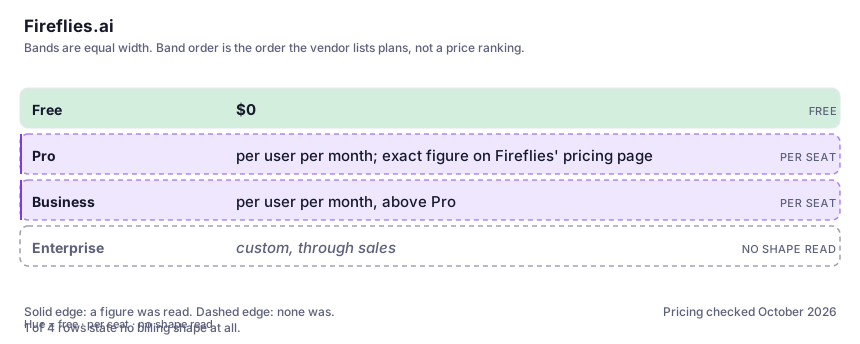
| Free | $0 | A permanent plan with capped transcription minutes and limited storage per user. Enough to run your real audio through it and judge accuracy; not enough to depend on once you are in meetings most days. |
| Pro | per user per month; exact figure on Fireflies' pricing page | The individual tier most people land on: more transcription and storage and the fuller AI-note feature set. Prices render dynamically and vary with billing period, so confirm the current number directly rather than trusting a review. |
| Business | per user per month, above Pro | Team workspaces, admin controls, retention settings and integrations. Buy it for the sharing and governance layer, not for marginally more minutes — that is where the per-seat cost earns its keep. |
| Enterprise | custom, through sales | Security review, centralised controls and the data-handling terms procurement wants. Given what this tool records, this is the tier at which the compliance questions actually get answered on paper. |
Who it fits, and who it doesn't
Reach for Fireflies.ai if you…
- Meeting-heavy roles — sales, account management, founders — where follow-ups get written from transcripts several times a week.
- Researchers and journalists who import recorded audio and need searchable, speaker-labelled text rather than a live caption.
- Small teams that want a shared, searchable meeting record without running their own knowledge-management project.
- You are already the person emailing 'can someone send me the notes from that call' — and you would rather query an archive than ask.
Skip it if you…
- Your calls all live in one platform whose free transcripts answer 'what happened in that meeting' and you never need cross-meeting search.
- You handle legally privileged, medical or heavily confidential conversations and compliance has not approved a third-party recorder — consent and retention come before convenience, full stop.
- Your real need is turning clean audio into an edited story or article, which is editing-first work like Descript, not a meeting bot.
- Your culture will not tolerate a named bot joining every call; the participant-list presence is not a bug you can switch off, it is the mechanism.
How to test it properly in 30 minutes
Don't judge a tool on the demo. Run the same four tasks you'd actually do with it, and score it against this checklist — the same one this desk works from before a profile goes up (see how we check a tool).
- Import one real meeting with the worst audio you regularly get — overlap, accents, jargon — and audit ten lines by hand. Judge the error rate on names and numbers, not the polished demo.
- Search across every meeting you have imported for a name and a figure you know were said. Searchability is the whole product; make sure it works on your data before a team pays for it.
- On your next call, tell attendees the transcription bot is joining before it does, and note the reaction. That tells you whether it survives your team and your clients.
- Run one meeting's native Zoom or Teams transcript against Fireflies on the same call and name, out loud, what Fireflies adds. If you cannot, do not pay for it.
- Read the vendor's current data-handling, retention and consent guidance before importing anything confidential — and after that fact, check the free-tier and per-seat numbers on the live pricing page, not a review.
Alternatives worth comparing
Meeting transcription and notes via a bot that joins the call — for teams needing searchable records, with a privacy trade to read first.
AI inside your Notion workspace — for people whose notes and docs already live there, not for anyone wanting a standalone assistant.
Descript
Edit video and podcast by editing the transcript — the fastest way for a writer to cut sound.
Disclosure: this profile is editorial. Fireflies.ai did not review it, pay for it or provide a free account for it. Links to the vendor are plain outbound links, not affiliate links. Errors are mine — report one and it gets fixed and logged on the updates page.