Granola
The short verdict
The honest inverse of the meeting bot: better for the room, worse for the calendar. If the no-bot design solves your actual problem — clients who bristle at bot icons, platforms where bots cannot go, calls that only your computer hears — then $14 per month is cheap, the flat pricing has no meter to fear, and the free tier is a real plan rather than a demo. If it creates a different problem — undisclosed capture, meetings you miss, muddled in-room speakers — the architecture is a disqualification, not a preference. Test it on your worst real meeting before paying, and disclose it once out loud before you trust it in a client call.
- Maker
- Granola
- Category
- Meetings & voice
- Entry price
- Freemium
- Free option
- Yes — Basic is free indefinitely, but meeting history older than 30 days becomes inaccessible until you upgrade
- Works on
- macOS, Windows, iOS, Android; it captures your device's audio, so it works wherever your computer takes calls
- Pricing checked
- October 2026
What Granola is, plainly
Granola is an AI note-taker built on one architectural bet: the notetaker should be your computer, not a guest on the call. Instead of a bot dialling in and sitting in the attendee list the way Otter.ai does, Granola listens to the audio already passing through your machine and turns it into notes in the background. "Granola doesn't join your meeting. Instead, it transcribes in the background while you stay present" is the product page's own framing, and everything good and awkward about this tool follows from that choice. Because it never touches the meeting platform itself, it does not care which one you use: Zoom, Meet, Teams, a desktop phone call and a screen-share all look the same to something listening to device audio. Notes are yours to edit and share explicitly — the vendor's phrase is "private by default" — and the habit it is selling is simple: stop typing during the meeting, clean up afterwards.
The same bet tells you exactly where it loses. A bot that joins calls can cover meetings you are not in; Granola physically cannot, so the 9am you skipped stays a blank page. A bot is at least self-advertising — it names itself in the participant list, which quietly handles half of your disclosure duty — while a silent local tool gives attendees no visible signal at all, and they will never know they are being transcribed unless you say so. And capture quality becomes your hardware's problem: remote voices arrive clean through system audio, but anyone physically in the room with you is transcribed through your microphone, which is precisely where speaker separation and accuracy get worse. If your work is an account team that wants a searchable archive of every call, including the ones you were absent for, bot-based capture from Otter.ai or your conferencing platform's native recorder fits that shape better than Granola's does. The comparison between that architecture and this one is worked through on the meeting-notes decision desk.
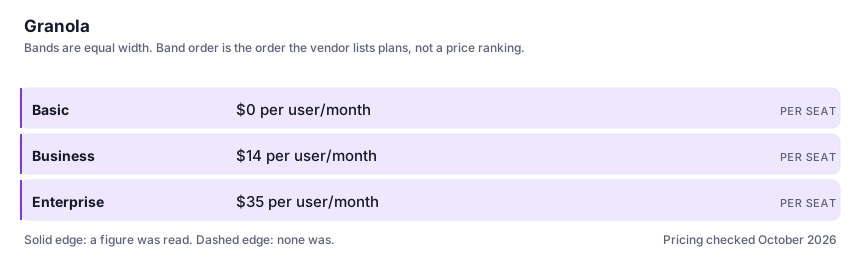
The commercial shape is unusually legible, so read it before downloading. The free Basic plan is not a countdown demo: it includes AI meeting notes and multi-language support, but caps your viewable meeting history at 30 days — the paywall is memory, not volume. Nothing stops working on the free tier; you just quietly lose access to last month. Business is $14 per user per month and unlocks unlimited history plus integrations that push notes into Attio, Notion, HubSpot, Affinity and Zapier. Enterprise is $35 per user per month, adding admin controls and single sign-on. There is no credit meter and no usage layer anywhere on the page I read on 7 October 2026 — a flat per-seat price with no surprise-bill vector, which is rare in this category and worth saying plainly; no annual pricing was shown, so check the vendor's page for current terms. What you are actually buying with the Business tier, underneath everything else, is your meeting memory.
Where it wins
- Nothing joins your call, so nothing changes in the meeting itself for the other attendees — the bot icon problem simply does not exist here.
- Flat per-seat pricing with no credit meter or usage layer: no mechanism for a surprise bill, unlike almost every other tool in this directory.
- The free plan is genuinely usable indefinitely as long as your meeting memory only needs to reach a month back.
- Business-tier integrations write meeting outcomes into systems of record instead of leaving them in a notes silo.
- Works across every conferencing platform at once, because it never depends on the platform.
Where it falls short
- It cannot capture a meeting you are not in, which is a hard architectural limit, not a missing feature — bot-based rivals cover your absences and this cannot.
- No visible signal to participants: disclosure rests entirely on you, and in all-party-consent jurisdictions that is not a trivial thing to be quietly wrong about.
- In-room voices come through your microphone and calls on a phone away from your laptop may not come through at all — capture quality is your hardware's problem.
- The 30-day free wall means the habit is real while the record decays; a tool holding your meeting memory deserves more caution on the free tier than the phrase "free" implies.
- Search and sharing across a whole team is thin until the admin layers arrive: at Basic and Business this is notes for people, not a company archive.
What it's built for
Bot-free audio capture
Runs on your machine and listens to what your computer hears rather than joining the call as a participant. No bot icon, no extra guest for the client to notice, and no dependence on which conferencing platform the other side uses — that is the whole product bet in one feature.
Background transcription while you stay present
Transcription and note production happen around the meeting rather than after it, so you are not the person visibly typing during a conversation with a client. Notes arrive as an artefact you edit, not a chat you have to prompt.
Multi-language support, free tier included
One of the few features the Basic plan is not stingy about. Exact current language coverage is worth checking on the vendor's own page rather than any directory entry — including this one — because it is the kind of list that grows.
Integrations that move notes out of the app (Business)
Advanced integrations push finished notes into Notion, HubSpot, Attio, Affinity or anything reachable through Zapier. This is the difference between a personal notebook and a sales team's CRM hygiene tool, and it is exactly where the $14 tier earns itself.
Admin controls and SSO (Enterprise)
Single sign-on and admin controls sit at the top tier, which is where procurement's questions get answered. If a company is going to standardise on this, the security documentation behind the Enterprise plan — not the pricing table — is the document to read.
What it costs at your team size
| Plan | Indicative price | What you actually get |
|---|---|---|
| Basic | $0 per user/month | AI meeting notes, multi-language support, and a 30-day window on meeting history. A genuinely usable free tier for someone whose recall horizon is the current month; the retention wall is the entire conversion mechanism. |
| Business | $14 per user/month | Unlimited meeting notes and history plus the Attio, Notion, HubSpot, Affinity and Zapier integrations. Flat per-seat pricing with no annual column shown on the pricing page as I read it in October 2026 — verify current terms there before budgeting. |
| Enterprise | $35 per user/month | Adds enterprise-grade security, admin controls and SSO. This is where data-handling review conversations live; read the vendor's security documentation rather than trusting this summary if compliance is your reason for buying. |
Count the people who would each need their own login.
Who it fits, and who it doesn't
Reach for Granola if you…
- Consultants, freelancers and founders who take calls at their own machine and want follow-up notes written without a stranger on the line.
- Client-facing work where a bot appearing in the attendee list changes the room — legal, agency, sales conversations where optics matter.
- You are the person who already types notes during meetings and then never re-reads them.
- Small sales teams on the Business tier who want call outcomes landing in the CRM without anyone copying them.
Skip it if you…
- You need notes from meetings you did not attend — joinable bots and platform-native recorders cover that and this physically cannot.
- Your compliance function requires the recorder to be an auditable participant inside the meeting platform; a local app has the wrong shape for that conversation.
- Your meetings are mostly phone calls taken away from a computer — until you have verified what the current mobile apps capture on your real device, assume nothing.
- You are in an all-party-consent environment where verbally disclosing each call is socially expensive; a self-naming bot does a disclosure favour this tool leaves to you.
How to test it properly in 30 minutes
Don't judge a tool on the demo. Run the same four tasks you'd actually do with it, and score it against this checklist — the same one this desk works from before a profile goes up (see how we check a tool).
- Use it on your next three real meetings on your own machine with your worst headset, and judge the notes on whether you could send them to a colleague without a rewrite — not on the demo.
- Compare one Granola note against the same call's platform-native transcript. Write down concretely what Granola adds. If the list is empty, do not pay.
- On day 31 of the free plan, try to open a month-old meeting. That moment is the paywall; decide now whether $14 buys you a memory you will actually use.
- Announce on one internal call that you run a local note-taking tool, and note the reaction. That tells you whether it survives your team's policy — a question the pricing page cannot answer.
- Read the vendor's security and privacy documentation for what leaves your machine and what happens to transcripts. "Private by default" is a sentence; the processing detail is a document.
Alternatives worth comparing
Meeting transcription and notes via a bot that joins the call — for teams needing searchable records, with a privacy trade to read first.
AI inside your Notion workspace — for people whose notes and docs already live there, not for anyone wanting a standalone assistant.
The assistant that already has your email, docs and calendar — if you live in Google Workspace.
Disclosure: this profile is editorial. Granola did not review it, pay for it or provide a free account for it. Links to the vendor are plain outbound links, not affiliate links. Errors are mine — report one and it gets fixed and logged on the updates page.