Replit
The short verdict
The most complete idea-to-deployed-app path a non-DevOps person can buy, with a real IDE under the agent so you can outgrow the AI without leaving the platform — and a usage meter that is the actual price of the product, not the subscription. Buy it for small real things and set the spending cap on day one. Skip it if your product already lives in your own repo, if you plan to hand generated code to a professional team without budgeting the untangling, or if regulated data makes third-party infrastructure a non-starter. The $20 sticker is an entry fee; the dashboard tells you the truth.
- Maker
- Replit
- Category
- App builders
- Entry price
- Freemium
- Free option
- Yes — the free Starter plan gives daily Agent credits, one deployment and 2GB storage, and apps go down after 30 days inactive
- Works on
- Browser-based IDE and hosting; apps and workspaces you can also reach from mobile — the browser is the primary experience
- Pricing checked
- October 2026
What Replit is, plainly
Replit is neither an editor with an AI bolted on nor a prompt-to-mockup toy: it is a programming environment living in your browser, an Agent that writes code inside it, and hosting underneath all of that. You describe an app in English; the agent scaffolds the project, writes the files, runs them on Replit's servers, iterates on errors, and publishes the result when you ask. The defining behaviour is that the computer your code runs on is theirs, not yours — no environment setup, no local runtime, and no exit you can pretend is free of work. What separates it from closed generators is the IDE underneath the agent: every file the agent writes is visible, hand-editable, and runnable in a real workspace, so you can ignore the AI entirely and code by hand the moment you can. For someone shipping a small real thing — an internal tool, a first version of a product — without three days of deployment plumbing, that combination is the pitch, and a genuine one.
Judged against how professional developers already work, its losses are structural. If you have an existing codebase, CI and infrastructure, Replit is not where your product lives; Cursor and Copilot assist inside your repo, while Replit asks you to move the work to it. And taking agent-generated code out is the honest weak point: what comes back out is not just files, it is Replit's assumptions — its deployment configuration, its database, its hosting conventions — so handing generated code to a professional team means a rewrite of the parts that touch the outside world. The app itself often survives export; the plumbing does not.
The commercial shape is the whole product, so read this before paying anything. A subscription grants a usage budget — on the pricing page as I read it in October 2026, Core is $20 a month ($18 billed annually) including "$20 towards more powerful models" plus Free Mode allowances (up to 30 hours of Agent chat, up to 60 projects), while Pro is $100 ($90 annually) with $100 of model usage, ten parallel agents and database rollback up to 28 days. Credits pay not only for the Agent but for the cloud around it: published apps, storage and databases draw on the same balance, and third-party model fees are deducted at the provider's public API rate. Surprise bills appear in predictable places: an agent loop retrying a failing task on an expensive model burns the month's grant quickly; an Autoscale deployment carries a small base fee plus per-request charges; a "temporary" Reserved VM runs continuously at roughly $15 to $130 a month depending on size. The documented guardrails — confirmation before a paid action starts, hard spending caps, and unused credits that roll over for two months — are the difference between a surprise and a disaster, so set them the day you subscribe, not the day the invoice arrives.
Where it wins
- No-setup is the feature: from idea to public URL without installing a toolchain, provisioning a server or writing a Dockerfile.
- The agent is not a black box — you can open the code and edit it, which means the tool grows with the user instead of capping out.
- Billing guardrails are actually designed in: paid-action confirmations, hard caps and two-month credit rollover, per their documentation — more than most usage-metered tools offer.
- Hosting, database and app live in one system, so a non-DevOps person can ship something that stays shipped.
Where it falls short
- The subscription price is an entry fee, not the operating price: $20 of model usage is a rounding error for daily agentic work, and buying additional credits is part of the intended experience for heavy users.
- Taking generated code into a real codebase is genuinely manual: deployments, database wiring and hosting assumptions come out of the export and have to be rebuilt — the work nobody quotes in the demo.
- Always-on and per-request charges are exactly the class of billing that gets forgotten — a Reserved VM you left running or an app whose traffic tripled will be discovered by the invoice, not by you.
- Your code, data and runtime sit on their infrastructure; for regulated or client-confidential work that can end the conversation before the features matter.
- The more you lean on it, the more each project quietly depends on Replit-specific pieces.
What it's built for
Agent: describe, build, run, iterate
The agent plans the app, writes files, runs them in the cloud workspace, reads errors and fixes itself before showing you a working result. Pro scales this to ten parallel agents; on any tier, the retries that eventually succeed are also what the credit meter charges you for.
A real IDE underneath the agent
Full code editor, files, packages and a workspace you can hand-edit at any time. This is the substantive difference from closed prompt-to-app builders: when the agent writes something wrong, you can fix it yourself rather than re-prompt and hope.
Deployment types, each with its own meter
Static hosting is effectively free with billed outbound transfer; Autoscale charges per requests and compute units and nothing while idle, with a small monthly base fee; Reserved VMs run always-on at a flat monthly price. Picking the wrong class is how a hobby app ends up with a hosting bill.
Built-in databases with rollback
Databases live inside the same credit-metered environment, and Pro extends rollback up to 28 days. Convenient right up to the day you notice your data is entangled with their platform — see the export question in the FAQ.
Free Mode: flat-rate everyday agent work
Core and Pro include allowances for ordinary Agent use at no extra charge (up to 30 hours of chat, 60 projects on Core). Staying inside Free Mode is the honest way to keep a month predictable; stepping outside it is what the model budgets pay for.
What it costs, and what these numbers cannot tell you
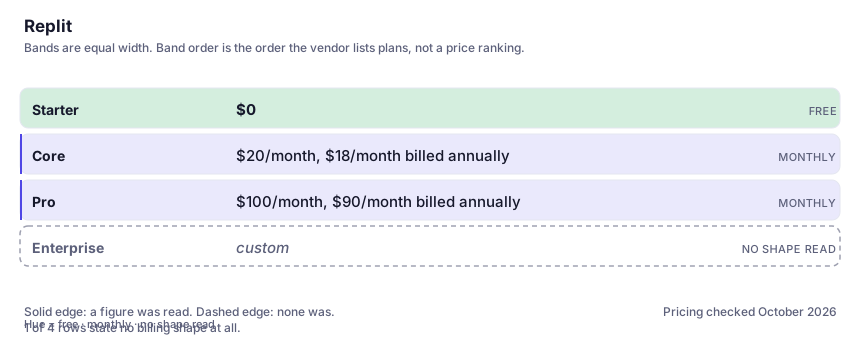
| Plan | Indicative price | What you actually get |
|---|---|---|
| Starter | $0 | Daily credits for Agent usage, one deployment, 2GB storage — and apps automatically go down after 30 days. A genuine sandbox for one small project; the teardown rule means it is a workshop, not a home. |
| Core | $20/month, $18/month billed annually | Unlimited workspaces, up to 30 hours of chat and 60 projects on Free Mode, and $20 of usage toward more powerful models each month. The right tier for monthly-billed hobby and internal-tool work — the model grant is what gets consumed first. |
| Pro | $100/month, $90/month billed annually | Ten parallel agents, $100 toward the most powerful models, database rollback up to 28 days and premium support. Priced for people whose agent runs all day; buy it when you can already point at Core's ceiling, not before. |
| Enterprise | custom | SSO/SAML, single-tenant environments and static outbound IPs. The security posture individual plans cannot offer; current plan figures live on Replit's pricing page, which moves — check it, not this paragraph. |
Who it fits, and who it doesn't
Reach for Replit if you…
- Non-engineers and light-coding operators shipping internal tools, dashboards or a first product version without the deployment plumbing they would otherwise pay twice for.
- Founders validating something small where the deliverable is a working URL, not a maintainable codebase.
- Developers prototyping fast — where setup time dominates the work and hand-editable output means the agent can be ignored when it is wrong.
Skip it if you…
- You already have a codebase, CI and infrastructure — an assistant inside your repo (Cursor or Copilot) keeps your environment authoritative.
- You intend to hand generated code to a professional team without budgeting for the rewrite of its deployment, database and hosting assumptions.
- Your data is regulated or client-confidential and your compliance rules do not yet approve a third-party runtime and database — that conversation precedes the pricing one.
- You will not watch a usage dashboard. This platform bills on what you consume; inattention is priced.
How to test it properly in 30 minutes
Don't judge a tool on the demo. Run the same four tasks you'd actually do with it, and score it against this checklist — the same one this desk works from before a profile goes up (see how we check a tool).
- Build one real small app end to end — not a demo — and deploy it on the cheapest deployment type that fits. At month's end open the usage breakdown and name which line item actually cost you: agent, requests, storage or transfer.
- Deliberately let the agent fail and retry one task, and watch the credit meter move. Failure is the hidden cost centre in every agent product; learn its shape here rather than on a deadline.
- Export the code and try to run it on your own machine without Replit. Count the hours the untangling takes — that is the real switching cost, and you pay it later whether or not you planned to.
- Set the hard spend cap and confirm the paid-action prompt exists in your own account, before your first heavy session. Do not rely on any third-party paragraph, including this one, about a guardrail you are about to depend on.
- Price one real feature against doing it yourself in a local editor with a coding agent. If your own setup would have taken twenty minutes, Replit's convenience is worth less than it looks.
Alternatives worth comparing
Cursor
The editor built around AI agents that edit whole files — for developers who want to describe changes and review diffs, not type them.
AI pair-programmer inside the editor you already use — for developers who want completions and chat without changing tools.
Claude
The assistant for people who read a lot: long documents, careful prose, and fewer invented answers.
Disclosure: this profile is editorial. Replit did not review it, pay for it or provide a free account for it. Links to the vendor are plain outbound links, not affiliate links. Errors are mine — report one and it gets fixed and logged on the updates page.