LM Studio
The short verdict
The kindest way to get a real open model running on your own computer, and the right pick when a terminal is what has been stopping you. It shares every honest limitation of local models — a capability tier below the frontier cloud assistants, hardware you must supply, and model licences you must read yourself — but it removes the friction that keeps most people from trying them at all. Explore here, then move to a CLI runner once you are building.
- Maker
- LM Studio
- Category
- Local & open models
- Entry price
- Freemium
- Free option
- Yes — the desktop app and local model running are free; a hosted agent and larger allowances sit on paid tiers
- Works on
- Desktop for Windows, macOS and Linux; a built-in local server; a client SDK and command-line tool
- Pricing checked
- October 2026
What LM Studio is, plainly
LM Studio is what Ollama looks like if you take away the command line: a desktop application where you search for an open model, click to download it, and chat with it on your own machine — no terminal, no editing config files, no remembering which quantisation flag you needed. Underneath it is the same GGUF world of quantised open weights, and it exposes the same kind of local server so other tools can point at a model running on your laptop. The real product is the interface and the model browser; the technical substance is close to its CLI cousin, but for a large class of people the graphical layer is the difference between running a local model and not.
Against Ollama, which does the same job, the choice is mostly about how you like to work rather than what is possible. Ollama is lighter, scriptable, and better when you are building something that consumes an API; LM Studio is friendlier for exploring, with visual model discovery, downloadable chat right inside the app, and a serving panel you can click on. Judged against the frontier cloud assistants, though, it loses on the same axis everything local does: the open models it runs are a tier below on hard reasoning and long-context work, and you are buying privacy, offline capability and zero per-token cost rather than the smartest answers. If you want the best output with no setup, a subscription still wins; you open LM Studio when you specifically do not want your text leaving the machine.
The commercial shape has a nuance most summaries blur. The desktop app is free to download and use for individuals, and local inference is not metered — you pay with your hardware, the same as Ollama. What LM Studio sells on top is a hosted agent layer (its Bionic product) and larger allowances on paid tiers, which the pricing page lists at about $20 a month for one tier and $100 for a higher one, the difference being things like higher usage limits, private US-hosted open-source models and early feature access rather than the local app itself; it also says team subscription plans are coming, so anything team-shaped should be read from the live page before it goes in a budget. The cloud credit and agent line is where a meter exists at all — the local app is the free part.
On licensing, the same warning that applies to Ollama applies here in full, because LM Studio is a front end to the very same open weights. The app being free to use says nothing about the licence on a model you download through it: a GGUF file inherits whatever terms the model creator attached — permissive, use-restricted, llama-family community conditions, or research-only — and the model browser does not stop you shipping something you have no right to ship. The application's own licence is a separate question from the models' licences, and neither absolves you of reading the specific model's terms before a commercial deployment.
Where it wins
- The friendliest genuine on-ramp to local models in the category: if a terminal put you off self-hosting, this removes that barrier entirely.
- Free for the core thing people care about — running open models locally with no metered per-token cost.
- Local server plus a client SDK mean it is not only a toy app; you can wire a laptop model into real tools.
- Visual model discovery and quantisation choice make 'can my machine run this' a browsing question rather than a research project.
Where it falls short
- Same ceiling as every local runner: the open models trail frontier cloud assistants on hard reasoning and long tasks, and the pretty interface does not change that.
- The commercial layer is a hosted agent on a usage meter, so the free app and the paid cloud product are easy to conflate until a limit bites.
- Team and enterprise pricing is not firmly published yet, which makes a company budget line awkward to pin down today.
- As a desktop app it is heavier and less scriptable than a CLI runner, so developers building automated pipelines often prefer the leaner alternative.
What it's built for
Graphical model search and download
Browse, filter and fetch open models from inside the app, with quantisation variants shown, instead of remembering a pull command. The single reason a non-developer ends up with a working local model.
Chat directly in the desktop app
Load a model and talk to it with a proper chat interface, temperature and system-prompt controls exposed as sliders. Good enough to replace a local assistant without touching another tool.
One-click local server
Serve a loaded model on your machine through an OpenAI-compatible endpoint so editors, agents and scripts can use it. The bridge between 'a nice app' and 'a model in my product'.
The Bionic agent layer
LM Studio's assistant for work and code, usable on a free allowance and expanded through paid tiers with higher limits and hosted open-source models. This is the part of the product that has a commercial shape at all.
Hardware-friendly quantisation selection
It surfaces model sizes and quantised variants so you can pick one your machine can actually hold, with the practical caveat that fit still depends on the model and how much context you run.
What it costs, and what these numbers cannot tell you
| Plan | Indicative price | What you actually get |
|---|---|---|
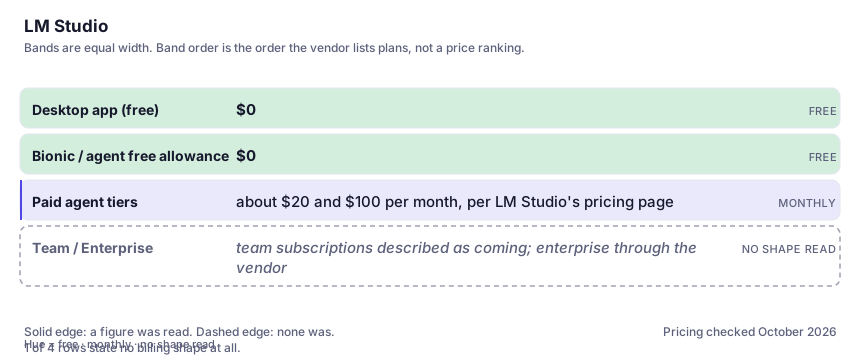
| Desktop app (free) | $0 | Download the app, browse and run open models locally, chat and serve them on your machine. Unmetered for local use; the only cost is the hardware and time you bring. For most individual readers this is the whole reason to be here. |
| Bionic / agent free allowance | $0 | The company's own FAQ states the agent can be used for free, within limits. A sensible way to try the hosted-assisted workflow before paying, not a plan to depend on at volume. |
| Paid agent tiers | about $20 and $100 per month, per LM Studio's pricing page | The higher-priced tier advertises several times the usage limits plus private, US-hosted open-source models and early features; both paid tiers add web search and page extraction. This is a meter and a hosting arrangement, not a licence for the local app. Prices and allowances change — confirm on the live page. |
| Team / Enterprise | team subscriptions described as coming; enterprise through the vendor | Centralised billing and org management are referenced, with team plans signposted rather than fully priced at the time of writing. If you need this now, talk to the vendor directly rather than planning around a figure quoted elsewhere. |
Who it fits, and who it doesn't
Reach for LM Studio if you…
- Non-developers and cautious tinkerers who want local AI without learning a command line.
- You want to compare several open models side by side, quickly, on your own machine, before committing to any of them.
- Privacy-first personal use — drafting, summarising, reading your own documents on a machine you control.
- Builders who want a local OpenAI-compatible endpoint for another app but prefer clicking a serving panel to configuring a service.
Skip it if you…
- You are comfortable in a terminal and mostly consume models through an API — Ollama is lighter and more scriptable for that job.
- You want the strongest answers with zero fuss; a frontier subscription beats any local model here and costs less than the GPU.
- Your machine is underpowered — the app will happily let you download a model it cannot run, and the experience is a spinner or a crash.
- You need firm team pricing today for procurement; that is not settled on the public page yet.
How to test it properly in 30 minutes
Don't judge a tool on the demo. Run the same four tasks you'd actually do with it, and score it against this checklist — the same one this desk works from before a profile goes up (see how we check a tool).
- Download one model your machine is likely to hold and one it probably will not, and feel the difference. Judge against what the app and the model page say about memory, not a stranger's token-rate screenshot.
- Run three real tasks locally and the same three through your usual cloud assistant; count how often you reach for the cloud one — that gap is the honest price of going local.
- Turn on the local server and point a client or a short script at it, so you know whether the 'model in my own app' workflow actually works on your setup.
- Read the licence attached to each model you download; the app being free tells you nothing about what the weights let you do commercially.
- If you touch the agent or cloud tiers, read the current usage limits and the 'team plans coming' status on the live pricing page before assuming a figure.
Alternatives worth comparing
The hub where open models, datasets and demos live — infrastructure for builders and researchers, not a consumer chatbot.
The default AI assistant — the broadest feature set, and the benchmark every other tool gets measured against.
Claude
The assistant for people who read a lot: long documents, careful prose, and fewer invented answers.
Disclosure: this profile is editorial. LM Studio did not review it, pay for it or provide a free account for it. Links to the vendor are plain outbound links, not affiliate links. Errors are mine — report one and it gets fixed and logged on the updates page.