v0
The short verdict
The sharpest focused tool in the app-builder group and the one with the most honest meter: credits are prepaid, rates are published, and the balance pauses rather than bills — but the stack lock is the real terms and conditions. Inside Next.js on Vercel it is the fastest idea-to-URL motion available; outside it you are buying reference material and a rewrite. Evaluate the two bills together — v0 credits for generating, Vercel platform for hosting — because the second one is where the surprise actually lives. If you are not already a Vercel person, the right purchase is the editor that works where your code lives.
- Maker
- Vercel
- Category
- App builders
- Entry price
- Freemium
- Free option
- Yes — a $0 plan capped at 7 messages a day, which is a demo, not a workflow
- Works on
- Web app; generates Next.js/React code that deploys to Vercel, with exported code runnable anywhere
- Pricing checked
- October 2026
What v0 is, plainly
v0 is Vercel's AI app builder, and the two halves of that sentence explain each other. You describe an interface or a whole app in chat; it generates real, working full-stack code in Next.js with Tailwind and shadcn/ui, and a Deploy button puts it on Vercel's infrastructure in one click. You can also clone the look of an existing page from a screenshot, or import a Figma file. The output distinction that matters is that this is code, not a mockup: a developer can open the generated project, keep editing it and run it anywhere React runs. The honest characterisation is a very fast junior engineer who only knows one stack, produces work that looks finished earlier than it is, and types at whatever rate your credit balance allows.
It loses where its strengths point the other way. Against Cursor, the difference is location: Cursor works inside your existing codebase, so its output lands on your branch with your components and your conventions, while v0 starts from nothing and hands you material to translate — a real cost if your product already has authentication, a design system and state management, because the generated front end is shallow precisely in those unglamorous layers. The stack lock is absolute: output is Next.js/React with Vercel conventions, so if your team builds on anything else, every screen v0 makes is a reference implementation someone must re-write by hand. And unlike Replit, v0 is not where your app lives — hosting is Vercel's platform, metered on a separate bill — so you inherit two vendors' decisions, not one.
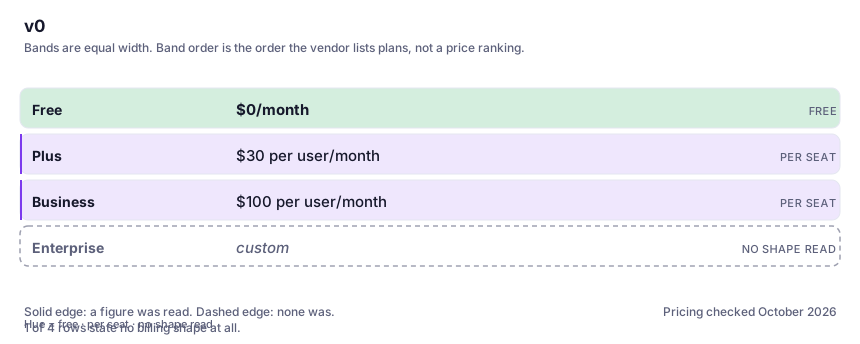
The pricing is a prepaid balance, and the balance is the story. Plans as shown on v0's own pages in October 2026: Free at $0 with a seven-messages-daily limit; Plus at $30 per user per month including $30 of monthly credits per user plus $2 of free daily credits on login; Business at $100 per user per month with $30 of included credits per user in a pool shared across the team, plus admin and security controls; Enterprise custom, with data never used for training. A legacy Premium tier at $20 is documented as being sunsetted, so check your own plan's migration terms. Consumption is not per message: model token rates are published — v0 Mini at $0.20 input / $1.20 output per million tokens, v0 Pro at $2/$10, v0 Max at $5/$25, v0 Max Fast at $10/$50 — so the same prompt on Max Fast can cost a dozen times what Mini charges, and tokens per credit depend on the model. The kind part: when credits run out, generation pauses rather than billing on. The cruel part: generation pauses. Your actual surprise bill is not v0's — it is the Vercel platform charge for whatever you deployed, where Hobby is free with capped allowances and Pro at $20 a month bills overage from rates like $0.60 per million function invocations per the page I read. The app that gets traffic is the invoice.
Where it wins
- The fastest path in this directory from a design idea to a working, professional-looking URL, because generation and deployment are one motion.
- Prepaid pause instead of auto-billing: a zero balance stops your work, but it cannot invent a bill — the failure mode is annoyance, not invoice.
- Published per-model token rates make consumption calculable before you commit, which more usage-metered tools should copy and few do.
- Output is real, exportable Next.js/React code, so the work survives leaving the platform — unlike page-format lock-ins.
- Screenshot and Figma cloning is a legitimate design-handoff shortcut for products that need to look competent.
Where it falls short
- One stack, absolutely: anything outside Next.js/React with Vercel conventions turns generated code into reference material someone must rewrite, which is the honest cost the demos never invoice.
- The free tier's seven daily messages is a demo, not a plan — nothing real gets finished inside it, so evaluation takes deliberate patience.
- Included credits evaporate on the larger models: $30 a month is a budget, not a licence, and Max Fast exists precisely to spend it fast.
- The price you see is not the price you pay — the deployed app runs on Vercel's separately-billed platform, and traffic, functions and build minutes charge there, not here.
What it's built for
Prompt to working full-stack app
Describe a screen or a product and receive real Next.js code with Tailwind styling and shadcn/ui components — the documented stack, not a proprietary page format. The result runs, not just renders, and a developer can carry it forward.
Clone pages from screenshots or Figma
Point it at a picture of an interface you admire or a Figma file and it approximates the layout in components. Useful for boring-product UI that needs to look competent; the copyright and taste questions are yours to manage.
One-click deploy to Vercel
The gap between generated code and a shareable URL is one button — the strongest single feature in the product, and also the moment your hosting costs move onto Vercel's separate meter. Clicking it is a decision, not a convenience.
Extensibility to your own APIs and databases
Per the product's own framing you can wire in your APIs, databases and components, which is what separates v0 from a landing-page toy. Doing it well still means knowing what you are doing — the generation assists, it does not architect.
Model tiers with published token rates
Choose between v0 Mini, Pro, Max and Max Fast; each has a posted per-million-token price, which means you can compute your worst-case month before you have one. This transparency is rare in the category and worth naming.
Team workspaces with shared credit pools
Business seats draw from a pool shared across the team, with admin controls and plan-dependent data-privacy terms — the pool is also how one colleague's all-day generation pauses everyone's work at zero balance.
What it costs at your team size
| Plan | Indicative price | What you actually get |
|---|---|---|
| Free | $0/month | Seven messages a day. Enough to feel the product on small tasks, not enough to finish anything real — a demo metered out daily rather than a plan you can work on. |
| Plus | $30 per user/month | $30 of included monthly credits per user plus $2 of free daily credits on login, access to all models, and purchasable top-ups. The tier solo builders land on; the live page currently renders an extra $90 figure beside the price, so check it before buying. |
| Business | $100 per user/month | $30 of included monthly credits per user shared across the team pool, plus the admin, security and privacy controls organisations need. The premium over Plus is governance, not generation; verify current terms on v0's page. |
| Enterprise | custom | Additional security and the documented commitment that data is never used for training. If procurement is involved, the contract is the product at this tier. |
Count the people who would each need their own login.
Who it fits, and who it doesn't
Reach for v0 if you…
- Developers and product teams already inside the Next.js/Vercel world, where generated code lands in the same idioms your codebase uses.
- Founders and agencies whose deliverable is a credible working URL, reached faster than any design-to-dev handoff.
- Front-end-heavy work where looking right is the requirement and the back end stays thin.
- Teams replacing static mockups with deployed prototypes engineers can genuinely fork from.
Skip it if you…
- Your product is not React — an existing Vue, Svelte or Rails codebase turns every generation into a translation project, and Cursor working in-place beats v0 working elsewhere.
- You cannot budget a professional rewrite of the generated code's auth, state and data layers: what breaks when generated code meets a real codebase is exactly those invisible layers, and someone competent still has to own them.
- Compliance forbids deploying on Vercel — then the one-click deploy is a trapdoor, not a feature.
- You want it free: the $0 tier teaches you the tool and nothing more.
How to test it properly in 30 minutes
Don't judge a tool on the demo. Run the same four tasks you'd actually do with it, and score it against this checklist — the same one this desk works from before a profile goes up (see how we check a tool).
- Build the ugliest real interface you need this week on the free tier's daily messages, and count how many days the honest version takes you.
- Run one serious generation, then open your credit ledger and match the burn against the published token rate for the model you chose. Multiply by the months of work ahead and price the habit before the habit forms.
- Deploy something to Vercel and immediately read the Hobby/Pro usage limits — name the exact meter (functions, bandwidth, build minutes) that public traffic would push you over, while the app is still small.
- Export the generated code and get a colleague to read and run it cold. How long until they would maintain it? That number is the real cost of "one click".
- Give it a screenshot of a tool you actually use daily and compare the clone's fidelity to what hand-building the same screen would cost you. Judge the editing time, not the first render.
Alternatives worth comparing
Cursor
The editor built around AI agents that edit whole files — for developers who want to describe changes and review diffs, not type them.
AI pair-programmer inside the editor you already use — for developers who want completions and chat without changing tools.
Claude
The assistant for people who read a lot: long documents, careful prose, and fewer invented answers.
Disclosure: this profile is editorial. v0 did not review it, pay for it or provide a free account for it. Links to the vendor are plain outbound links, not affiliate links. Errors are mine — report one and it gets fixed and logged on the updates page.