Grok
The short verdict
Buy it for one specific reason — live access to X — and nothing else. If you do not need to know what is being said right now, the assistants it loses to are better writers, better document tools and calmer companies. If you do need it, subscribe at the lowest paid tier, spend a week watching the single usage pool instead of buying credits, turn Auto Top Up off until you know your burn rate, and never let a yearly Heavy renewal arrive without a calendar reminder you set yourself.
- Maker
- xAI (now branded SpaceXAI)
- Category
- Chat assistants
- Entry price
- Freemium
- Free option
- Yes. xAI's own docs state that Grok is free to start, and that free-tier caps on chat and voice keep working even after a paid weekly allowance is spent
- Works on
- Web at grok.com, iOS, Android; access can also come through an X Premium subscription; separate Grok Build and Grok Bot products share the account
- Pricing checked
- October 2026
What Grok is, plainly
Grok is the assistant from xAI, the company Elon Musk founded in 2023 and which has since been folded into SpaceX and now brands itself SpaceXAI — you notice because the documentation pages carry the new name. It began as a chatbot inside X and is now a standalone product: xAI's overview page describes it as available on the web at grok.com and in iOS and Android apps, running the grok-4.7 model family. In use it is a fast, deliberately unpolished assistant whose pitch is tone rather than capability: it answers questions the bigger assistants hedge or refuse, it jokes, and it performs an irreverence that some people find refreshing and others find exhausting by day three. The subscription is no longer one product either. A single account now covers chat, Imagine for images and video, voice modes, Grok Build for agentic coding, a separate Grok Bot product that runs on a persistent cloud workstation, and connectors into Google Drive, Gmail and Calendar, Outlook, SharePoint, OneDrive, Teams and Salesforce.
As a general writing and reasoning tool it loses to ChatGPT on drafting polish and to Claude on long documents, and that is a description of documented behaviour rather than a benchmark result: the gaps show up in sustained tone control, in how much repair work a first draft needs, and in patient multi-step reasoning, which is where the two established assistants have spent years compounding. Its real differences lie elsewhere. It searches X, which makes it the assistant people open when the question is what is happening right now rather than what is known; the same feature makes it worse than its rivals for anything historical, because the corpus is the least reliable text on the internet and this product has a documented habit of attaching statements to real people who never made them. The image side carries baggage the others do not: in early 2026 major news outlets reported that Grok's image generation was producing sexualised pictures of real people at scale, the UK privacy regulator opened an inquiry into X over it, and reporting in April 2026 said such output continued after promised fixes. That is not a joke about the product; it is a brand-risk question you should settle before putting its output beside your name.
The money is the part people misread, so read this before subscribing. Grok is free to start. Paid SuperGrok tiers raise your limits, and in June 2026 xAI replaced separate per-product daily caps with one weekly usage pool shared across chat, Imagine, voice and Build; the pool appears as a percentage under Settings > Usage, broken down by product, resetting on a fixed day. When it empties, paid features pause until the reset while the free chat and voice caps carry on, and you are offered two escape hatches: Extra Usage Credits, from $5, purchasable on the web only, expiring a year after purchase, and priced — in xAI's own words — at standard rates, which means a higher cost per action than the usage already baked into your plan; and Auto Top Up, where you set an amount and a monthly cap and the balance refills itself. That second option is where the surprise bill lives, and the vendor's FAQ is unusually candid about the other one: large unexpected invoices are frequently a SuperGrok Heavy yearly subscription rather than anything you generated. I could not load x.ai/pricing or grok.com/plans from this machine on 7 October 2026 — both refused — so I quote no monthly figure here. Open the evaluation checklist in one tab, x.ai/pricing in another, and read the annual number rather than the monthly one. The API is a separate meter and that one I could verify: grok-4.7 runs at $2.00 per million input tokens, $0.50 cached input and $6.00 output below 200k prompt tokens, rising to $4.00, $1.00 and $12.00 above that threshold, with US-regional endpoints billed at a 10 per cent premium.
Where it wins
- Live search over X is a genuinely different capability, and for current events it beats every assistant that has to wait for its crawl.
- The June 2026 move to one weekly pool is a real improvement: you can spend the whole allowance on video or on chat instead of running out in one product while another sits unused.
- Usage visibility is decent for a consumer product — a percentage bar, a per-product breakdown and a stated reset time in Settings.
- Billing behaviour is documented honestly in the vendor FAQ, including the credit cost warning and the yearly-renewal trap, which is more than most assistants give you.
- If you already pay for X Premium or Premium+, Grok access may be bundled on the linked account, so the marginal cost could be nothing.
- API rates are published per million tokens with a clear long-context threshold, so you can price a workload before you run it.
Where it falls short
- Pricing transparency is poor. The consumer plans and their prices are readable only inside the app or on a page that blocks automated access, so nobody can compare tiers without signing in first.
- One subscription, three ways to spend: a weekly pool, separately purchased credits at worse effective rates, and an opt-in auto top-up. That is a billing design built to be exceeded.
- The image and video side has a documented moderation failure record in 2026, including a UK regulator inquiry. Whatever you think of the product, that history is part of using it in public.
- Company and product churn is high: xAI is now SpaceXAI, Grok Studio has been discontinued in favour of Grok Build, model aliases rotate, and Companions are iOS-only with no plans for web or Android. Tutorials and integrations age badly.
- Watermarks cannot be removed and are legally loaded in some regions; obscuring them breaches the acceptable use policy, which rules out a lot of commercial layout work.
- As prose, it still needs more editing than the established assistants, and its habit of agreeing with the user's framing is a research problem, not a personality quirk.
What it's built for
Chat with live X and web search
The one thing no rival can copy: search over posts as they happen, cited back into the answer. Excellent for breaking events and for finding whether a niche tool has a community; unreliable for anything settled, because settled facts get sourced from arguments in reply threads.
Imagine: images and video
Text-to-image and text-to-video generation inside the same app and the same usage pool. Output carries a permanent Grok watermark that xAI states cannot be removed, and 720p video quietly falls back to 480p once you hit the cap for your tier.
Voice modes
Speech-to-speech and transcription products exist on both the consumer app and the API, drawing from the same weekly allowance. Useful for hands-free questions; free-tier users keep a separate voice cap even after their paid pool is empty.
Grok Build and Grok Bot
Agentic coding (Grok Build, which replaced the discontinued Grok Studio) and a separate Grok Bot product giving you a persistent cloud computer with messaging, approvals and routines. Note that Grok 4.7 Fast is only available inside Grok Build and Cursor, not on the public API.
Connectors into work tools
Google Drive, Gmail and Calendar, Outlook, SharePoint, OneDrive, Teams and Salesforce, plus custom MCP tunnelling. This is where Grok stops being a novelty and becomes something you could plausibly run against your own files — mostly documented for Business licences.
File uploads and Projects
Web accepts roughly a hundred files at a time, Android twenty, most files up to 150 MB each: PDF, Office formats, CSV and spreadsheets, code, images, audio and video. Projects exist for grouping context, though xAI warns some feature names differ between grok.com and other hosts.
What it costs, and what these numbers cannot tell you
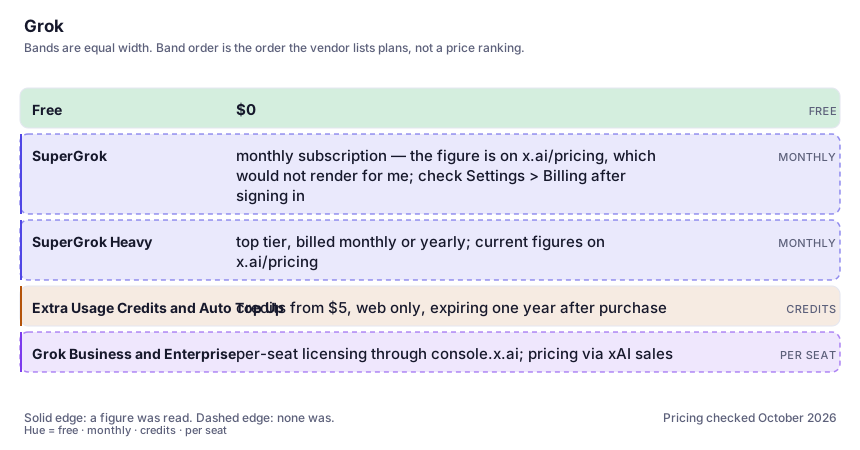
| Plan | Indicative price | What you actually get |
|---|---|---|
| Free | $0 | Starter access with its own caps on chat and voice. Enough to judge the tone and the live-search trick; not enough to plan a workflow around, and the caps are visible only inside the app. |
| SuperGrok | monthly subscription — the figure is on x.ai/pricing, which would not render for me; check Settings > Billing after signing in | The tier most individuals want. Buys you the shared weekly usage pool across chat, Imagine, voice and Build, higher model access and priority features. Read the pool, not the tier name, because your cost per generation depends on which product you spend it on. |
| SuperGrok Heavy | top tier, billed monthly or yearly; current figures on x.ai/pricing | A much larger weekly allowance and the heaviest model configurations. xAI's own FAQ flags that the yearly charge here is the source of unexpected large invoices, so if you take annual, calendar the renewal date on the day you buy. |
| Extra Usage Credits and Auto Top Up | credits from $5, web only, expiring one year after purchase | Not a plan but the place where overspend happens. Credits are billed at standard rates, which xAI states costs more per action than included usage, and Auto Top Up will silently refill your balance up to the monthly cap you set. |
| Grok Business and Enterprise | per-seat licensing through console.x.ai; pricing via xAI sales | Team workspaces carry the full SuperGrok benefits (or Heavy on upgraded seats), sharing restricted to licensed members, with custom retention policies on Enterprise. An organisation can disable your personal workspace entirely. |
Who it fits, and who it doesn't
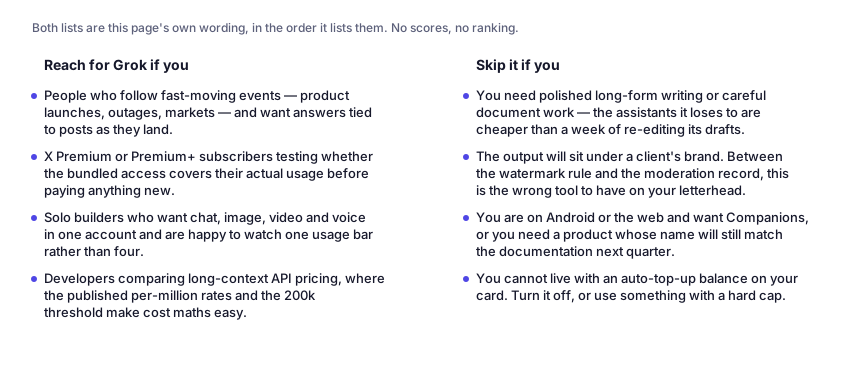
Reach for Grok if you…
- People who follow fast-moving events — product launches, outages, markets — and want answers tied to posts as they land.
- X Premium or Premium+ subscribers testing whether the bundled access covers their actual usage before paying anything new.
- Solo builders who want chat, image, video and voice in one account and are happy to watch one usage bar rather than four.
- Developers comparing long-context API pricing, where the published per-million rates and the 200k threshold make cost maths easy.
Skip it if you…
- You need polished long-form writing or careful document work — the assistants it loses to are cheaper than a week of re-editing its drafts.
- The output will sit under a client's brand. Between the watermark rule and the moderation record, this is the wrong tool to have on your letterhead.
- You are on Android or the web and want Companions, or you need a product whose name will still match the documentation next quarter.
- You cannot live with an auto-top-up balance on your card. Turn it off, or use something with a hard cap.
Where it stops fitting
How to test it properly in 30 minutes
Don't judge a tool on the demo. Run the same four tasks you'd actually do with it, and score it against this checklist — the same one this desk works from before a profile goes up (see how we check a tool).
- Ask the same breaking-news question here, in a leading assistant and in a search engine, and check whether the extra recency actually changes the answer or only the confidence.
- Give it one factual question where you know the answer and one where you do not, then read the citations rather than the prose. Look specifically for statements attributed to real people.
- Spend a whole day using one product only — Imagine or chat — and watch how fast the weekly pool drains. Different products burn it at very different rates, and that determines your real tier.
- Before upgrading, calculate your cost per action on Extra Usage Credits versus the included pool. The vendor says credits are more expensive per action; check whether that holds on the work you actually do.
- Open Settings > Billing and Settings > Usage and screenshot both: which renewal date is charged, whether Auto Top Up is on, and what the monthly cap is.
- If you plan commercial image work, download an output first and inspect the watermark and provenance metadata. Do not assume it is removable.
Questions people ask
Is Grok free?
It is free to start, with its own caps on chat and voice, and xAI states those free caps keep working even when a paid weekly pool is empty. The paid SuperGrok tiers raise the pool. The current prices live on x.ai/pricing and inside Settings > Billing; I could not read either on 7 October 2026, so treat any price you see in a blog post, including the tier names, as something to confirm in the app.
What does the weekly usage pool actually mean?
Since June 2026, paid Grok users get one allowance shared across chat, Imagine, voice and Build instead of separate daily caps per product. You can burn it all on one product, Settings > Usage shows the percentage and the per-product split, and it resets on a fixed weekly schedule. When it hits zero, paid features pause rather than bill you — unless you buy Extra Usage Credits or have Auto Top Up switched on.
Why did my bill jump?
The two documented causes are an annual SuperGrok Heavy renewal arriving without reminder — xAI's own FAQ calls out large unexpected invoices as frequently being this — and credit top-ups, which are charged at standard rates and cost more per action than the usage included in your plan. Check purchase history at grok.com/?_s=billing, and remember that a subscription bought through Apple or Google is managed there, not by xAI.
Is my Grok subscription the same as X Premium?
No, they are different transactions from different companies. X handles refunds for X Premium; xAI handles Grok subscriptions. Premium+ access applies to the account linked with your X account, which is why people sign in with a second login and think they have lost what they paid for.
Can I use Grok images commercially?
Generated images and videos carry a Grok watermark that xAI says cannot be removed, and removing or hiding provenance signals violates its acceptable use policy; in some jurisdictions labelling AI output is legally required. That settles the technical question but not the legal one about rights in AI output — read the current terms for your tier before shipping it in a paid deliverable.
Alternatives worth comparing
The default AI assistant — the broadest feature set, and the benchmark every other tool gets measured against.
Claude
The assistant for people who read a lot: long documents, careful prose, and fewer invented answers.
The assistant that already has your email, docs and calendar — if you live in Google Workspace.
An answer engine that cites its sources — the tool to open when you need to check, not just to write.
Disclosure: this profile is editorial. Grok did not review it, pay for it or provide a free account for it. Links to the vendor are plain outbound links, not affiliate links. Errors are mine — report one and it gets fixed and logged on the updates page.