Julius AI
The short verdict
A good analyst with a loose brief: genuinely useful against your own files, better still connected to a database and asked the same question weekly, and far better than a chat model doing arithmetic. Buy it on the maths of credits and connectors, not on the deck generator — and if your analysis is ad hoc, the assistant you already pay for is the honest answer. The audit stays yours: a confident chart built on the wrong column is the failure mode this whole category produces.
- Maker
- Caesar Labs
- Category
- Data & analysis
- Entry price
- Freemium
- Free option
- Yes — 25 one-off welcome credits plus 25 daily credits per the vendor's billing docs, with the generation features marked limited
- Works on
- Web; spreadsheet and CSV files uploaded or connected; connectors to Google Drive, OneDrive, SharePoint, Postgres, BigQuery and Snowflake
- Pricing checked
- October 2026
What Julius AI is, plainly
Julius is an AI workspace whose centre of gravity is analysis: upload a spreadsheet, connect a drive or a warehouse, ask questions in plain language, and it runs the work on its own compute and returns tables, charts, reports, dashboards and exports. The vendor's documentation describes it as a place to research, analyse, build and create, and the honest read is that the data thread is the strongest one — the same conversation also produces a slide deck, a small website, an image or a video clip, which is convenience if you wanted those artefacts and distraction if you did not. What happens underneath is code execution rather than guessed arithmetic, which is why its numbers can be right where a plain chat's would not, and why tasks cost different amounts depending on the compute they burn.
The obvious comparison is not another analyst tool; it is the assistant you already pay for. ChatGPT and Claude both take a file, run code against it and return a chart, so for one ad hoc CSV a week, paying twice for the same class of model is a poor trade. Julius earns its keep where an assistant stops: persistent connections to Postgres, BigQuery or Snowflake with learned schema, scheduled report runs, a shared team workspace with usage dashboards and audit logs, and outputs shaped for handover rather than pasting. Against a real BI stack or a notebook, though, it is a different animal: no versioned pipeline, no governed metric definitions, nothing a colleague can rerun. It is an analyst who produces handsome one-off answers and forgets how they were made.
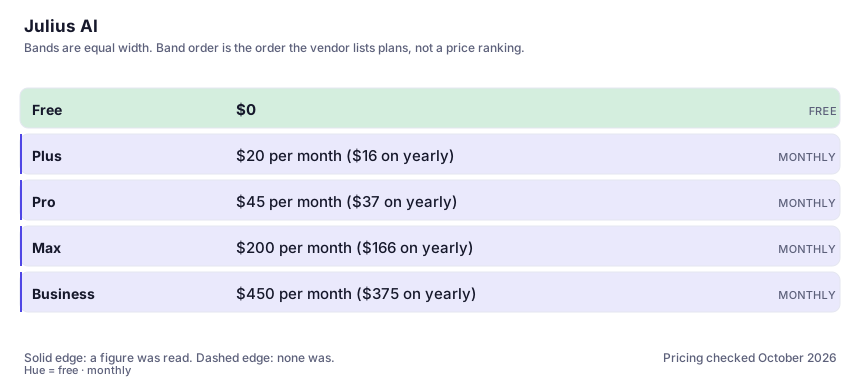
The pricing page is candid if you read the units. Plans as shown on 2026-10-07: Plus at $20 a month, Pro at $45, Max at $200 and Business at $450, with about 20% off billed yearly, and the free tier running on daily credits. The currency is credits, not messages: the docs state a simple message costs less than a full analysis or code execution, that model choice changes the cost, and that bigger datasets and longer outputs add up faster. Two traps follow. Annual plans grant the year's credits upfront, so an annual Plus at 24,000 credits is not 2,000 a month of headroom but one pool that empties if you front-load. And the connector stack you would expect mid-tier — warehouses, no table limits, unlimited scheduled runs — sits at Business, twenty-two times the Plus price. The billing docs also list tiers the cards do not: an Ultra at $500 and Growth plans from $750 to $5,000.
Where it wins
- Analysis runs as code over real data, so aggregation errors are far less likely than in a chat model asked to do arithmetic in its head.
- Connectors, schema learning and scheduled runs turn it from a clever one-off into something that produces the same report every Monday.
- Outputs are handover-shaped — deck, dashboard, site — which removes the paste-and-reformat stage between an answer and a deliverable.
- Credit allowances are published per tier with a live usage page: the metering is at least visible, unlike tools that say unlimited and mean otherwise.
Where it falls short
- A model that writes your query and draws your chart will be wrong confidently sometimes, and the wrong result arrives in the same polished format as the right one. Every figure that reaches a decision needs independent checking.
- The credit system is honest but punishing on exactly the work you bought it for: multi-step analyses, big datasets and strong models each burn faster, and annual plans hand you a year's pool at once.
- The product has spread into websites, images and video, so you are buying a generalist workspace when the reason you searched for it was a spreadsheet.
- Warehouse access, unlimited scheduled runs and no table limits live at the $450 tier, a twenty-two-fold jump from Plus that makes the advertised entry price misleading for anyone with real data sources. Nothing it produces is reproducible in an engineering sense.
What it's built for
Plain-language analysis over your files
Upload a spreadsheet, ask for a metric, a breakdown or a regression, and get a table and chart in the thread. The analysis executes rather than improvises, which is the difference between this and a chat model doing arithmetic in its head.
Warehouse and drive connectors
Google Drive on the free tier; OneDrive, SharePoint, Postgres, BigQuery and Snowflake on paid plans, with schema learning so it knows what your tables mean. Scheduled runs are capped at three on the entry paid tier and lifted higher up.
Artefacts from the same thread
Presentations, reports, dashboards, websites, images and video all come out of the analysis conversation. Handy for the weekly pack; also the reason the product now competes with five categories instead of one.
Credits instead of message counts
Per the billing docs, actions cost varying credits by task type, model and data size, with a live usage page. Free daily credits plus a one-off welcome grant; paid credits renew each cycle, arriving as a single pool on annual plans.
Team workspace with administrative visibility
Shared files and threads, usage dashboard, centralised billing, roles, audit logs, and a SOC 2 Type II claim in the footer. The layer a manager buys; a solo user rarely needs any of it.
What it costs, and what these numbers cannot tell you
| Plan | Indicative price | What you actually get |
|---|---|---|
| Free | $0 | Per the billing docs, 25 welcome credits (one-off) plus 25 daily credits, the cheaper internal models, Google Drive as the only connector, and the deck, image, video and website generators marked limited. A sampler — enough to test one genuinely hard question. |
| Plus | $20 per month ($16 on yearly) | 2,000 credits a month, one seat, frontier model access, exports of decks, charts and reports, unlimited charts, three scheduled runs. Here the credit ceiling becomes the constraint: complex analyses burn hundreds each. |
| Pro | $45 per month ($37 on yearly) | 5,000 credits a month, expanded context, priority email support, otherwise the same shape as Plus. A volume and context purchase rather than a feature purchase — the feature list barely moves. |
| Max | $200 per month ($166 on yearly) | 25,000 credits a month, the strongest models, larger context, permanent file storage, early access and priority at high traffic times. That last line implies throttling below it, worth knowing before a big job on Pro. |
| Business | $450 per month ($375 on yearly) | 60,000 credits a month, up to 50 seats, warehouse connectors with no table limit, unlimited custom agents and scheduled runs, admin controls. Billing docs additionally list Ultra at $500 and Growth tiers from $750 to $5,000. |
Who it fits, and who it doesn't
Reach for Julius AI if you…
- Operators, marketers and finance or ops people who live in spreadsheets, will not write SQL, and need an answer plus a chart today.
- Small teams wanting recurring reports from the same source, using scheduled runs against a connected database.
- Analysts who must hand work to non-analysts, where the deck or dashboard is the deliverable rather than the notebook.
Skip it if you…
- Your work is one file a week of ad hoc questions; the assistant you already pay for uploads files and runs code too, and the overlap is nearly total.
- You need reproducible, reviewable pipelines — that is a notebook and a real BI tool, and this product's convenience is bought by giving up exactly that.
- You cannot audit the numbers. If a chart goes into a board pack and nobody recomputes the underlying figures, this tool raises your risk rather than your output.
How to test it properly in 30 minutes
Don't judge a tool on the demo. Run the same four tasks you'd actually do with it, and score it against this checklist — the same one this desk works from before a profile goes up (see how we check a tool).
- Upload the messiest real file you own — merged headers, a date column stored as text, three sheets — and ask one question whose answer you know. Judge whether it noticed the dirt or silently analysed the wrong column.
- Reproduce a figure you have already computed in a pivot table or formula, then ask how it arrived at its number and check the logic rather than the result. That habit is the whole safety case for AI analysis.
- Ask for a chart with an implied causal claim and read what it says. Note whether it flags the limits of what the data supports, and whether you would have noticed if it had not.
- Run a genuinely multi-step task — filter, aggregate, compare periods, export a summary — and record the credits consumed from the usage page. Multiply by your real weekly volume before choosing between 2,000 and 5,000 a month.
- Generate the deck or report artefact from the same thread and check every number survived the transfer from analysis to slide. Handover is where wrong figures get signed off.
- Check the credit balance before and after one real session, and read the plan table again after. A monthly pool of 2,000 credits is not the same thing as unlimited analysis, and the pricing page's tiers move.
Alternatives worth comparing
The default AI assistant — the broadest feature set, and the benchmark every other tool gets measured against.
Claude
The assistant for people who read a lot: long documents, careful prose, and fewer invented answers.
The assistant that already has your email, docs and calendar — if you live in Google Workspace.
Disclosure: this profile is editorial. Julius AI did not review it, pay for it or provide a free account for it. Links to the vendor are plain outbound links, not affiliate links. Errors are mine — report one and it gets fixed and logged on the updates page.