Microsoft Copilot for Excel
The short verdict
The cheapest real productivity gain in this category if you already live inside Microsoft 365, and a poor buy if you do not: its value is placement and in-place editing rather than analysis, and Microsoft's own documentation tells you to verify what it produces and keep it away from sensitive financial decisions. An assistant in a grid is not a pipeline, and the vendor behind the grid is part of the dependency. Do the per-seat arithmetic on paper — base plan, add-on, seats — before promising anyone a feature.
- Maker
- Microsoft
- Category
- Data & analysis
- Entry price
- Paid
- Free option
- No meaningful one for this: a Copilot licence or a qualifying Microsoft 365 subscription is required, with the add-on sold on top of the base plan
- Works on
- Excel on Windows, Mac, web, iPad, iPhone and Android; files must be stored on OneDrive or SharePoint
- Pricing checked
- October 2026
What Microsoft Copilot for Excel is, plainly
Copilot in Excel is the assistant sitting on the Home tab, and its whole argument is placement. You describe a job in English and it adds a column, writes the formula, builds the chart or PivotTable, formats the range, spots duplicates — and increasingly runs multi-step changes in the workbook itself, which Microsoft's documentation describes as letting Copilot plan, run and verify results in your file, with a change history to review. It is not a destination you visit; it is a pane that can see your data, which is the advantage no external assistant has: nothing gets pasted, and the context is already right. Rows, the AI spreadsheet I expected to list here, shut down in August 2026 — the point stands anyway: an AI spreadsheet was never a destination either, and this one arrives attached to a subscription you almost certainly already hold. The constraints are documented rather than hidden: files must live on OneDrive or SharePoint, editing needs calculation options set to automatic, and there is no standalone product to buy.
As an analysis engine it is the weakest of the three tools on this page for the same job. Where a specialist assistant can run code over a file, reason about a question you phrased badly and say what the result does not support, Copilot's answers are bound to what it can express as formulas, filters and pivot shapes: competent at 'add a column computing margin per order', thin at 'is this trend real'. Microsoft's support page states the limits plainly — AI-generated results can be mistaken or misinterpreted, it advises against using Copilot for sensitive areas including finance, legal and medical topics, and it instructs you to review, edit and verify anything it creates. That warning covers a large share of what Excel is used for. Against ChatGPT or Claude, the question is narrow: are in-place edits and one fewer copy-paste worth a separate line item?
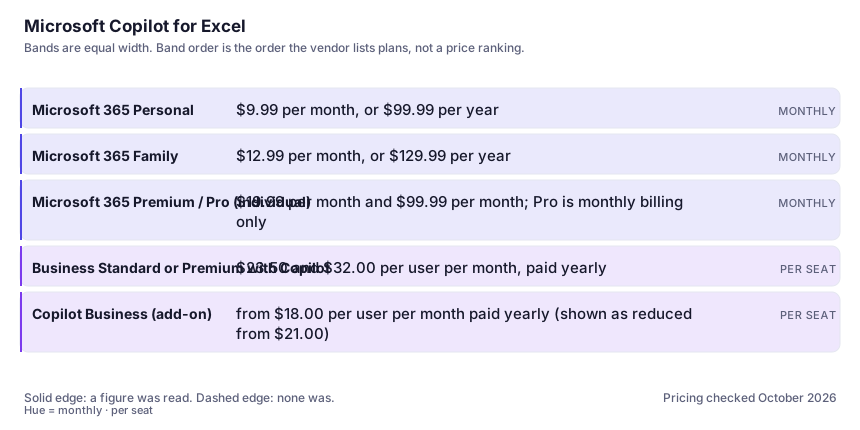
Pricing needs care because it stacks. On the consumer side Copilot is bundled into Microsoft 365 Personal at $9.99 a month and Family at $12.99, with Premium at $19.99 and a Pro tier at $99.99 raising usage allowances — and Family's AI applies to the owner only. On the business side there are bundles: Business Standard with Copilot at $23.50 per user per month paid yearly, Business Premium with Copilot at $32.00, or the Copilot Business add-on from $18.00 — shown on the page I read as reduced from $21.00, so treat it as promotional — which still needs a qualifying Microsoft 365 plan beneath it. The surprise is rarely the Copilot price but base subscription plus add-on per seat, with heavier agent features metered separately and the cheaper tiers allowance-limited rather than unlimited. Microsoft's documentation describes 'M365 Copilot (Premium)' as the add-on licence with priority access and 'M365 Copilot (Basic)' as standard access without it, labels worth checking before you promise a colleague a feature. See how to evaluate an AI tool and how this page was checked.
Where it wins
- Placement is the product: it sees your workbook, so there is no export-paste-reimport loop and no context assembly you maintain by hand.
- It edits rather than advises — columns, formulas, charts and formatting land in the file, which is where the minutes actually save themselves.
- Available on every Excel surface Microsoft documents: Windows, Mac, web, iPad, iPhone and Android, so it travels with the licence rather than a browser tab.
- The vendor documents its own failure modes, including an instruction to verify output and a warning against sensitive finance, legal and medical decisions.
Where it falls short
- An assistant writing your formula can be wrong and will not say so: a plausible lookup that silently aggregates the wrong rows passes review because it looks finished. Audit every generated calculation against a number you already know.
- Cost stacks. Consumer plans are usage-allowanced rather than unlimited, Family's AI covers only the owner, and the business add-on needs a qualifying base subscription beneath it. The per-person price is never the number on the Copilot page.
- Direct edits are a risk on shared workbooks. Microsoft's tips say to be mindful with sensitive or shared files and to review change history — the pane can reshape data you did not mean to touch.
- It is bound to spreadsheet idioms, so statistical testing, large joins and reproducible pipelines belong elsewhere. Requirements bite too: files on OneDrive or SharePoint, automatic calculation, blocked on checkout, and a pane that cannot be turned off independently.
What it's built for
Formula and column generation from description
Ask for a margin, a rolling average or a lookup across sheets and it writes and applies the formula. Microsoft's tips say to name the columns or ranges to work on — the vaguer the prompt, the more confidently wrong the result.
Charts, PivotTables and formatting on request
Describe the visual and get it, plus conditional formatting, duplicate removal and text standardisation. The highest-value cluster: boring, frequent, and specified well enough to rarely go wrong.
Direct edits to your workbook, with history
The newer behaviour changes cells rather than suggesting text. Microsoft states plainly that Copilot makes direct changes to your workbook, that you should be careful with shared files, and that change history shows what it touched. Undo is a version, not a keystroke.
Grounding in your file rather than your paste
It reads the workbook it sits in — headers, ranges, other sheets — so the context problem that plagues paste-into-chat analysis mostly disappears. Connectors and referenced files appear as plan features in Microsoft's comparison.
Agents and reasoning above the pane
Microsoft's pricing material lists pre-built agents including Researcher and Analyst, reached through Copilot Chat, with some agent features marked metered — the layer where 'what does my plan include' stops having a simple answer.
What it costs at your team size
| Plan | Indicative price | What you actually get |
|---|---|---|
| Microsoft 365 Personal | $9.99 per month, or $99.99 per year | Desktop apps with Copilot and an advanced Copilot chat at higher usage than the free assistant. The cheapest legitimate way to get Copilot in Excel as an individual; the allowance is a ceiling, not unlimited. |
| Microsoft 365 Family | $12.99 per month, or $129.99 per year | The same apps for up to six people, but Copilot features are for the subscription owner only. If two people in the house work in Excel, this is one owner's assistant plus shared storage, not two AI seats. |
| Microsoft 365 Premium / Pro (individual) | $19.99 per month and $99.99 per month; Pro is monthly billing only | Higher and then highest usage allowances, including agentic features for advanced research and analytics. The tiers differ in how much you may run, not what exists. |
| Business Standard or Premium with Copilot | $23.50 and $32.00 per user per month, paid yearly | Copilot across Word, Excel, PowerPoint, Outlook and Teams plus the apps and security you would buy anyway. For a business not already licensed the bundle usually beats bundle-plus-add-on arithmetic. |
| Copilot Business (add-on) | from $18.00 per user per month paid yearly (shown as reduced from $21.00) | For organisations already on a qualifying Microsoft 365 plan: Copilot in the apps, Work IQ grounding, model choice, pre-built agents. That qualifying-base-plan requirement is the footnote that changes real per-seat cost. |
Count the people who would each need their own login.
Who it fits, and who it doesn't
Reach for Microsoft Copilot for Excel if you…
- People whose working life is already inside Excel and a Microsoft 365 subscription, where the marginal cost is an add-on rather than a new tool to learn.
- Recurring formula, chart, PivotTable and formatting requests — the boring middle of spreadsheet work this handles well.
- Organisations with an IT function that wants one vendor, one invoice and documented enterprise terms rather than a browser assistant per employee.
Skip it if you…
- You are not already on Microsoft 365 and only need analysis occasionally — upload to the assistant you already pay for and paste the result back.
- The output must be reproducible and reviewable: this is an assistant in a grid, not a pipeline, and nobody can rerun its reasoning next quarter.
- Your data cannot live on OneDrive or SharePoint, or the decisions are genuinely sensitive — financial close, clinical or legal figures — where Microsoft's own guidance says not to rely on its output.
How to test it properly in 30 minutes
Don't judge a tool on the demo. Run the same four tasks you'd actually do with it, and score it against this checklist — the same one this desk works from before a profile goes up (see how we check a tool).
- Take a real workbook you already understand, ask for a column you know the answer to, and verify it against a manual calculation before accepting the formula. Do this once and you will know how careful to be forever.
- Point it at a range with a deliberately awkward shape — blanks, a total row inside the range, dates stored as text — and see whether it complains or computes silently. Silent wrong arithmetic is this category's signature failure.
- Generate a chart and a PivotTable from the same data and check the axis and aggregation actually match what you asked for.
- Run a multi-step instruction (filter, group, add margin, highlight the worst ten) and open the workbook's change history, then roll one change back before you need to.
- Check your licence reality: which label the app shows you, whether the feature exists on your plan and region at all, and whether the file's location or calculation mode disabled it.
Alternatives worth comparing
The default AI assistant — the broadest feature set, and the benchmark every other tool gets measured against.
Claude
The assistant for people who read a lot: long documents, careful prose, and fewer invented answers.
AI inside your Notion workspace — for people whose notes and docs already live there, not for anyone wanting a standalone assistant.
Disclosure: this profile is editorial. Microsoft Copilot for Excel did not review it, pay for it or provide a free account for it. Links to the vendor are plain outbound links, not affiliate links. Errors are mine — report one and it gets fixed and logged on the updates page.