NotebookLM
The short verdict
The strongest free source-grounded tool in this category for documents you already hold — the one case where its published design beats a general assistant, which is about grounding rather than breadth. Use the standard tier hard for a month, because 100 notebooks at 50 sources each is more than most people exhaust. Pay only when the limits genuinely bite, and when you do, be honest that you are buying a Google AI bundle for storage and Gemini access with this included — not buying this. And accept its ceiling: it is a disciplined analyst over your files, not a researcher who can tell you that your files are wrong.
Changes that touch this profile
The news desk logged these changes and dated them. Each line links to the item that recorded it.
- Maker
- Category
- Research & study
- Entry price
- Free tier; paid access inside Google AI subscriptions
- Free option
- Yes — 'Standard' access with no plan required: 100 notebooks per user and 50 sources per notebook on Google's own plan table
- Works on
- Web; Android and iOS apps; notebooks now surfaced inside the Gemini apps and Google Search AI Mode; Workspace, Education and Gemini Enterprise licences
- Pricing checked
- October 2026
What NotebookLM is, plainly
NotebookLM was renamed Gemini Notebook on 16 July 2026, as part of Google's habit of calling everything Gemini. The old address still redirects, the product is the same, and I will keep calling it NotebookLM because that is what you will tell a colleague. What it is, concretely: a notebook where you put sources — PDFs, web pages, YouTube videos, audio files, Google Docs and Slides, or your own pasted notes — and then interrogate only those sources. Answers come with inline citations you can click back into the document, which is the feature that separates it from a general assistant. From the same source set the Studio panel generates artefacts: audio overviews, video overviews, mind maps, flashcards and quizzes, infographics, slide decks, reports and study guides, across 80-plus languages. You can also ask it to discover new sources, which turns it from a document reader into a narrow research tool. It behaves, in short, like a very disciplined analyst: it will summarise a forty-page report accurately and it will be unhelpful about anything that is not in the folder.
Where it loses is scope and ownership. It is not a chat assistant and cannot replace one; for 'what does the world know about this', Perplexity and the big assistants reach further, because NotebookLM's default world is your source list. It is also not a knowledge base: notebooks are silos with weak export, so nothing here competes with a workspace your team already lives in, and after six months you have forty notebooks with no structure except what you gave them. The generation quality inherits the model behind it, which means audio and video overviews are fluent and slightly hollow — they compress, they smooth over disagreement, and they will happily blend two contradicting documents into one confident paragraph unless you explicitly ask it to surface the conflict. And the whole thing lives inside a Google account: age verification gates access in some territories, under-18 accounts get stricter content policies and fewer features, the mobile app is available in a shorter list of countries than the web, and outputs from the image and video models carry watermarks that are applied automatically in India, South Korea and Vietnam.
The commercial shape is the part most reviews get wrong, because there is no longer a standalone Notebook plan to buy. Access is now a multiplier inside Google's consumer AI bundles, and Google's own help page states the tiers plainly: without a plan you get standard limits; Google AI Plus doubles them; Google AI Pro quadruples them; Google AI Ultra is 5x or 20x higher than Pro depending on which Ultra subscription you hold. On the plan table, Pro is $19.99 monthly or $199.99 annually and includes 5 TB of storage; Ultra starts at $99.99 monthly with 20 TB or 30 TB; Plus is the entry bundle with 400 GB, and Google renders its price with a script that would not give me the number, so read that one off the page yourself. That means the surprise bill here is never NotebookLM: you are buying a storage-and-Gemini bundle and the notebook rides along, and if you only wanted the notebook, you are paying for four other things. Work and school accounts get access through qualifying Workspace editions or Gemini Enterprise, where the pitch is governance — VPC-SC, IAM controls and no human review of your content.
Where it wins
- Citations are the point: an answer you can trace back to a page of your own document is worth more than a fluent answer you cannot.
- The free tier is substantive — 100 notebooks, 50 sources each, real limits, no credit card — which is rare for a tool this capable.
- One source set turns into many formats: study guide, audio overview, quiz, mind map, slide outline. That is a genuine multi-hour saving for anyone preparing to teach or present material.
- Explicit statement that your uploads do not train the models, with an even stronger no-human-review posture on Workspace accounts.
- Usage cost is shown before you generate, and the Generate later queue means hitting a limit is an inconvenience rather than a paywall.
- It is honest about its own boundary: it tells you when something is not in the sources instead of inventing a plausible answer.
Where it falls short
- The rename has already made every tutorial, bookmark and article about it slightly wrong, including the two names you now have to remember. Nothing about the product changed; everything about finding help for it did.
- You cannot buy the notebook alone. Paid access is locked inside a storage-and-Gemini bundle, so a student who only wants higher audio-overview limits is being sold 5 TB of Drive.
- Notebooks do not scale into a knowledge base. Fifty sources per notebook and no real structure means the tool is excellent for one project and poor for your last forty.
- Audio and video overviews prioritise listenability over fidelity: they compress nuance and can blur disagreement between sources, so treating one as a substitute for reading your material is a mistake.
- Feature availability varies by account type, age and country — mobile in fewer territories than web, visible watermarks applied automatically in three countries, some functions gated to over-18 accounts.
- The strongest single limitation is that it is only as good as your source set, and it will not tell you that your sources are thin, out of date or wrong.
What it's built for
Source-grounded chat with inline citations
Every answer points back into the material you uploaded, which makes it auditable in a way a general assistant's answer is not. This is the actual product; everything else is presentation.
Artefact generation from the same sources
Audio overviews, video overviews, mind maps, flashcards, quizzes, infographics, slide decks, reports and briefings, each built from your notebook's sources rather than from the model's memory.
Broad source import plus source discovery
PDFs, websites, YouTube, audio, Google Docs and Slides, pasted text, and a discovery mode that finds additional sources for the topic and folds them into the same notebook.
Usage you can see before you spend it
The Studio panel shows an expected AI usage cost per artefact, chat shows your remaining allowance and reset time, and when you are out of limits you can queue work with Generate later — web only, and it may take a couple of hours.
Sharing, analytics and custom chat on paid tiers
Custom chat and analytics are now available broadly, advanced sharing is paid-only, and public and featured notebooks let you publish a curated set of sources. Workspaces add admin controls and enterprise data handling.
It is not training on your material
Google states your data is not used to train the product unless you send feedback, and that with Workspace or Education accounts content is not human-reviewed even when you rate a response. For a research tool, that clause is a feature, not a footnote.
What it costs, and what these numbers cannot tell you
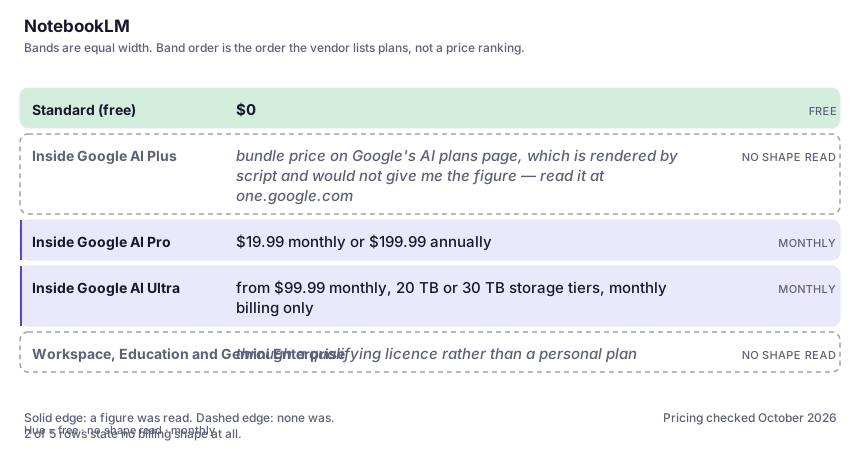
| Plan | Indicative price | What you actually get |
|---|---|---|
| Standard (free) | $0 | 100 notebooks and 50 sources per notebook, standard AI usage limits, no plan required beyond a Google account above the age of consent. This is a genuinely usable product, not a demo, and most individuals should start and stay here for a month. |
| Inside Google AI Plus | bundle price on Google's AI plans page, which is rendered by script and would not give me the figure — read it at one.google.com | Two times the standard limits, 400 GB of storage and higher access across Gemini features. Only worth it if you wanted the storage and the wider bundle anyway. |
| Inside Google AI Pro | $19.99 monthly or $199.99 annually | Four times standard limits, 200 to 500 notebooks and 100 to 300 sources per notebook depending on the table, watermark removal and early access to key features. The tier a heavy student or a researcher lands on. |
| Inside Google AI Ultra | from $99.99 monthly, 20 TB or 30 TB storage tiers, monthly billing only | 5x to 20x Pro-level access, 500 to 600 sources per notebook and the highest model access. Bought for the whole Google AI stack, not for notebooks; the notebook is the least of what you are paying for. |
| Workspace, Education and Gemini Enterprise | through a qualifying licence rather than a personal plan | Expanded access in some Workspace editions; enterprise paths add 5x or more artefacts, VPC-SC, IAM controls and enterprise data protection with regionalisation. Sharing a notebook does not change the collaborator's limits. |
Who it fits, and who it doesn't
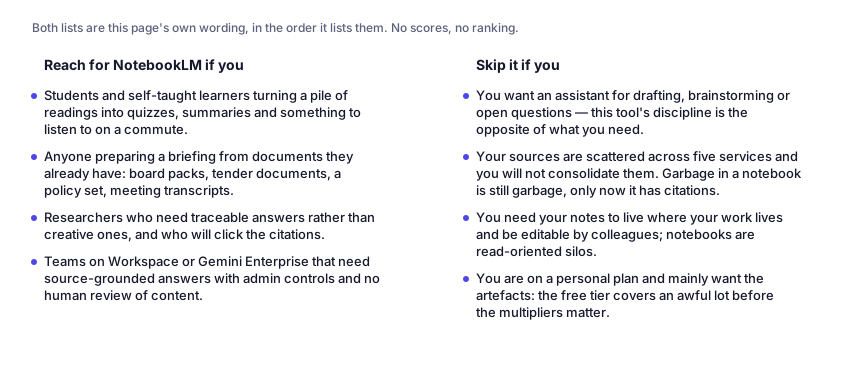
Reach for NotebookLM if you…
- Students and self-taught learners turning a pile of readings into quizzes, summaries and something to listen to on a commute.
- Anyone preparing a briefing from documents they already have: board packs, tender documents, a policy set, meeting transcripts.
- Researchers who need traceable answers rather than creative ones, and who will click the citations.
- Teams on Workspace or Gemini Enterprise that need source-grounded answers with admin controls and no human review of content.
Skip it if you…
- You want an assistant for drafting, brainstorming or open questions — this tool's discipline is the opposite of what you need.
- Your sources are scattered across five services and you will not consolidate them. Garbage in a notebook is still garbage, only now it has citations.
- You need your notes to live where your work lives and be editable by colleagues; notebooks are read-oriented silos.
- You are on a personal plan and mainly want the artefacts: the free tier covers an awful lot before the multipliers matter.
Where it stops fitting
How to test it properly in 30 minutes
Don't judge a tool on the demo. Run the same four tasks you'd actually do with it, and score it against this checklist — the same one this desk works from before a profile goes up (see how we check a tool).
- Load one notebook with four documents on the same topic that genuinely disagree, then ask a question with no obvious right answer. Judge whether it surfaces the conflict or averages it away.
- Click ten citations at random. Do they land on the passage that actually supports the sentence, or merely on a nearby one?
- Generate an audio overview and a video overview from material you know cold, and count how much precision you would have lost if you had only listened to them.
- Ask one question whose answer is not in your sources and see whether it says so. That behaviour is the entire reason to use this over a general assistant.
- Check your limits in Settings > Usage on the free tier, then decide honestly whether you hit them in a normal week before paying for a bundle to raise them.
- If you are evaluating this for a team, read the Workspace and enterprise data terms on Google's own page rather than this profile, and confirm which licence your account actually carries.
Questions people ask
Is NotebookLM still called NotebookLM?
No. Google renamed it Gemini Notebook on 16 July 2026 and describes it as the same standalone product with deeper Google integration. notebooklm.google redirects to notebook.google, and paid access now appears as 'Gemini Notebook' inside the Google AI plan tiers. If you are searching for help, tutorials and answers, use both names — most of what exists online predates the change. See prompt writing tips for the phrasing that works on it.
What do you actually pay for?
Nothing at the standard tier: 100 notebooks, 50 sources each, standard usage limits, with a Google account above the age of consent. Paid access comes as multipliers on a single usage pool inside Google's consumer bundles — 2x at Plus, 4x at Pro ($19.99 monthly, $199.99 annually), and 5x to 20x above Pro at Ultra (from $99.99 monthly). You are buying a whole Google AI plan that happens to include this, not this on its own.
Does it use my documents to train Google's models?
Google states that your data is not used to train Gemini Notebook unless you provide feedback, and that feedback may involve reviewing the full context of that interaction. For Workspace and Education accounts it says uploads, queries and outputs are not human-reviewed even when you rate a response, and are not used to train models. Read the page for your own account type rather than trusting a summary of it — including this one.
Can it replace reading the source material?
For revision, partially; for decisions, no. The overviews are fluent and they compress. Audio and video artefacts are excellent for holding the shape of a long document in your head and poor for the specific number you will be asked about afterwards. Keep the citations open and go back to the page.
How is it different from just using Gemini or ChatGPT with my files?
The bound. A general assistant will answer your question using your file plus everything else it knows, which is sometimes useful and often undetectable. NotebookLM answers from your notebook and tells you where each claim came from, which makes it auditable. For anything you might have to defend — a briefing, a study effort, a decision — that constraint is the feature. For everything else it is a limitation.
Alternatives worth comparing
An answer engine that cites its sources — the tool to open when you need to check, not just to write.
The assistant that already has your email, docs and calendar — if you live in Google Workspace.
Claude
The assistant for people who read a lot: long documents, careful prose, and fewer invented answers.
AI inside your Notion workspace — for people whose notes and docs already live there, not for anyone wanting a standalone assistant.
Disclosure: this profile is editorial. NotebookLM did not review it, pay for it or provide a free account for it. Links to the vendor are plain outbound links, not affiliate links. Errors are mine — report one and it gets fixed and logged on the updates page.