DALL·E
The short verdict
The best value image tool if you already pay for ChatGPT, and the best one for briefs written as instructions rather than feelings. Skip it if the deliverable has to look beautiful at print size on the first attempt — that is a specialist's job, and this is a draft machine with a very good manners problem solved.
- Maker
- OpenAI
- Category
- Image
- Entry price
- Bundled with ChatGPT plans
- Free option
- Yes, a limited number of images on the free tier
- Works on
- Web, iOS, Android, macOS, Windows, API
- Pricing checked
- October 2026
What DALL·E is, plainly
DALL·E is OpenAI's image model, and the reason to use it is architectural rather than aesthetic: it sits inside ChatGPT, the same window where you are already writing the brief. That sounds like a small thing and is not. You describe the change you want in ordinary sentences — "make the tie navy, remove the second coffee cup, keep everything else identical" — and it edits, without a parameter syntax, without a separate account, and without you re-explaining the whole image from scratch. It is the most instruction-following image tool of the mainstream set, which makes it better at a written spec than at a feeling.
The practical shape of a session is slow and conversational. You get one or a few candidates per turn rather than a grid of forty, so exploration is a dialogue instead of a slot machine; the chat history is your version control, which is genuinely nice, and the same chat history is what makes it tedious when you want to compare eight directions side by side. Requested edits are applied as region work, and each one can quietly re-render neighbouring detail you had approved — a logo that moved, a hand that changed. The safe habit is to accept a composition, then make one small edit at a time and re-check the whole frame every turn.
What it is weak at, first and most often: style. Output has a recognisable friendly-corporate register, illustration-leaning and clean, and it fights photorealism prompts more than the specialists do, so ten images for one campaign look related only in the sense that they all look like the same tool. Resolution: generations land at modest fixed sizes with no built-in upscaler, so anything for print or a large hero banner goes soft fast — text edges and hair detail are the first casualties. Refusals: the safety filter declines likeness-adjacent, violent and brand-character requests, and it often declines before trying, so a legitimate request about a real person or a competitor's product needs rephrasing. On rights, the terms let you use output commercially, but that does not clear third-party rights, machine-generated images are not registrable as copyright in the US, and current API image models are billed per token rather than as a flat price per picture. Even so: for a team already paying for ChatGPT this is the best value-per-extra-dollar image capability available — no new subscription, no new data-processing agreement, no new vendor to approve. For anyone whose deliverable is a beautiful image rather than a correct one, it is a draft machine, not a finished asset.
Where it wins
- The best conversational editing loop of the mainstream tools — plain-English change requests, no parameter syntax to memorise.
- Reliably legible short text in images, which the aesthetic-first tools still get wrong.
- No extra subscription if you already have ChatGPT, and no new vendor to approve.
- Follows fussy written briefs: counts, positions, colours and "don't include X" survive better here.
Where it falls short
- Aesthetics are a step behind the specialists; a distinctive look takes far more prompting to achieve.
- Modest fixed output sizes with no built-in upscaler, so print and large-format work degrade quickly.
- Edits re-render neighbouring detail, which means you re-check the whole frame every turn.
- Filtering declines a lot of legitimate briefs involving real people, brands or ambiguous subjects, and you lose time rephrasing.
What it's built for
Conversational editing
The headline capability. Point at what you want changed in prose and it changes it, with the rest of the frame nominally preserved. Nominally is the load-bearing word: check the whole image after every edit, because neighbouring elements move.
Instruction-following over a written spec
Give it a fussy brief — objects present, their relative positions, a colour to use, a mood to avoid — and it satisfies noticeably more clauses than the aesthetic-first tools do. This is why it is good for diagrams, explainers and ad concepts with real copy.
Text in images that mostly spells the word
Short labels, headlines and sign text come out legibly far more often than elsewhere in the category. Long sentences, small print, diacritics and non-Latin scripts still break, and it will happily produce a plausible-looking misspelling, so zoom to 100% before shipping.
Same product as the writing assistant
One subscription, one conversation, one file upload area. You can paste the image back into the chat and ask what is wrong with it, then ask for the fix. That loop is the workflow nobody advertises and everyone ends up using.
API access for image generation
Programmatic generation exists, but the current pricing table lists image models with per-token rates rather than a flat per-image price, and older model rows have been removed from it. Budget from your own usage, not from a headline number.
What it costs, and what these numbers cannot tell you
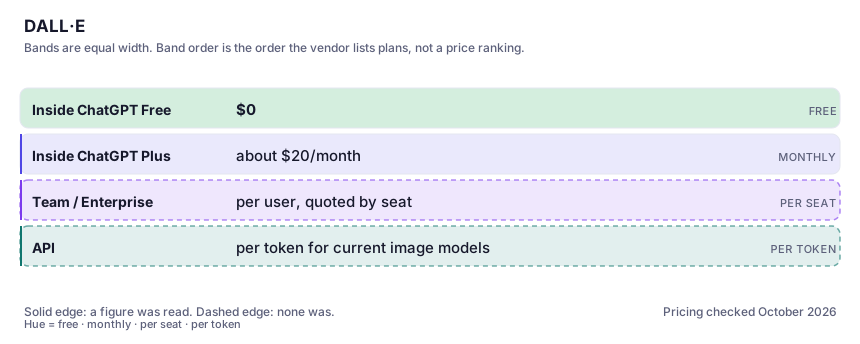
| Plan | Indicative price | What you actually get |
|---|---|---|
| Inside ChatGPT Free | $0 | A real but capped image allowance. Fine for occasional use and for deciding whether the instruction-following suits you; expect a wait and a limit under heavy use. |
| Inside ChatGPT Plus | about $20/month | The plan most individuals want: image generation with the stronger model plus materially higher limits. If you already pay for Plus, this costs you nothing extra, which is the whole argument. |
| Team / Enterprise | per user, quoted by seat | Admin controls and workspace data terms. The relevant question is procurement, not quality: an image tool inside an approved assistant is much easier to get signed off than a new one. |
| API | per token for current image models | Billed on input and output tokens, with figures listed on OpenAI's pricing docs rather than per picture. Verify the current model row yourself before estimating a monthly cost; the table changes. |
Who it fits, and who it doesn't
Reach for DALL·E if you…
- Blog headers, diagrams, explainer visuals and social cards where the image has to carry a specific message.
- Anyone already paying for ChatGPT who wants image capability without another subscription.
- Ad concepts where the copy has to be readable in the mock-up.
- Non-designers who need to say "change the blue to green" without learning a tool.
Skip it if you…
- You need a distinctive, beautiful visual style at first attempt — use a specialist image tool and keep this for the brief.
- You need print-resolution output; the size ceiling and the soft detail will waste your week.
- You need a coherent character or product across many shots — consistency is not this tool's strength.
- Your subject touches real people, public figures or existing brands, where refusals dominate the session.
How to test it properly in 30 minutes
Don't judge a tool on the demo. Run the same four tasks you'd actually do with it, and score it against this checklist — the same one this desk works from before a profile goes up (see how we check a tool).
- Write a six-clause brief (three objects, one position constraint, one colour, one thing excluded) and count the clauses satisfied on the first attempt. That number is the instruction-following ceiling.
- Ask for a headline with eight words of real copy in it, then zoom to 100%. Judge spelling, not the thumbnail.
- Make one small edit and inspect the whole frame for things that moved. That failure mode costs more time than any other here.
- Generate the same subject on this and one aesthetic-first tool with identical prompts. Compare, do not guess.
- Try one legitimate business request involving a named real person and see what the filter does. Knowing the boundary now saves you later.
Alternatives worth comparing
For mood boards, concept art and illustration: the best aesthetic defaults in the category, the least control over exact composition.
The image model you run yourself: unlimited private generations and real control, paid for in setup time and hardware.
AI built into Canva — on-brand graphics, decks and quick edits for non-designers who already make their visuals there.
The default AI assistant — the broadest feature set, and the benchmark every other tool gets measured against.
Disclosure: this profile is editorial. DALL·E did not review it, pay for it or provide a free account for it. Links to the vendor are plain outbound links, not affiliate links. Errors are mine — report one and it gets fixed and logged on the updates page.