Grammarly
The short verdict
Keep the free layer installed; it is a real tool and costs nothing. Pay only for the tone and rewrite features you notice yourself missing, and be clear that this is a sentence-level assistant — the paragraph and the argument are still your job. Anyone buying it as their AI writer is paying twice for the same tab.
- Maker
- Grammarly
- Category
- Writing
- Entry price
- Freemium
- Free option
- Yes — genuinely useful, indefinitely
- Works on
- Windows, macOS, browser extension, iOS, Android, Outlook, Google Docs
- Pricing checked
- October 2026
What Grammarly is, plainly
Grammarly's real product is not a model, it's location. It sits in the text field: email, docs, CRM note, LinkedIn message, the reply you're typing at 11pm. Nothing else about writing assistance is worth much if you have to leave the field to get it, and that stickiness is why a decade-old grammar checker still has a place in a directory alongside generative assistants.
It is important to separate the two layers, because they are different purchases. The free layer is a proofreader: spelling, grammar, punctuation, and some clarity flags. It is good at mechanical errors, better than a native spellchecker for non-first-language writers, and worth keeping installed whether or not you ever pay. The paid layer is a rewriter: it will replace sentences, adjust tone, generate text from a prompt inside your document, and offer style suggestions at scale. That is a different category of tool, it overlaps almost entirely with a general assistant, and it is the part many subscribers aren't using.
The failure modes are subtle and cumulative. Free: it will mark a stylistic choice as an error, insist on closing a phrasal verb, flag correct punctuation inside quoted or technical text, and flatten dashes and code snippets into suggestions you should refuse. It also has a dictionary/locale switch that quietly changes spelling conventions across a whole document, and it cannot see the shape of a long piece — repeated ideas, a buried argument, a paragraph that contradicts another one are invisible to it because those are not local errors. A tool that grades sentences will keep telling you your sentences are fine while the document around them is a mess.
In the paid layer, the deeper risk is sameness. Accept enough rewrites and your writing converges on a house style that readers of enough AI-assisted email will recognise as nobody in particular. The rewriter is excellent at making a blunt sentence polite and sometimes destroys the bluntness that was the point. Use it on a message you have already written, decline suggestions you disagree with, and keep one paragraph of your own unedited prose somewhere you can compare against.
Privacy deserves the same bluntness. This is a product that can see what you type, including drafts you never send. Consumer and business arrangements differ, settings change, and the option around whether typed content may be reviewed by the vendor has shifted over the years. Check the toggles in your own account, and keep anything you would not put in a shared inbox out of it — passwords, health data, client-confidential text. Do not take a third-party summary, including this one, as a substitute for reading your plan's terms.
Where it wins
- Present in every text field, which is worth more than a marginally better checker in a separate app.
- The free tier is a real product, not a teaser — plenty of users should never pay.
- Very useful for non-first-language writers on mechanical correctness and phrasing confidence.
- Setup cost is trivial: install, add your names and jargon to the dictionary, get on with work.
- Catches the typo class that a human stops seeing in their own sent message.
Where it falls short
- Treats stylistic choices as errors, and its suggestions are tuned for correctness rather than your voice.
- Weak on anything above the sentence: structure, repetition, contradiction and a buried argument are invisible to it.
- The paid AI rewriting overlaps heavily with a general assistant, so a single-purpose subscriber is paying twice.
- Accept-enough mode produces recognisable, smoothed-out sameness across a team's writing.
- Genuinely unreliable on technical text, quoted material, dashes and code; false positives train you to ignore it.
- It reads what you type, which is a real trade rather than a footnote for confidential work.
What it's built for
Free correctness layer
Spelling, grammar, punctuation and concise rewrites of clearly broken sentences. It works everywhere you type rather than only in one app, which is the whole reason it survives on a desk next to a capable assistant.
Paid generative rewriting
Rewrite a selection for tone, length or clarity, or draft from a prompt in place. Good at turning a rough internal note into something fit to send; it is a chat model wearing your toolbar.
Tone detection
Reads intent from wording and warns you how a line may land. Occasionally useful, often wrong about dry or ironic writing, and best treated as a prompt to re-read your own sentence rather than a verdict.
Style and engagement suggestions
The paid layer's long tail: vocabulary, sentence variety, readability, preposition and pronoun advice. This is where it over-corrects most, and where you should set a manual review habit rather than accept-all.
Plagiarism and citation checks
Available on higher tiers against web sources. Fine as a tripwire before publishing, thin as a substitute for a proper originality review.
Snippets and personal dictionary
Saved text blocks for the paragraphs you re-send constantly, plus names and jargon it should leave alone. Setting up the dictionary is a fifteen-minute job that removes most of the annoyance.
What it costs, and what these numbers cannot tell you
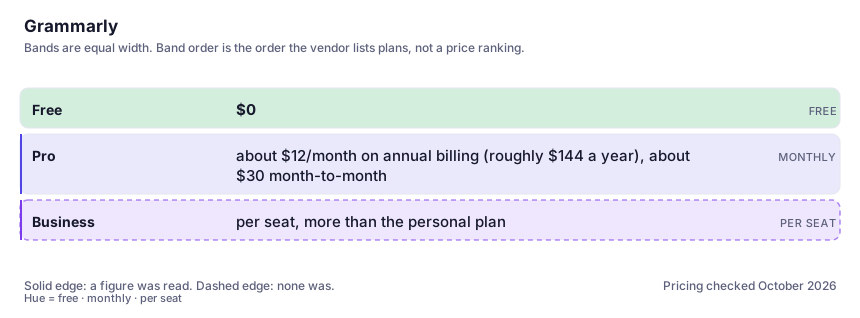
| Plan | Indicative price | What you actually get |
|---|---|---|
| Free | $0 | Correctness plus a little clarity, indefinitely. For many people this is the only tier that gets used, and it is a legitimate stopping point. |
| Pro | about $12/month on annual billing (roughly $144 a year), about $30 month-to-month | Unlimited generative rewrites, tone reworking, full style suggestions, plagiarism checks and rewriting limits that beat the free tier. The month-to-month price is a poor deal unless the need is genuinely short-term. |
| Business | per seat, more than the personal plan | Shared style guides, admin visibility, per-seat snippets and contractual data terms. Verify the current per-seat figure on the vendor's plans page; it moves and varies by seat count. |
Who it fits, and who it doesn't
Reach for Grammarly if you…
- You write email, chat messages and forms all day and want corrections where you're typing.
- English is not your first language and mechanical correctness is a career multiplier.
- You manage a team's outbound tone and want one shared style guide enforced in every field.
- You want a free always-on proofreader and are not tempted by the rewriter.
- You send messages you later wish you'd softened, and want a tone warning before you hit send.
Skip it if you…
- Your work is long-form and structural — a document-aware assistant is the better use of that money.
- You're only buying it for AI rewriting you can already get from the chat tool on the next tab.
- You write technical or code-heavy text where its suggestions are noise more often than help.
- You cannot comfortably let a vendor read your drafts, in which case even the free layer is the wrong architecture.
How to test it properly in 30 minutes
Don't judge a tool on the demo. Run the same four tasks you'd actually do with it, and score it against this checklist — the same one this desk works from before a profile goes up (see how we check a tool).
- Send it one email containing a name it will misread, an acronym, a code fragment and a British or American spelling you intend. Count how many of its suggestions you should decline.
- Run one real document of yours through the free layer and then the paid layer and note which fixes you actually needed. That split tells you whether to pay.
- Accept three rewrites without reading them closely, then compare the paragraph to your original. Judge whether you liked yours.
- Open your account settings and record what is toggled on for content review and training, per your own plan. Do not rely on a blog for this.
- Add your recurring names and terms to the dictionary and see whether the false positives drop. If they don't, the tool will irritate you forever.
- Draft the same short message in a general assistant and in Grammarly's rewriter. If you can't tell which is which, you already know what not to pay for.
Alternatives worth comparing
The default AI assistant — the broadest feature set, and the benchmark every other tool gets measured against.
Claude
The assistant for people who read a lot: long documents, careful prose, and fewer invented answers.
Marketing copy for teams that need one brand voice enforced across many people — priced accordingly.
Disclosure: this profile is editorial. Grammarly did not review it, pay for it or provide a free account for it. Links to the vendor are plain outbound links, not affiliate links. Errors are mine — report one and it gets fixed and logged on the updates page.