Jasper
The short verdict
A team product, priced and designed as one. It earns its cost when several non-writers must produce on-brand copy weekly and someone owns the brand assets. A solo marketer paying per-seat for what a general assistant plus good prompts already does is the person who should not buy it.
- Maker
- Jasper
- Category
- Writing
- Entry price
- Paid (trial only)
- Free option
- No permanent free plan; a short trial
- Works on
- Web, Chrome extension, API, integrations
- Pricing checked
- October 2026
What Jasper is, plainly
Jasper stopped being a text generator a while ago and became a marketing content platform: chat, document drafting, campaign assemblies that fan one brief out into channel variants, and the layer that actually justifies the price — persistent brand context. It can hold your voice description, your product facts and your audience definitions, and apply them to everything a team generates, which is precisely the discipline that falls apart when six people write prompts in a general assistant.
Be honest about what you are buying, though, because a large part of it is available elsewhere. Ten minutes of work in ChatGPT or Claude — a saved custom instruction with your tone rules, a style-guide file uploaded, three good examples of your own copy — reproduces most of the output quality for a solo writer. Jasper's case is not "smarter model"; it is organisational. Shared templates mean a new hire produces on-brand copy without knowing how to prompt. Approved assets mean nobody invents a product spec. Permissions and team workspaces mean a manager can see what got generated and shipped. For one freelancer it is close to waste; for a five-person content team with a publishing calendar it starts to earn its per-seat cost.
Where it disappoints in daily use: the writing has a house rhythm that regular readers learn to spot, so long-form pieces need a real editing pass to stop sounding uniformly arranged. Templates push you toward the shape the template wants rather than the shape the argument needs. Product knowledge goes stale silently — if your knowledge assets are six months old, Jasper will confidently state last year's pricing. And because it is priced per seat with an entry plan above the consumer assistants, the maths only works if several people use it every week.
There is also the question of whether marketing copy deserves AI at all in the places that matter. Jasper will save you hours on ad variants, meta descriptions, listing copy, internal briefs and first drafts of a blog post you will rewrite. It will not give you a positioning insight, and it should not be within shouting distance of a regulated claim without a human holding the compliance list.
Where it wins
- Enforced brand voice and shared product knowledge across a team is a real problem it solves better than scattered prompts.
- Campaign fan-out from one brief is the single clearest time saving.
- Non-marketers produce acceptable first drafts without prompting skill, which is the actual buying trigger.
- Team permissions, shared assets and API access satisfy the requirements a general consumer assistant simply doesn't have.
- Contractual data terms on business plans are easier to hand to a legal reviewer than a consumer chatbot log-in.
Where it falls short
- Per-seat pricing means a solo user is paying a team price for a fraction of the value.
- Output has a recognisable rhythm; without an editing pass, everything on the site sounds like the same writer.
- Knowledge assets go stale and the copy keeps asserting old facts, prices and features.
- Templates constrain structure — you get the shape the template was built for, not the argument your reader needs.
- A generic assistant plus a good saved prompt reproduces most single-user output for a fraction of the money.
What it's built for
Brand voice and knowledge assets
The core feature. Tone rules, product facts and audience definitions get attached to everything generated, so the team's output stops depending on who wrote the prompt. The trap is that stale knowledge produces confidently wrong copy, so treat these assets as owned documents with a review date.
Campaigns: one brief, many channels
Feed a campaign idea and get email, landing, social and ad variants in a set, which is the workflow most likely to save genuine hours — and the one where the variants all read like siblings of each other until you differentiate them.
Chat plus documents
A conversational mode for ideation and a long-form document mode with structure, so a brief can move from outline to draft without leaving the tool. Document handling is competent rather than excellent; long structured pieces are still better in a writing-first assistant.
Templates and workflows
Saved multi-step chains for repeated jobs, from a monthly newsletter to a batch of product descriptions. Useful for consistency, brittle when marketing wants to break the format.
Team seats, permissions and an API
Governance, shared assets and integrations into the martech stack. For a business this is the part IT actually cares about, and it is one of the few reasons to prefer a specialised platform over a consumer chat subscription.
What it costs at your team size
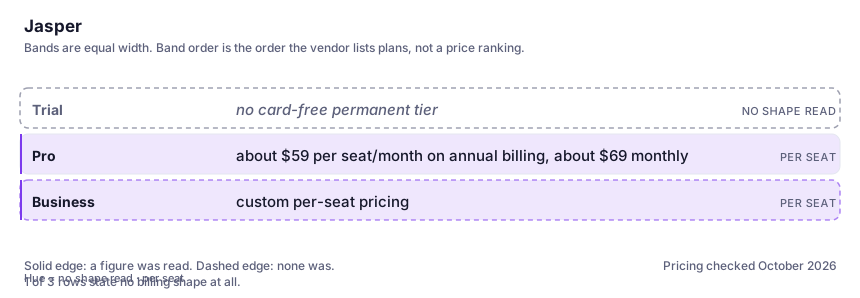
| Plan | Indicative price | What you actually get |
|---|---|---|
| Trial | no card-free permanent tier | You evaluate on a time-limited trial rather than an ongoing free plan, which means the decision has to be made quickly and on real work. |
| Pro | about $59 per seat/month on annual billing, about $69 monthly | The entry tier for a small team: brand voices, knowledge assets, audience definitions, campaigns. Seats stack, so a five-person team is paying several hundred dollars a month for what one assistant could do for one person. |
| Business | custom per-seat pricing | Unlimited brand and knowledge configuration, governance controls, API access and heavier workflow capability. This is where the data-handling terms you'd want to read live. |
Count the people who would each need their own login.
Who it fits, and who it doesn't
Reach for Jasper if you…
- A marketing team of three or more producing copy every week against one brand.
- Agencies that need non-writers to output on-brief drafts and route them to a human editor.
- Campaign launches where one brief has to become twenty channel assets.
- Companies whose IT or legal team will not approve a consumer AI log-in but will review a business contract.
Skip it if you…
- You are the only person writing. A general assistant with a saved voice prompt and your style guide will do it for a fifth of the cost.
- Your work is long-form editorial, technical documentation or analysis — this tool is shaped around marketing formats.
- You cannot maintain brand and product assets, because stale context is worse than no context.
- You need claims reviewed for a regulated category and expect the generator to handle that. It won't.
How to test it properly in 30 minutes
Don't judge a tool on the demo. Run the same four tasks you'd actually do with it, and score it against this checklist — the same one this desk works from before a profile goes up (see how we check a tool).
- Write one brief yourself, then generate the same campaign set from the saved brand assets and from a plain assistant with a good prompt. Compare quality, not speed.
- Give it a fact your knowledge asset got wrong on purpose and see whether anything catches it. This is how staleness behaves in production.
- Take one generated piece and edit it to your own house style; count the number of sentences you had to change. That ratio is the real saving.
- Have a colleague who has never used it produce one asset unaided. Team-usability is the whole product case.
- Price the seat count you'd actually need for a year and compare it to the assistant subscription plus a freelancer's editing hours.
Alternatives worth comparing
Copy.ai
Repeatable copy workflows for sales and marketing teams — good when the job runs every week.
The default AI assistant — the broadest feature set, and the benchmark every other tool gets measured against.
Claude
The assistant for people who read a lot: long documents, careful prose, and fewer invented answers.
AI inside your Notion workspace — for people whose notes and docs already live there, not for anyone wanting a standalone assistant.
Disclosure: this profile is editorial. Jasper did not review it, pay for it or provide a free account for it. Links to the vendor are plain outbound links, not affiliate links. Errors are mine — report one and it gets fixed and logged on the updates page.